38
Job Screen
...Overview
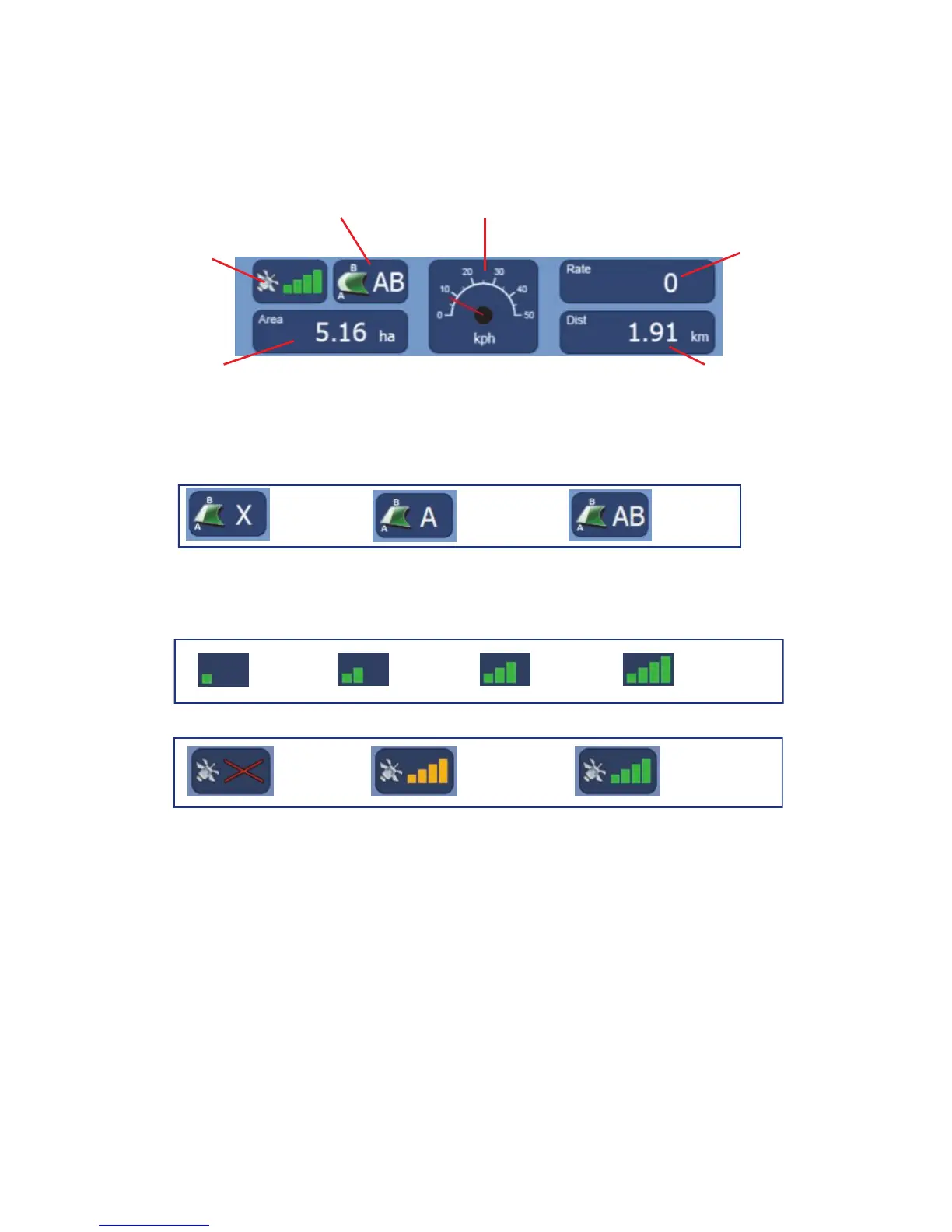
Information Panel
Guidance Mode - Displays the guidance mode being used and current status.
GPS Strength - Displays the GPS signal strength and status.
Coverage Area - Displays area covered based on the coverage area recording.
Speed - Displays current speed from GPS, press to change from Analogue to
Digital display.
Application Rate / Width - Displays current application rate (VRT and/or Auto
Shut Off software required) or current working width if using the section control
system.
Distance Travelled - Displays the distance travelled based on the coverage
area recording.
Speed
Guidance Mode
GPS Strength
Coverage Area
Application
Rate / Width
Distance Travelled
Point A
set
AB line
set
Guidance mode example
No GPS
Signal
GPS No
Differential
GPS With
Differential
GPS status
1 to 4
Satellites
5 to 6
Satellites
7 to 8
Satellites
9 or more
Satellites
GPS signal strength
No AB
set



 To Next Page