99
Taking Pictures
4
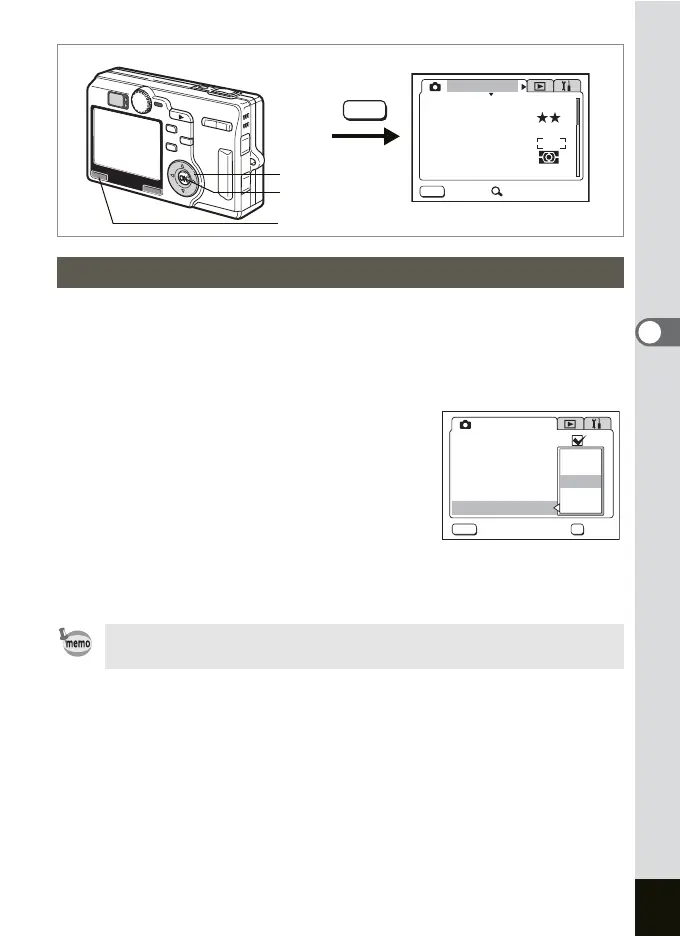
You can choose the Instant Review time from 0.5 sec., 1 sec., 3 sec.,
5 sec. and Off (no display).
1 Press the MENU button in the Capture mode.
The [A Rec.Mode] menu appears.
2 Use the four-way controller (23)
to select [Instant Review] and
press the four-way controller (
5).
3 Use the four-way controller (23)
to change the display time.
4 Press the OK button and then the
MENU button.
The camera is ready to take pictures.
Setting the Instant Review Time
The Instant Review setting is saved when the camera is turned off.
MENU
MENU
AWB
AUTOAUTO
2560
Rec. Mode
Recorded Pixels
Quality Level
White Balance
Sensitivity
Exit SIMPLE
AE Metering
Focusing Area
MENU button
OK button
Four-way controller
AUTOAUTO
5
sec
3
sec
1
sec
0.5
sec
Off
OK
MENU
Rec. Mode
Auto Bracket
Interval Shoot
Focus Limiter
Instant Review
Cancel OK
Digital Zoom
Time-lapse Movie



 To Next Page