56
Taking Pictures
4
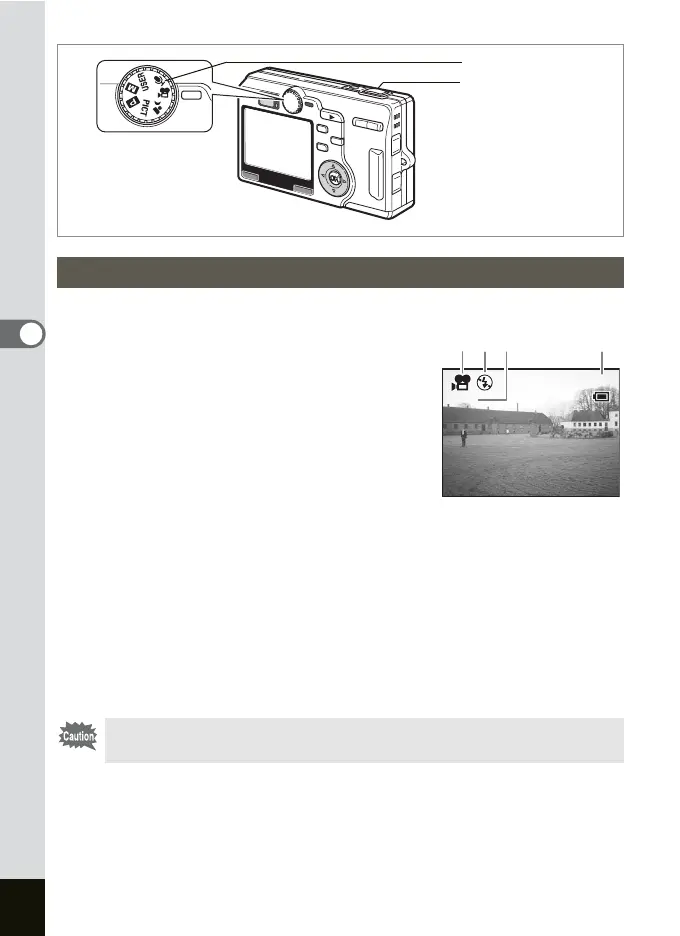
This mode enables you to shoot movies and sounds.
1 Set the mode dial to C.
The following shooting information appears
on the LCD monitor and the camera is ready
to take movies.
1
Movie mode icon
2
Flash Off icon
3 Time-lapse Movie setting
4 Recordable time
Press the shutter release button halfway to
focus.
2 Press the shutter release button.
Shooting starts. You can change the size of the image using the Zoom
button.
x
: makes the subject bigger.
w: makes the subject smaller.
3 Press the shutter release button.
Shooting ends.
Taking Movies (Movie Mode)
You cannot move the focusing area in the Movie mode.
Mode dial
Shutter release button
3:00 PM
7/ 7/2004
01:15
X10
3:00 PM
7/ 7/2004
01:15
X10
21 43











 To Next Page