88
Taking Pictures
4
You can choose the number of recorded pixels from [2560×1920],
[2048×1536], [1600×1200], [1024×768] and [640×480].
The more pixels there are, the larger the picture and the bigger the file size.
The data volume also varies depending on the quality level setting (
1
p.90).
Number of Recorded Pixels
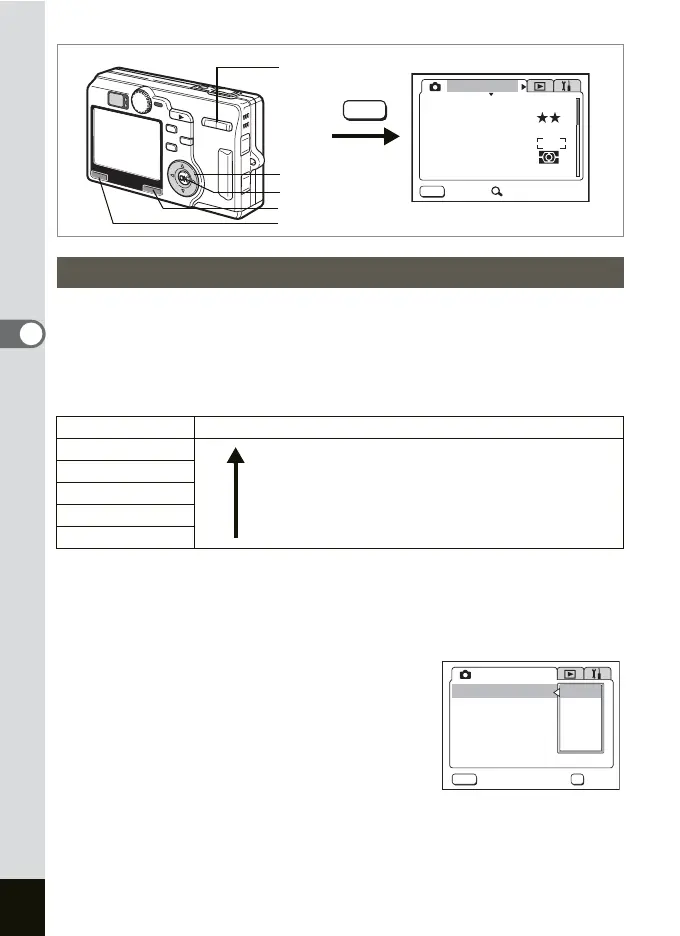
1 Press the MENU button in the Capture mode.
The [A Rec.Mode] menu appears.
Press x/y of the Zoom/f/y button if the SIMPLE menu is
displayed.
2 Use the four-way controller (23)
to select [Recorded Pixels] and
press the four-way controller (
5).
3 Use the four-way controller (23)
to change the size.
4 Press the OK button and then the
MENU button.
The camera is ready to take pictures.
Selecting the Recorded Pixels
Size Appropriate Use
2560×1920
Sharp, Clear
Fine printing such as photo printing, large-sized
printing, editing
2048×1536
1600×1200
1024×7680
Postcard-sized printing, using on homepage, attaching
to E-mail
640×480
MENU
MENU
AWB
AUTOAUTO
2560
Rec. Mode
Recorded Pixels
Quality Level
White Balance
Sensitivity
Exit SIMPLE
AE Metering
Focusing Area
Zoom/f/y button
MENU button
OK button
Four-way controller
Fn button
AUTOAUTO
2560
2048
1600
1024
640
OK
MENU
Rec. Mode
Recorded Pixels
Quality Level
White Balance
Sensitivity
Cancel OK
AE Metering
Focusing Area











 To Next Page