97
Taking Pictures
4
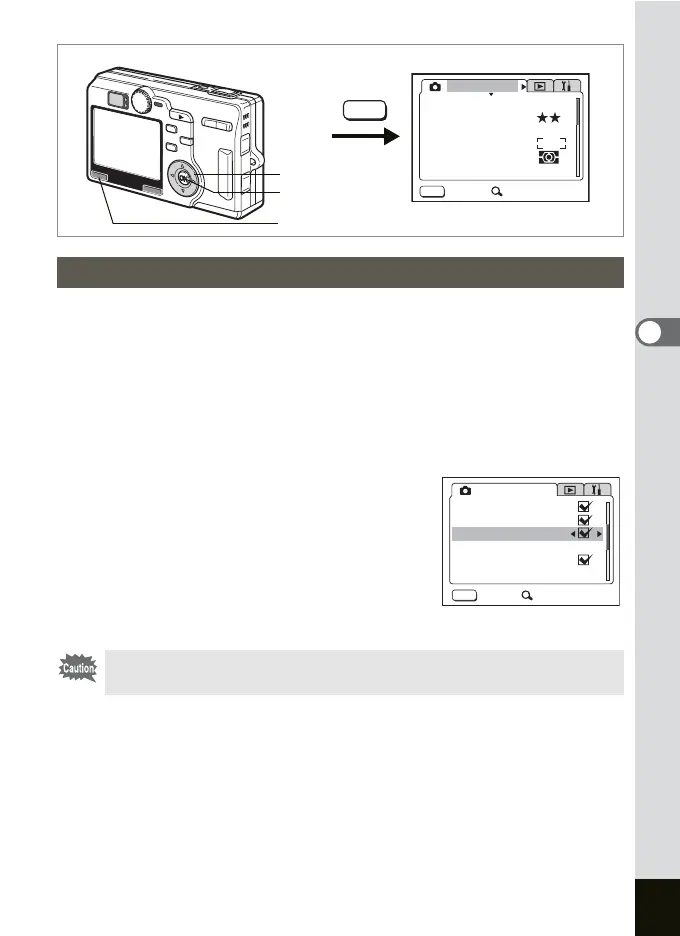
You can adjust the focus quickly by setting the focus limit to O (On). This
limits the movement of the lens to only long range in the Autofocus mode
and only close range in the Macro mode.
By setting the focus limit to P (Off), you can adjust the focus from
approximately 12 cm to
∞, however focusing takes a longer time.
1 Press the MENU button in the Capture mode.
The [A Rec.Mode] menu appears.
2 Use the four-way controller (23)
to select [Focus Limiter].
3 Use the four-way controller (45)
to select O (On)/P (Off).
4 Press the OK button.
The camera is ready to take pictures.
Adjusting the Focus Limit
The picture will be out of focus in the Super Macro mode if the Focus
Limit is set to P (Off).
MENU
MENU
AWB
AUTOAUTO
2560
Rec. Mode
Recorded Pixels
Quality Level
White Balance
Sensitivity
Exit SIMPLE
AE Metering
Focusing Area
MENU button
OK button
Four-way controller
MENU
Rec. Mode
Auto Bracket
Interval Shoot
Focus Limiter
Instant Review
Exit
Off
1
sec
SIMPLE
Digital Zoom
Time-lapse Movie











 To Next Page