79
Taking Pictures
4
This mode lets you take movies at a delayed frame rate so that when you
play back the movie, the action appears speeded up.
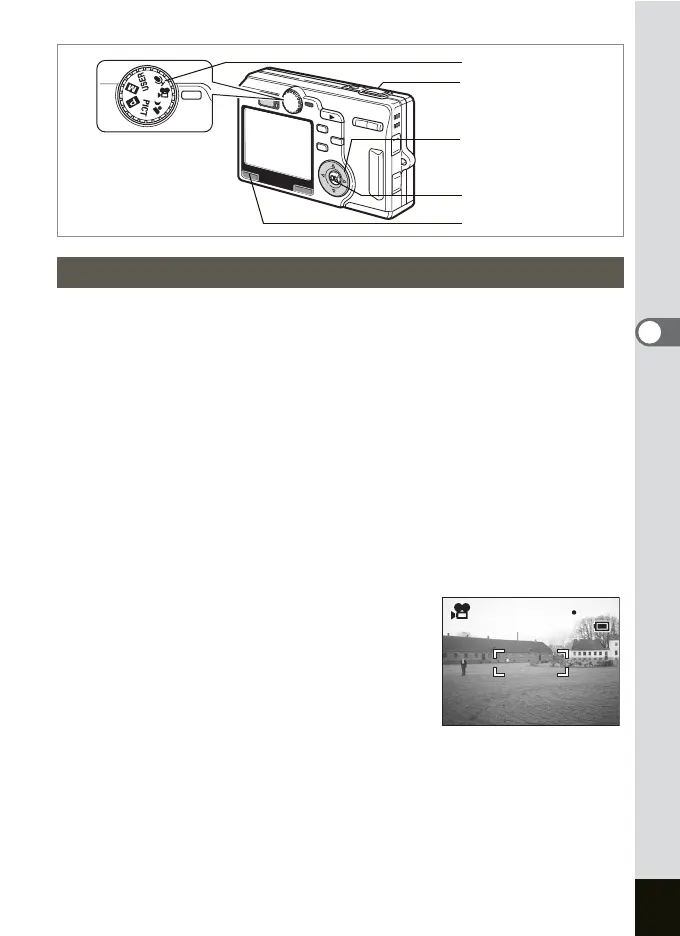
1 Set the mode dial to C.
2 Press the MENU button.
The [A Rec.Mode] menu appears.
3 Use the four-way controller (23) to select [Time-lapse
Movie] and press the four-way controller (
5).
4 Use the four-way controller (23) to choose
[Off], [×2], [×5], [×10] or [×20].
5 Press the OK button and then the MENU button.
The camera is ready to take movies.
6 Press the shutter release button.
Shooting in the Time-lapse Movie mode
starts.
Taking Time-lapse Movies
Mode dial
Four-way controller
OK button
MENU button
Shutter release button
01:15
01:15
3:00 PM
7/ 7/2004
x5
3:00 PM
7/ 7/2004
x5




 To Next Page