36
Common Operations
3
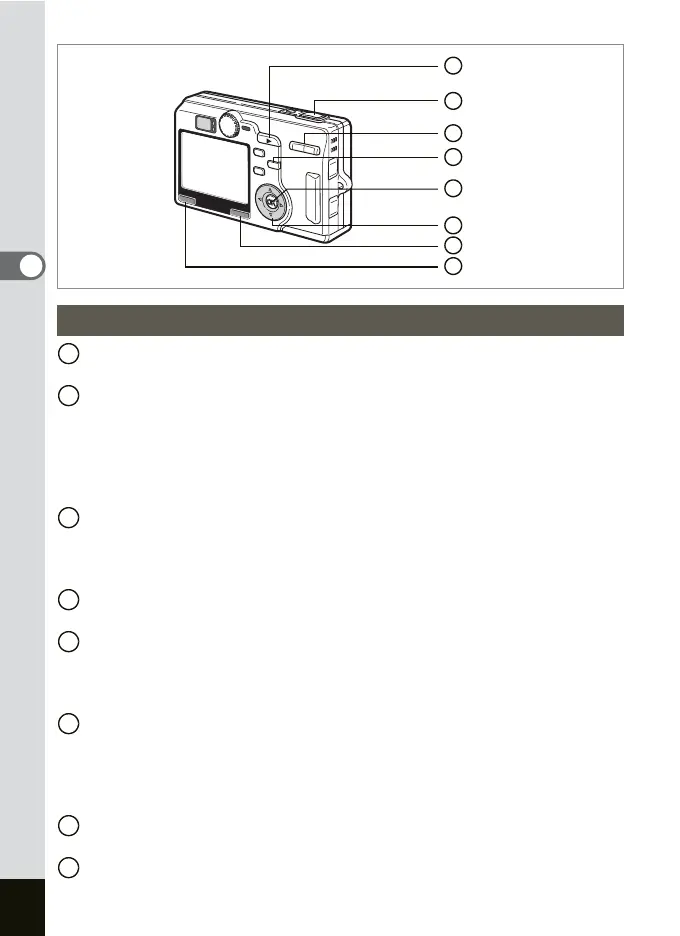
Q Playback button
Switches to the Capture mode.
Shutter release button
Press halfway: Changes to the Capture mode and adjusts and locks the
AF and AE.
Press down fully: Changes to the Capture mode and takes picture.
Changes to the Capture mode and Starts and ends
shooting movie.
Zoom/f/y button
Press
f
during normal playback to display nine images at once. (
1
p.115
)
Press Zoom/f/y button during zoom playback to change the size of
the Zoom Display image displayed on the LCD monitor. (1
p.111)
i
button
Deletes the image displayed on the LCD monitor. (1p.118)
OK button
Changes the information displayed on the monitor as follows. (1p.82)
Still picture, Movie: Display On, Histogram Display, Display Off
Sound: Display On, Display Off
Four-way controller
(2) Replays the movie and voice memo. (1p.109, 113)
(
45) Displays the previous or next image. (1p.29)
(
3) Rotates the image. (1p.30)
Stops playback of the movie.
Fn button
Displays the Fn Setting screen.
MENU button
Displays the [
A
Rec.Mode], [
Q
Playback] and [
B
Set-up] menus
. (
1
p.38)
Playback Mode
7
6
1
8
2
5
3
4
1
2
3
4
5
6
7
8











 To Next Page