51
Taking Pictures
4
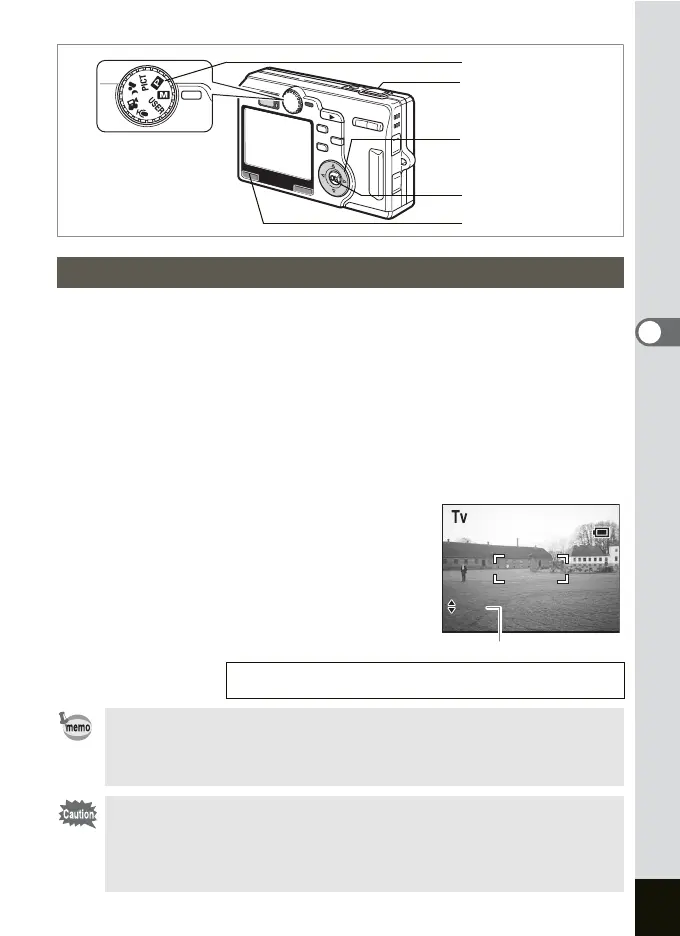
In this mode the shutter speed is set manually and the camera
automatically sets the aperture value.
1 Select b on the [A Rec.Mode] menu and press the
four-way controller (
5).
2 Press the four-way controller (23) to select Tv.
3 Press the OK button and then the MENU button.
4 Set the mode dial to b.
The camera is ready to take pictures in the Shutter-Priority mode.
5 Use the four-way controller (23)
to change the shutter speed.
2 Reduces the shutter speed.
3 Increases the shutter speed.
6 Press the shutter release button.
The picture will be taken.
Setting the Shutter Speed (Shutter-Priority Mode)
Playing Back Still Pictures 1 p.29
• The set shutter speed will be saved when the camera is turned off.
• If the [USER] or b in the [ARec.Mode] menu has been set to
[b], the camera will be ready to make settings or take pictures in
the Shutter-Priority mode by setting the mode dial to E or b.
•
When the focus mode is set to the Manual Focus or Focusing Area mode,
press the OK button to use the four-way controller to adjust the shutter
speed or the focus. (The function of the four-way controller changes each
time you press the OK button.)
•
[Auto] cannot be selected for the flash when in the Shutter-Priority mode.
Mode dial
Four-way controller
OK button
MENU button
Shutter release button
7/ 7/2004
3:00 PM
1/13
F8
037
3:00 PM
7/ 7/2004
1/13
F8
037
Shutter speed











 To Next Page