25
Getting Started
1
Set the current date and time and the display style.
1 Press the four-way controller (5).
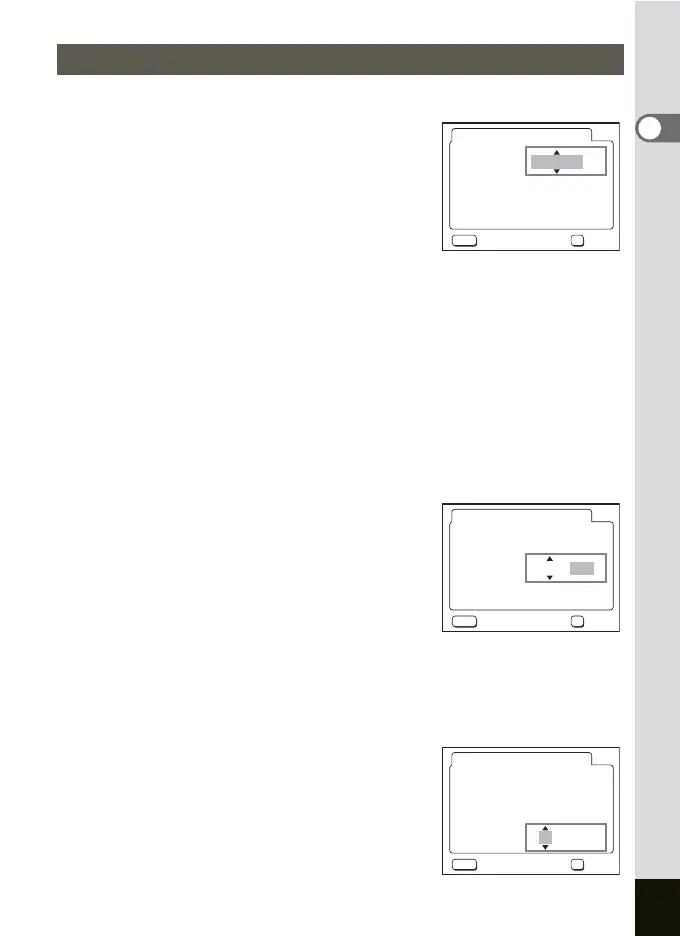
2 and 3 appear above and below “mm/dd/
yy”.
2 Press the four-way controller (23) to select the date
style.
3 Press the four-way controller (5).
2 and 3 appear above and below “12h”.
4 Press the four-way controller (23) to select [24h] (24-
hour display) or [12h] (12-hour display).
5 Press the four-way controller (5).
6 Press the four-way controller (23) to select [Date].
7 Press the four-way controller (5).
2 and 3 appear above and below the
month.
8 Press the four-way controller
(23) to change the month.
9 Repeat Step 7 and 8 to change the date and year.
10 Press the four-way controller (5).
11 Press the four-way controller (23) to select [Time].
12 Press the four-way controller (5).
2 and 3 appear above and below the hour.
Setting the Date and Time
MENU
OK
07
/
09
/
2004
07
:
00 AM
Date Adjust
Date Style
Date
Time
Cancel OK
mm/dd/yy 12h
MENU
OK
07
/
09
/
2004
07
:
00 AM
Date Adjust
Date Style
Date
Time
Cancel OK
mm/dd/yy 12h
MENU
OK
07
/
09
/
2004
07
:
00 AM
Date Adjust
Date Style
Date
Time
Cancel OK
mm/dd/yy 12h





 To Next Page