20 Pentax PocketJet Printer User’s Guide
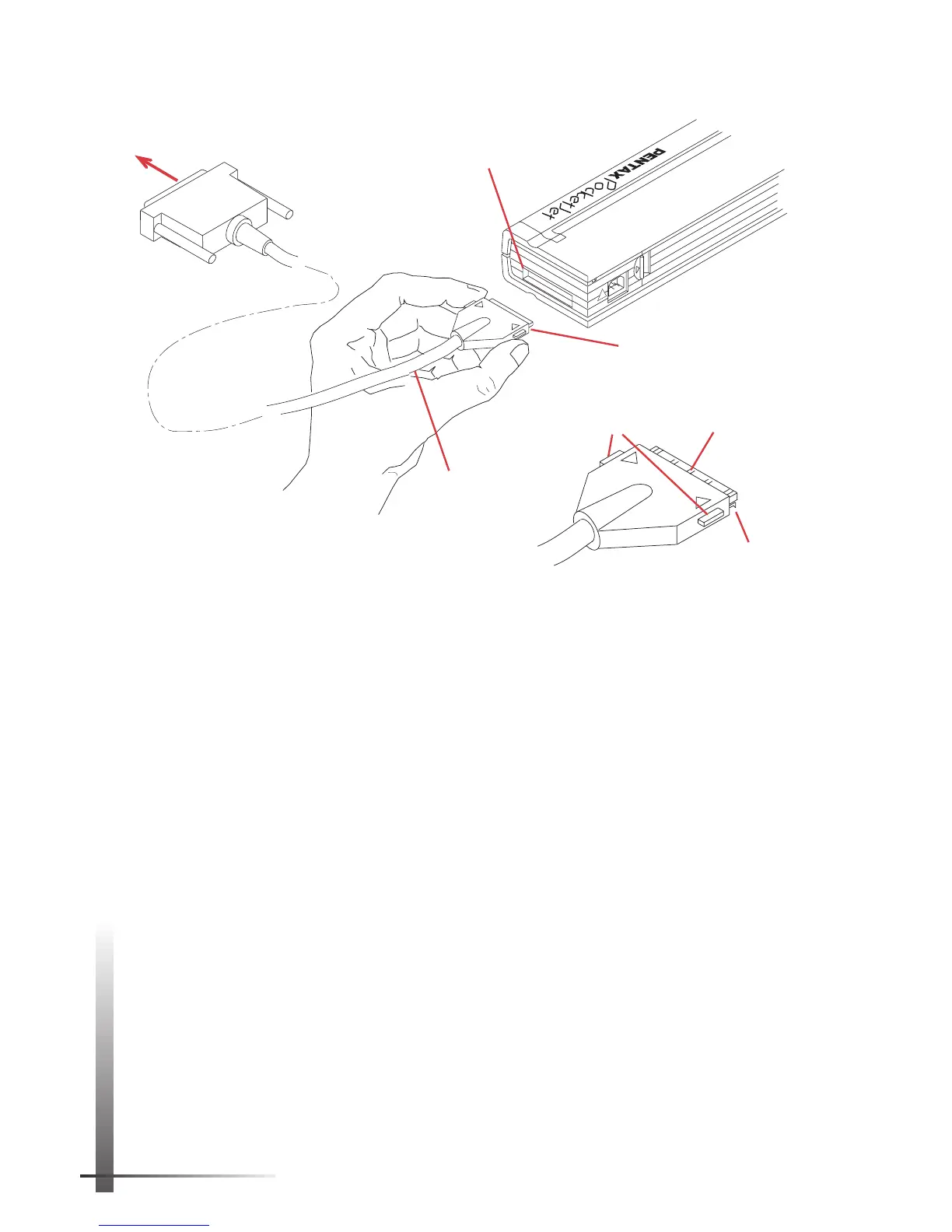
FIGURE 12. Instructions for connecting
the printer to your computer with a cable.
PARALLEL/SERIAL
AC ADAPT.
!
Interface
connector
Printer end of cable
(see detail below)
Parallel interface
cable
To appropriate
computer input
Small catches
(bottom)
Notched metal
surface (top)
Latching
devices
Optional Serial Interface
The RS-232C serial interface cable is available from your
dealer or direct from Pentax. See Chapter 8, “Ordering
Information,” on page 59.
Set DIP switches 1, 2 and 7 (and 6 on some models) to control
the printer’s serial interface by following these instructions.
NOTE:
The printer automatically senses whether it is
connected to the computer with a parallel or serial
interface. It does not use a DIP switch for this purpose.
Switches 1, 2 and 7 have no effect when the printer is
connected with a parallel interface.
1 Make sure the printer is turned off.
2 Set the printer face down so that the battery
compartment is toward you.
3 Use a pointed object such as a push pin or paper clip
to change the setting of a DIP switch. Gently move the
DIP switch away from you to turn it ON. Move it toward
you to turn it OFF.



 To Next Page