1
19
Introduction
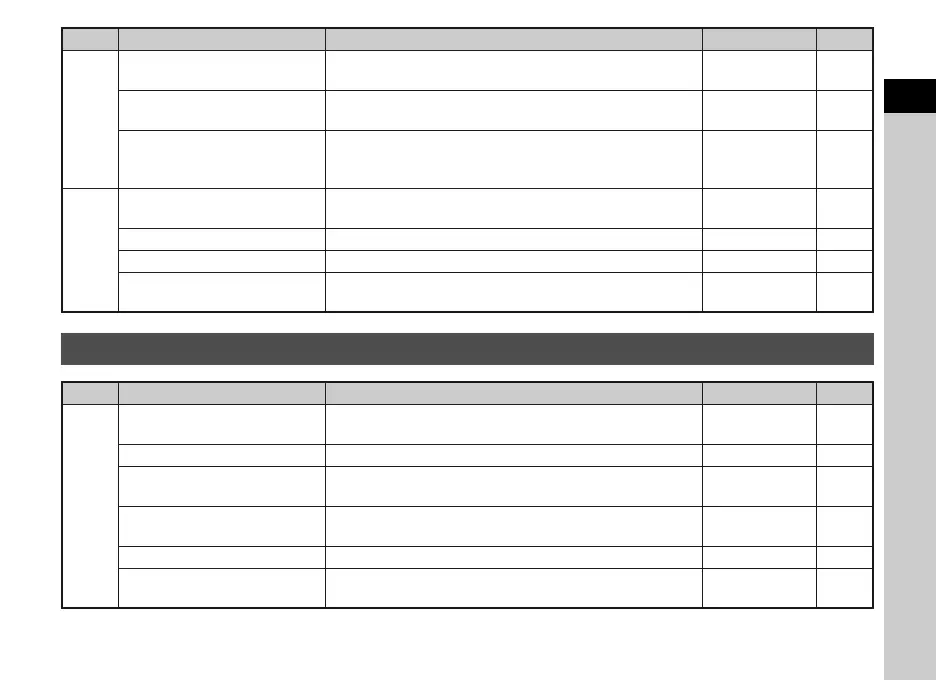
D3
Power Saving
Enables saving battery power by setting the display to dim
automatically if no operations are made within 5 seconds.
On -
Auto Power Off
Sets the time until the camera turns off automatically if no
operations are made for a certain period of time.
1 min. p.25
Reset
Resets the settings of the direct keys and for the items of the
A menu, C menu, B menu, D menu, control panel, and
playback mode palette.
-p.14
D4
Pixel Mapping
Maps out and corrects any defective pixels on the CMOS
sensor.
-p.76
Dust Removal Cleans the CMOS sensor by shaking it. - p.76
Format Formats a memory card. - p.26
Firmware Info/Options
Displays the camera’s firmware version. If an update file is
saved on your card, you can run the update.
--
Custom Setting Menus
Menu
Item Function Default Setting Page
E1
1. Lens Shutter Options
Sets whether to use the lens shutter and/or the electronic
shutter.
Lens shutter only p.72
2. Sensitivity Steps Sets the adjustment steps for ISO sensitivity. 1 EV Step p.34
3. AE-L with AF Locked
Sets whether to lock the exposure value when the focus is
locked.
Off -
4. Link AE and AF Point
Sets whether to link the exposure and AF point in the
focusing area during multi-segment metering.
Off p.34
5. Bracketing Order Sets the order for Exposure Bracketing shooting. 0 - + p.41
6. WB When Using Flash Sets the white balance setting when using flash.
Auto White
Balance
p.44
Menu
Item Function Default Setting Page


 To Next Page