114
3
Taking Pictures
The procedure for setting the focus manually (\) is described below.
1
Press the four-way controller (5) in A mode.
2
Use the four-way controller (5) to select \.
3
Press the 4 button.
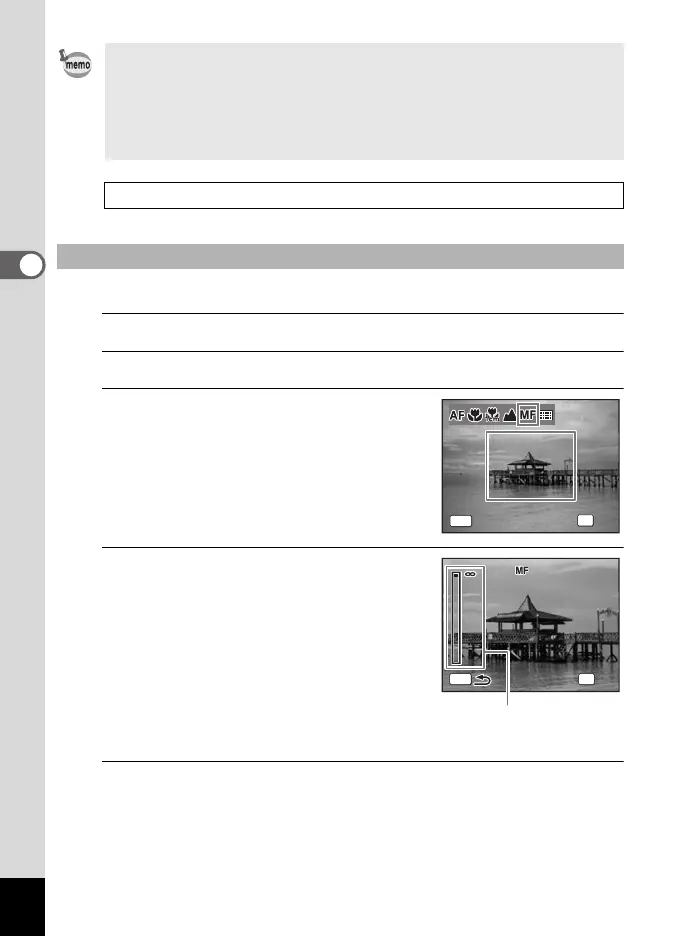
The central portion of the image is
magnified on the display to full screen.
4
Press the four-way controller
(23).
The \ indicator appears on the display to
indicate the approximate distance to the
subject. Use the four-way controller (23)
to adjust the focus using the indicator as a
guide.
2 for distant focus
3 for closer focus
5
Press the 4 button.
The focus is fixed and the camera returns to capture status.
After the focus is fixed, you can press the four-way controller (5) again
to display the \ indicator and readjust the focus.
•In 9 (Green) mode, you can only select = or q.
• The focus mode is fixed at s in S (Fireworks) mode.
• When [Auto Macro] is on and shooting with q selected, if the subject
is further than 50 cm away, the camera automatically focuses to
∞
(Infinity). By pressing the shutter release button fully, you can also take
a picture even when the focus is not set.
Saving the Focus Mode setting 1p.147
To Set the Manual Focus
MENU
OK
OK
Cance
l
OK
Cancel
Focu
s
Mo
de
Ma
nual Focu
s
Focus Mode
Manual Focus
4m
2
1
MENU
OK
OK
\ indicator
e_kb484.book Page 114 Wednesday, March 18, 2009 5:23 PM



 To Next Page