136
3
Taking Pictures
3
Use the four-way controller (45)
to select O (On) or P (Off).
O(On) Instant Review is displayed for
1 second.
P (Off) Instant Review is not displayed.
The setting is saved.
4
Press the 3 button.
The camera returns to capture status.
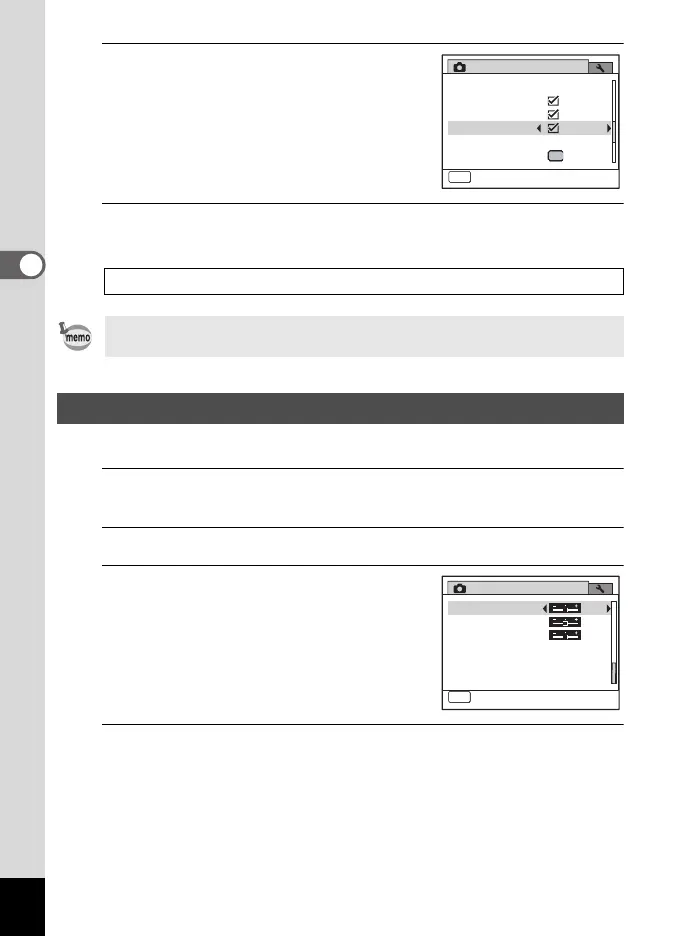
You can give the image sharp or soft outlines.
1
Press the 3 button in A mode.
The [A Rec. Mode] menu appears.
2
Use the four-way controller (23) to select [Sharpness].
3
Use the four-way controller (45)
to change the sharpness level.
F Soft
G Normal
H Sharp
4
Press the 3 button.
The setting is saved and the camera returns to capture status.
Instant Review 1p.67
If the Blink Detection function worked when shooting, [Closed eyes have
been detected.] is displayed for 3 seconds during Instant Review.
Setting the Image Sharpness (Sharpness)
Rec. Mode
MENU
Exit
3/4
Memory
Green Button
Blink Detection
Digital Zoom
Instant Review
Interval Shoot
Rec. Mode
Contrast
Off
MENU
Exit
4/4
Saturation
Date Imprint
Sharpness
e_kb484.book Page 136 Wednesday, March 18, 2009 5:23 PM



 To Next Page