147
3
Taking Pictures
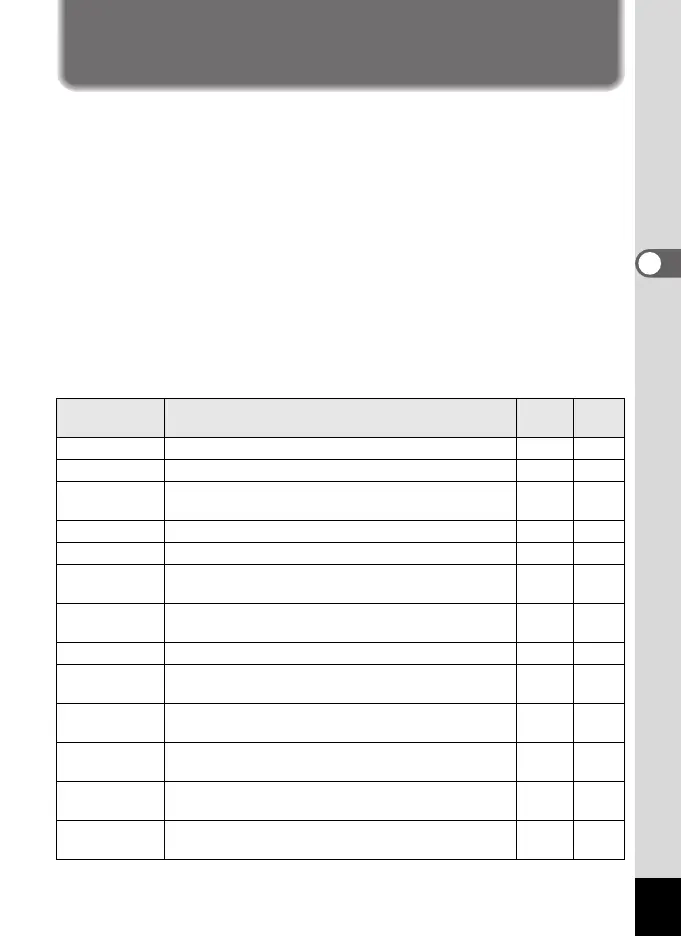
Saving the Settings (Memory)
The Memory function is for saving the current camera settings when the
camera is turned off.
For some camera settings, the Memory function is always set to O (On)
(the settings are saved when the camera is turned off), while for others
you can choose on or off (to choose whether the settings are saved or
not when the camera is turned off). The items which can be set to O (On)
or P (Off) in the Memory function are shown in the table below. (Items
not listed here are always saved in the selected settings when the
camera is turned off.)
If you select O (On), the settings will be saved in the status they were in
immediately before the camera was turned off. If you select P (Off), the
settings will be reset to the defaults when the camera is turned off. The
table below also shows whether the Memory default setting for each item
is on or off.
Item Description
Default
Setting
Page
Face Priority
A Face Recognition mode set by using the
I
button.
P p.78
Flash Mode The flash mode set with the four-way controller (4) O p.110
Drive Mode The drive mode set with the four-way controller (2) P
p.95 -
p.101
Focus Mode The focus mode set with the four-way controller (5) P p.113
Zoom Position The zoom position set with the zoom lever P p.82
MF Position
The manual focus position set with the four-way
controller (23)
P p.114
White Balance
The [White Balance] setting on the [A Rec. Mode]
menu
P p.123
Sensitivity The [Sensitivity] setting on the [A Rec. Mode] menu P p.125
EV
Compensation
The [EV Compensation] setting on the
[A Rec. Mode] menu
P p.108
AE Metering
The [AE Metering] setting on the [A Rec. Mode]
menu
P p.128
Digital Zoom
The [Digital Zoom] setting on the [A Rec. Mode]
menu
O p.84
DISPLAY
The information display mode set with the
W button
P p.20
File No.
If a new SD Memory Card is inserted when On has
been selected, file numbers are assigned sequentially.
O —
e_kb484.book Page 147 Wednesday, March 18, 2009 5:23 PM



 To Next Page