134
3
Taking Pictures
5
Press the four-way controller (3).
The frame moves to [Number of Shots].
6
Set the number of shots.
1 Press the four-way controller (5).
2 Use the four-way controller (23) to set [Number of Shots],
then press the four-way controller (5).
The setting is saved, and the frame returns to [Number of Shots].
7
Press the four-way controller (3).
The frame moves to [Start Delay].
8
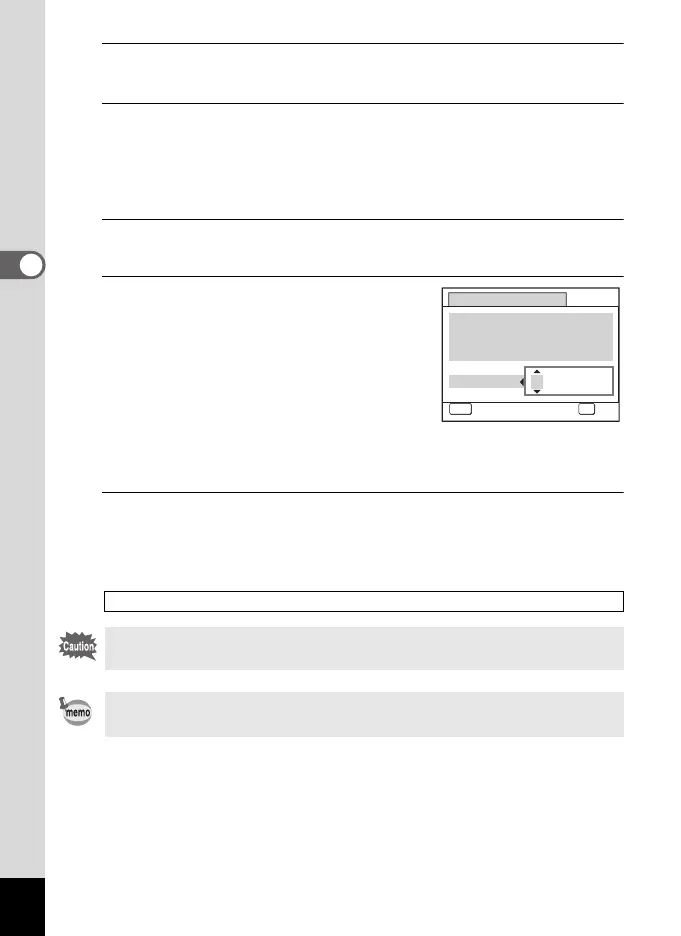
Set the start delay.
1 Press the four-way controller (5).
The current time and the recording start
time are displayed in real-time.
2 Use the four-way controller (23) to
set the hours, then press the four-way
controller (5).
3 Use the four-way controller (23) to
set the minutes, then press the four-way controller (5).
The setting is saved, and the frame returns to [Start Delay].
9
Press the 3 button twice.
The camera returns to the shooting screen. The operations up to this
point have only configured the [Interval Shoot] settings. To actually use
interval shooting, you must select [Interval Shoot] from the drive mode.
Taking Pictures at a Set Interval (Interval Shoot) 1p.98
Interval shooting is not available in F, X, C, 9 or N mode.
The [Interval Shoot] settings can also be configured from the drive
mode. (p.98)
Interval Shoot
MENU
Cancel
Current Time
Start Time
Start Delay hr. min.
0
OK
OK
10:00 AM
10:00 AM
0
e_kb484.book Page 134 Wednesday, March 18, 2009 5:23 PM



 To Next Page