52 – Embroidery
mySewnet Library
mySewnet library is a service where you can get ac-
cess to thousands of embroidery designs. Visit our
website to read more about this service and start
your subscription.
If you have a subscription, WiFi is connected and
you have logged in to your mySewnet account, the
mySewnet library will be visible in your machine.
Here you can scroll and select from all your mySew-
net library designs. To access the mySewnet library,
simply just touch the mySewnet library icon aval-
ible in the mySewnet tab.
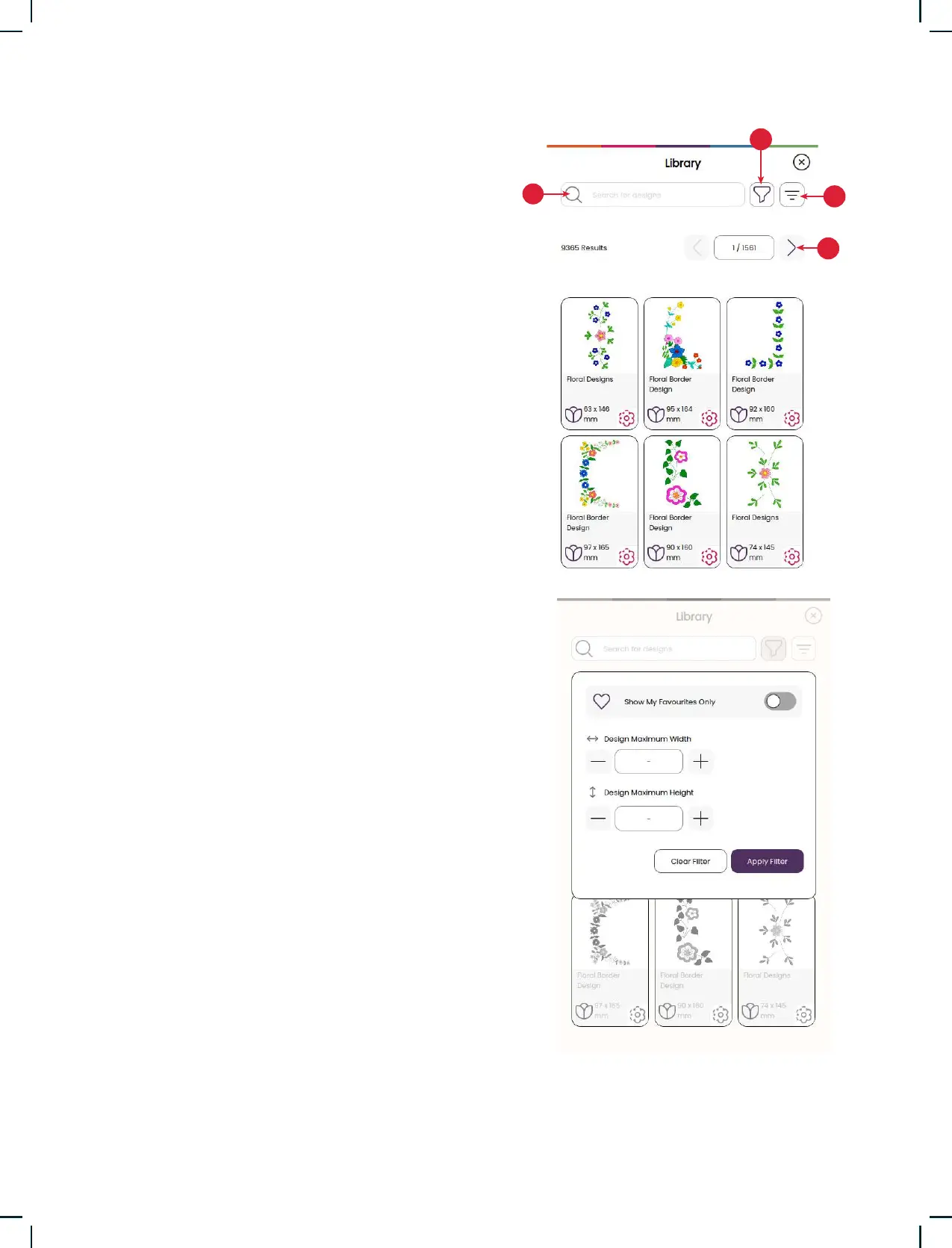
Use the search function to nd different types of
designs. There are several ways to lter and sort
designs. Filter designs by size by changing the
maximum width and/or maximum height. Designs
you’ve marked as favorite designs in mySewnet
can also be ltered in your machine if you touch the
Favorite Designs button.
You can also sort the designs by color block count,
size (area) or stitch count. Touch the Sort From
button to sort from highest to lowest value. Touch
the Sort From button again to sort from lowest to
highest value instead.
To remove all applied lters and clear your search,
touch clear lter.
If you haven’t started a subscription yet, the my-
Sewnet library menu will still by visible in your ma-
chine, but no designs in this menu will be shown.
1. Search
2. Filter
3. Sort
4. Toggle between different designs











 To Next Page