56 – Maintenance
MAINTENANCE
Cleaning the Machine
Cleaning the Bobbin Area
Raise the needle and turn off the machine.
Raise the needle and turn off the machine.
Cleaning under the Bobbin Area
To keep your sewing machine operating well, clean it often. No lubrication (oiling) is needed. Wipe the exteri-
or surface of your machine with a soft cloth to remove any dust or lint built up.
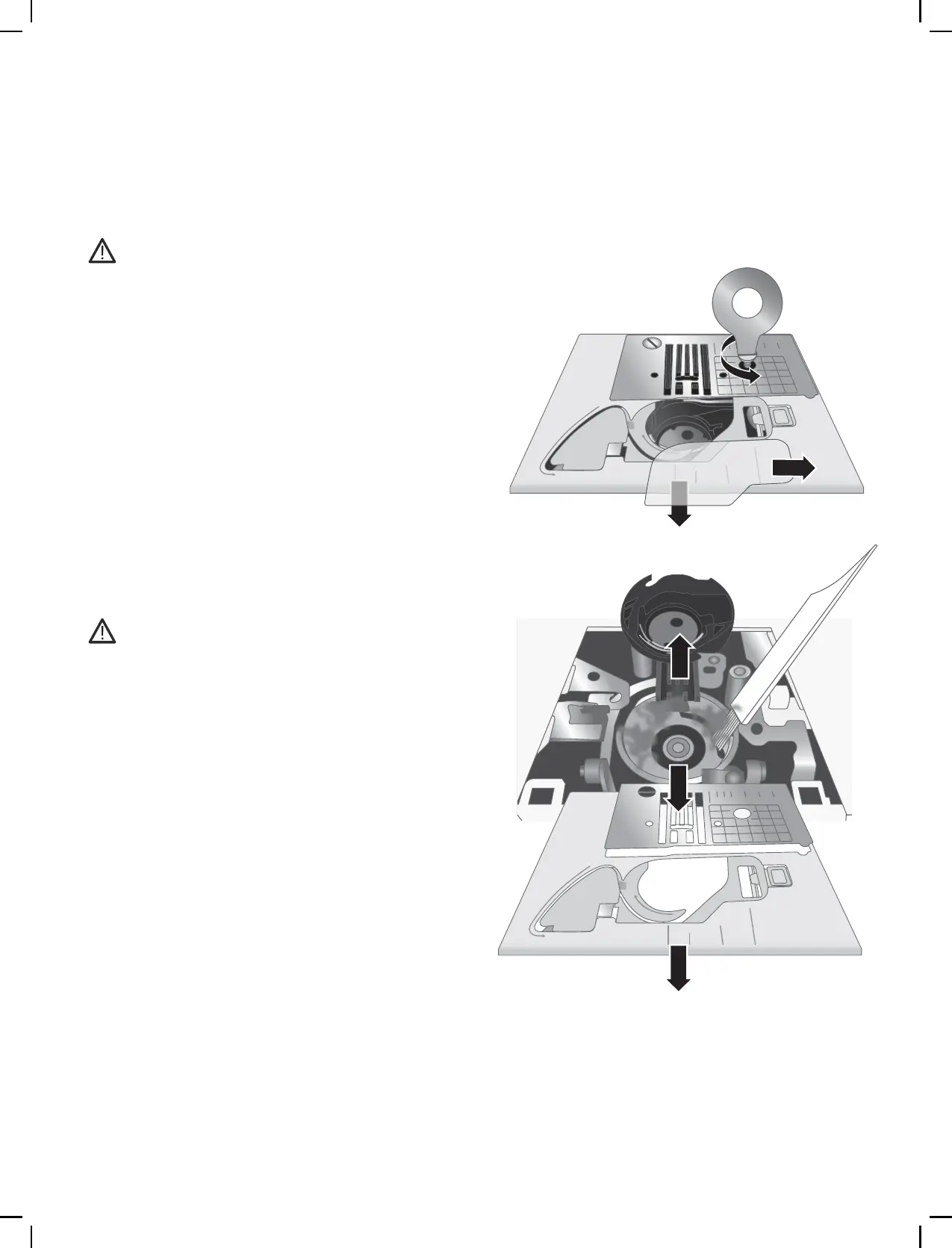
Remove the presser foot. Slide off the bobbin cover
and remove the bobbin.
Remove the plastic part of the needle plate by slid-
ing it off.
Remove the screws in the needle plate by using the
Multi-purpose tool. Lift up and remove the needle
plate.
Clean the feed teeth and the bobbin area with the
brush found among the accessories.
Place the needle plate over the feed teeth, replace
and tighten the screws.
Attach the presser foot, insert the bobbin and re-
place the bobbin cover.
Clean the area under the bobbin case after sewing
several projects or any time you notice an accumula-
tion of lint in the bobbin case area.
Remove the presser foot. Slide off the bobbin cover
and remove the bobbin.
Remove the plastic part of the needle plate by slid-
ing it off.
Remove the screws in the needle plate by using the
Multi-purpose tool. Lift up and remove the needle
plate.
Remove the bobbin case by lifting it up. This is eas-
ier if you push it slightly to the left or right as you
lift.
Clean the area with the brush or with a dry cloth.
Note: Do not blow air into the bobbin case area. The dust
and lint will be blown into your machine.











 To Next Page