8
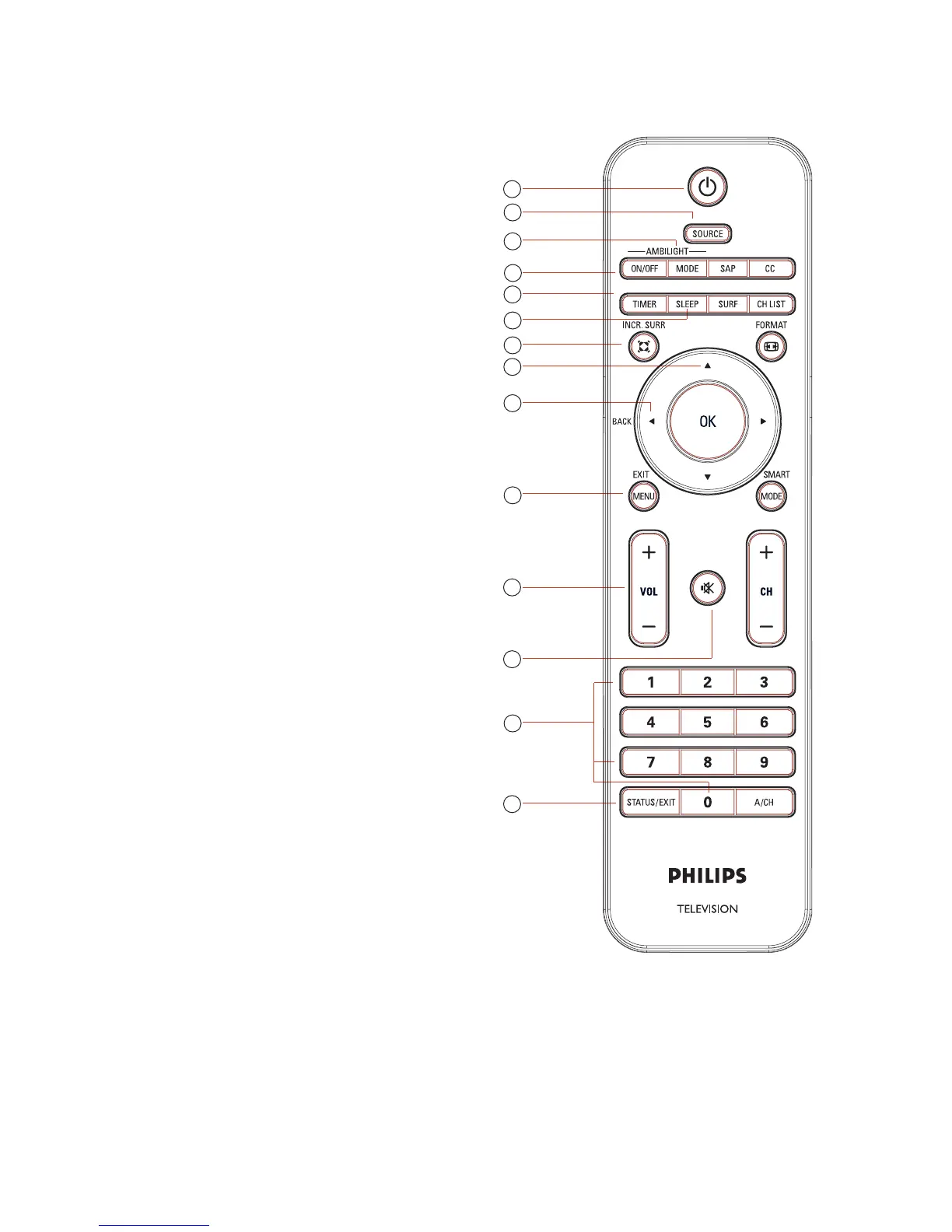
Overview of remote control keys and functions
POWER1. .
To switch the TV to standby mode if it
is already turned on. Or to turn on TV
when it is in standby mode.
SOURCE2.
To display the input source list or to
cycle through list of input sources by
repeatedly pressing button.
AMBILIGHT MODE3.
To select or cycle through the available
Ambilight modes. Not applicable on all
models.
AMBILIGHT ON/OFF4.
To turn on or turn off Ambilight.
Not applicable on all models.
TIMER5.
To activate the Timer menu.
SLEEP6.
To switch to standby after a specified
delay.
INCREDIBLE SURROUND7.
To enable Incredible Surround in stereo
mode and Spatial in mono mode.
CURSOR8.
To navigate and select menu items and
adjust individual settings
BACK9.
To return to the previous menu.
MENU10.
To switch the menu on or off.
VOL11. (Volume + / -)
To turn up or turn down the sound level.
MUTE12.
To turn the speaker sound on or off.
Numeric (13. 0-9)
To enter channel number, set time or
timer.








 To Next Page