25
Keyboard control
Choose to enable or disable the display keyboard
(control buttons) function.
{Lock} - Disable the keyboard function.
{Unlock} - Enable the keyboard function.
Tiling
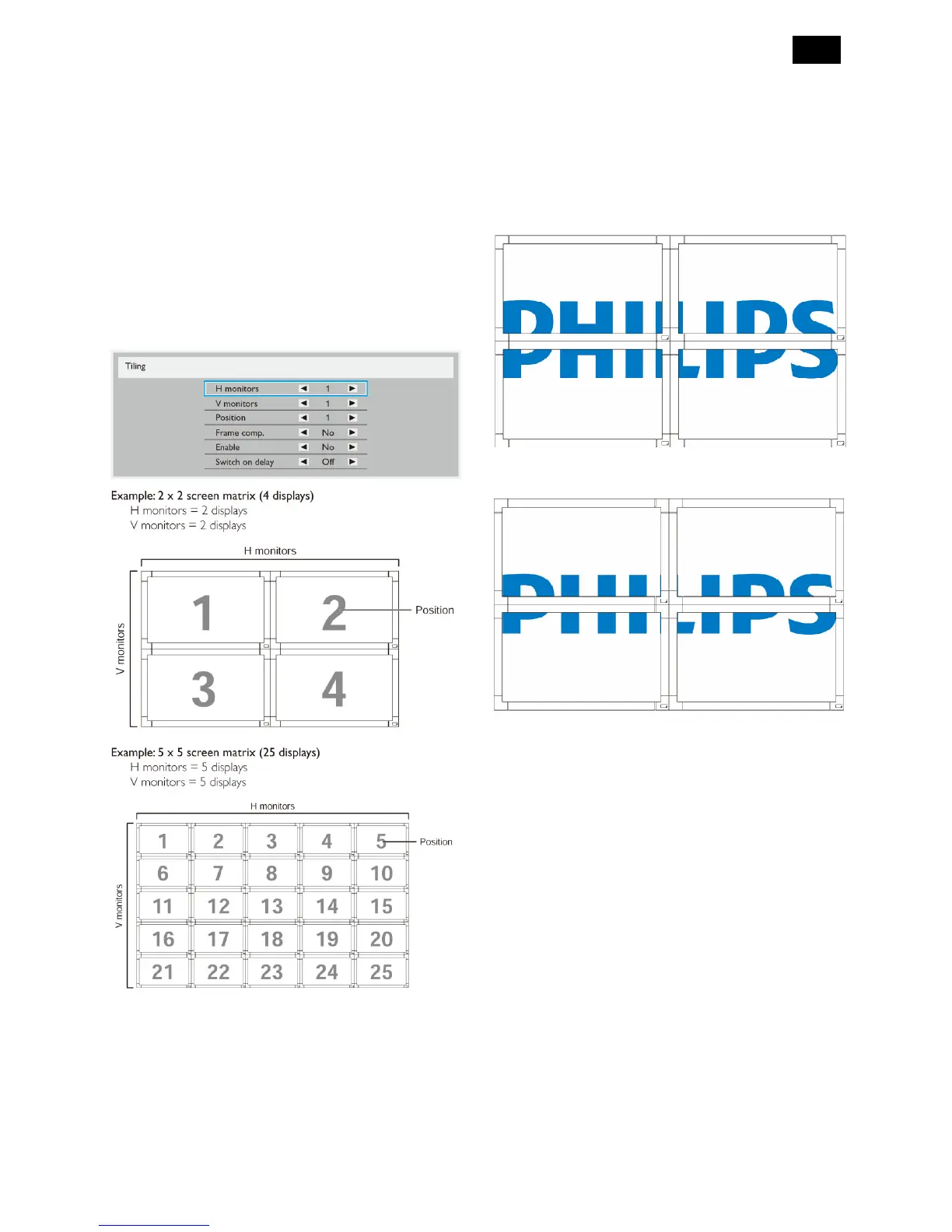
With this function you can create a single large-screen
matrix (video wall) that consists of up to 25 sets of this
display (up to 5-set each at the vertical and horizontal
side). This function requires a daisy-chain connection.
H monitors - Select the number of displays on the
horizontal side.
V monitors - Select the number of displays on the
vertical side.
Position - Select the position of this display in the
screen matrix.
Frame comp. - Choose to turn the frame
compensation function on or off. If turned on, the
display will adjust the image to compensate for the
width of the display bezels in order to accurately
display the image.
Frame comp. – off
Frame comp. – on
Enable: Choose to enable or disable the Tiling
function. If enabled, the display will apply the
settings in {H monitors}, {V monitors}, {Position}, and
{Frame comp.}.
Switch on delay: Set the power-on delaying time (in
seconds). The default option {Auto} allows a
sequential powering-on for each display by their ID
number when multiple displays are connected. The
options are: {off / Auto / 2, 4, 6, 8, 10, 20, 30, 40, 50}
NOTE: The Tiling function will be disabled when the
[ON/OFF] button for PIP is pressed.
Heat status
This function allows you to check the thermal status of
the display at any time.












 To Next Page