12 PREPARING YOUR REMOTE CONTROL
English
4.2 Using the remote control
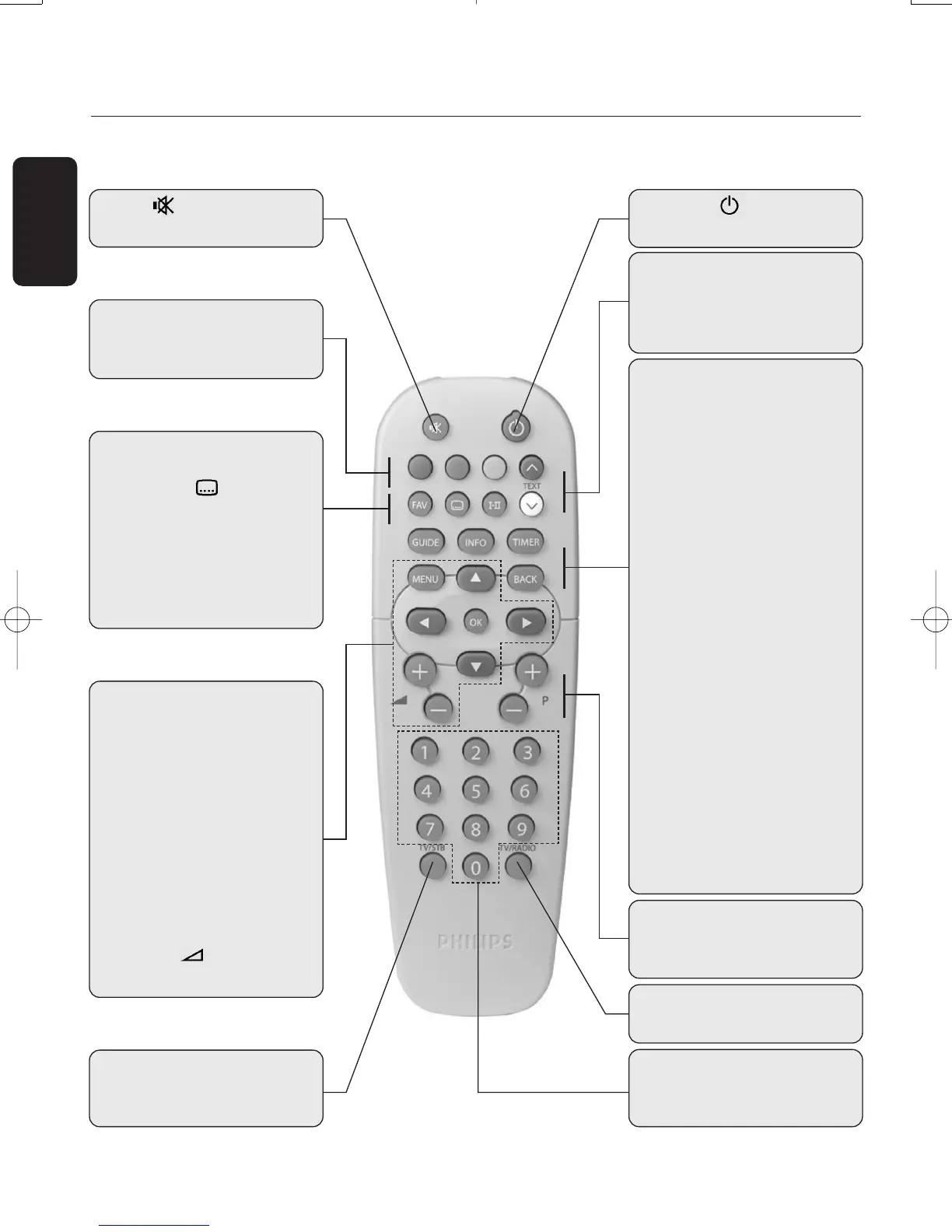
Mute
- Audio mute
Standby
- Standby / ON
TV / RADIO
- Toggle TV / Radio mode
P+ / P-
- Selection of next / previous
channel
0-9
- Channel selection in digital
TV mode
TV / STB
- Toggle between Digital and
Analogue TV/VCR/DVD.
RED, GREEN,YELLOW,
BLUE
- Active in Favourites list only
(blue) resp.V (white)
- Scrolls one Page Up or one
Page Down in guide or
favourite lists
V
FAV
- Toggle between favourite lists
SUBTITLE
- Temporarily starts/stops or
change Audio Subtitling
I-II
- Temporary update of audio
language and selection of
audio mode
MENU
- Open/Close menu (in digital
TV mode)
CURSOR keys
- The t and y cursor keys
are used to move within the
menus and lists
- The
u and i cursor keys
are used to select a value in a
menu item
OK
- Select / call up channel lists /
zap
VOLUME +/ -
- Volume up / down.
GUIDE
- Open Now & Next Guide
INFO
- Open info banner
- Show extended programme
information
- Close banner
TIMER
- Set a recording timer when
watching Digital TV or from
the GUIDE feature.
The
“TIMER, 0” sequence
keystroke deletes the current
running timer
BACK
- Selects the previously
watched digital TV channel
- In menu mode
Either exit the menu
Or bring selection one level
back
Or bring selection back one
level and cancel the changes
you have made.
Doc.DTR2000 version N/B 19/12/03 9:01 Page 12



 To Next Page