Note: If you have put your receiver in “standby” or “low power” mode and the red, right-hand LED is blinking, it
indicates that a free over-the-air upgrade of your receiver is taking place. Do not interrupt this operation.Wait
until the LED stops blinking and the left-hand LED is either orange or red (signalling either “standby” or “low
power” mode).You can then continue as normal.
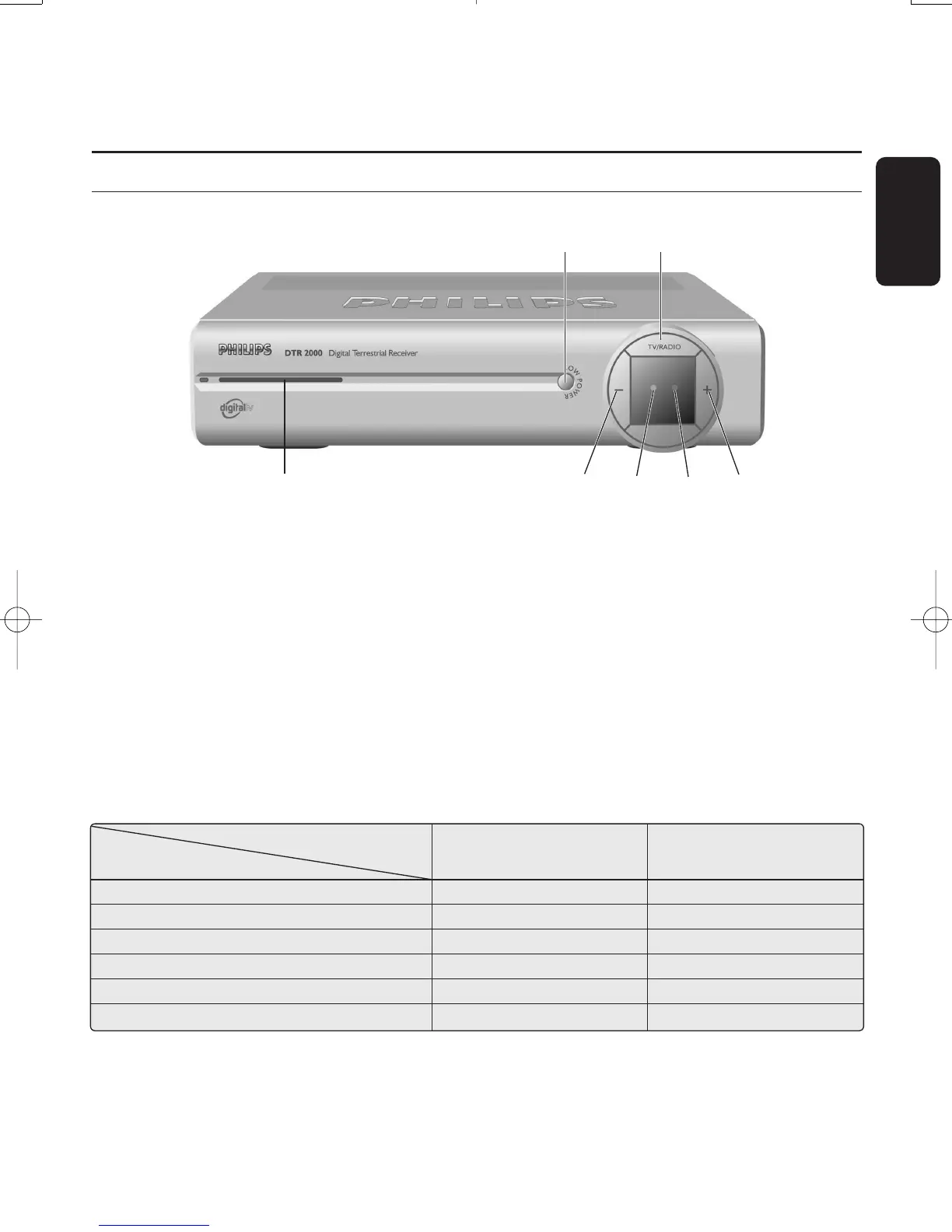
3.1 Front view
English
PRODUCT DESCRIPTION 9
3 Product description
1 LOW POWER button: . . . . . . . . . . Switch receiver ON or to “low power” mode.
Reset the receiver after a 5 second key press.
2 TV/RADIO button . . . . . . . . . . . . . . . Toggle between TV and Radio mode.
3 “-” button . . . . . . . . . . . . . . . . . . . . . . . . Channel down.
4 Multicolour LED indicator . . . . . . Display receiver status (see status indicator table).
5 Red LED indicator . . . . . . . . . . . . . . . Display receiver status (see status indicator table).
Blink at remote control command reception.
6 “+” button . . . . . . . . . . . . . . . . . . . . . . . . Channel up.
7 Smart Card slot . . . . . . . . . . . . . . . . . . Insert the smart card with the chip facing up.
Status indicator table
LED Right-hand LED Left-hand LED
Mode (Green/Orange) (Red)
Receiver off mains
Low power mode Red
Standby mode Orange
TV/Radio mode Green
Timer mode from running mode Green Red
Timer mode from standby mode Orange Red
QW
ERTYU
Doc.DTR2000 version N/B 19/12/03 9:01 Page 9



 To Next Page