E9480UD_EN.qx3 04.7.22 8:26 PM Page 16
16 Hookups (cont'd)
Connecting to a "IV and a Digital Stereo
(Stereo has Dolby DigitaF Mor MPEG2)
4
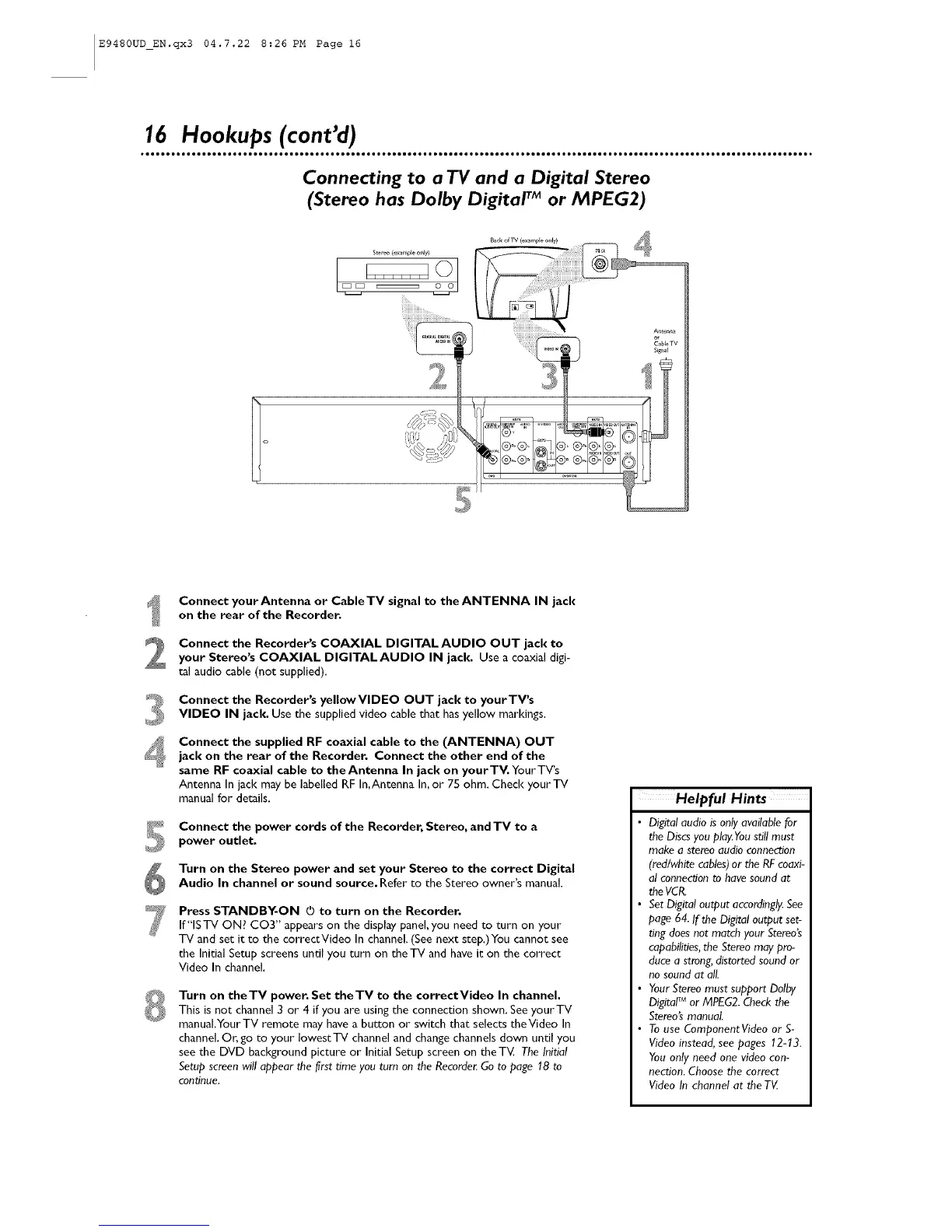
Connect yourAntenna or CableTV signal to the ANTENNA IN jack
on the rear of the Recorder.
Connect the Recorder's COAXIAL DIGITALAUDIO OUT jack to
your Stereo's COAXIAL DIGITAL AUDIO IN jack. Use a coaxial digi-
tal audio cable (not supplied).
Connect the Recorder's yellowVlDEO OUT jack to yourTV's
VIDEO IN jack. Use the supplied video cablethat hasyellow markings.
Connect the supplied RF coaxial cable to the (ANTENNA) OUT
jack on the rear of the Recorder, Connect the other end of the
same RF coaxial cable to the Antenna In jack on yourTV. YourTV's
Antenna In jack may be labelled RF In,Antenna In,or 75 ohm. Check your TV
manual for details.
Connect the power cords of the Recorder, Stereo, and TV to a
power outlet.
Turn on the Stereo power and set your Stereo to the correct Digital
Audio In channel or sound source. Refer to the Stereo owner's manual.
Press STANDBY-ON O to turn on the Recorder.
If"ISTV ON? CO3" appears on the display panel, you need to turn on your
TV and set it to the correctVideo In channel (See next step.)You cannot see
the Initial Setup screens until you turn on theTV and have it on the correct
Video In channel
Turn on theTV power. Set theTV to the correctVideo In channel.
This is not channel 3 or 4 if you are using the connection shown. See yourTV
manual,YourTV remote may have a button or switch that selects theVideo In
channel, Or, go to your lowest TV channel and change channels down until you
see the DVD background picture or Initial Setup screen on theTV, The Initia!
Setup screen will appear the/irst time you rum on the Recorde_Go to page 18 to
con_nue.
Helpful Hints
• Digital audio is only available for
the Discsyou play.Youstill must
make a stereo audio connection
(red/white cables)or the RFcoaxi-
al connecCJonto have sound at
the VCP_
Set Digital output accordingly.See
page 64. If the Digital output set-
ring does nat match your Stereo's
capabilities,the Stereo may pro-
duce a strong,distorted soundor
no sound at all.
Your Stereo must support Delby
Digita!r_ or MPEG2. Checkthe
Stereo'smanual.
To use Component Video or S-
Video instead, see pages 12-13.
You only need one video con-
nection. Choose the correct
Video In channel at the TV













 To Next Page