QUICK-USE GUIDE
DVDR600VR
12nc: 8239 300 33901
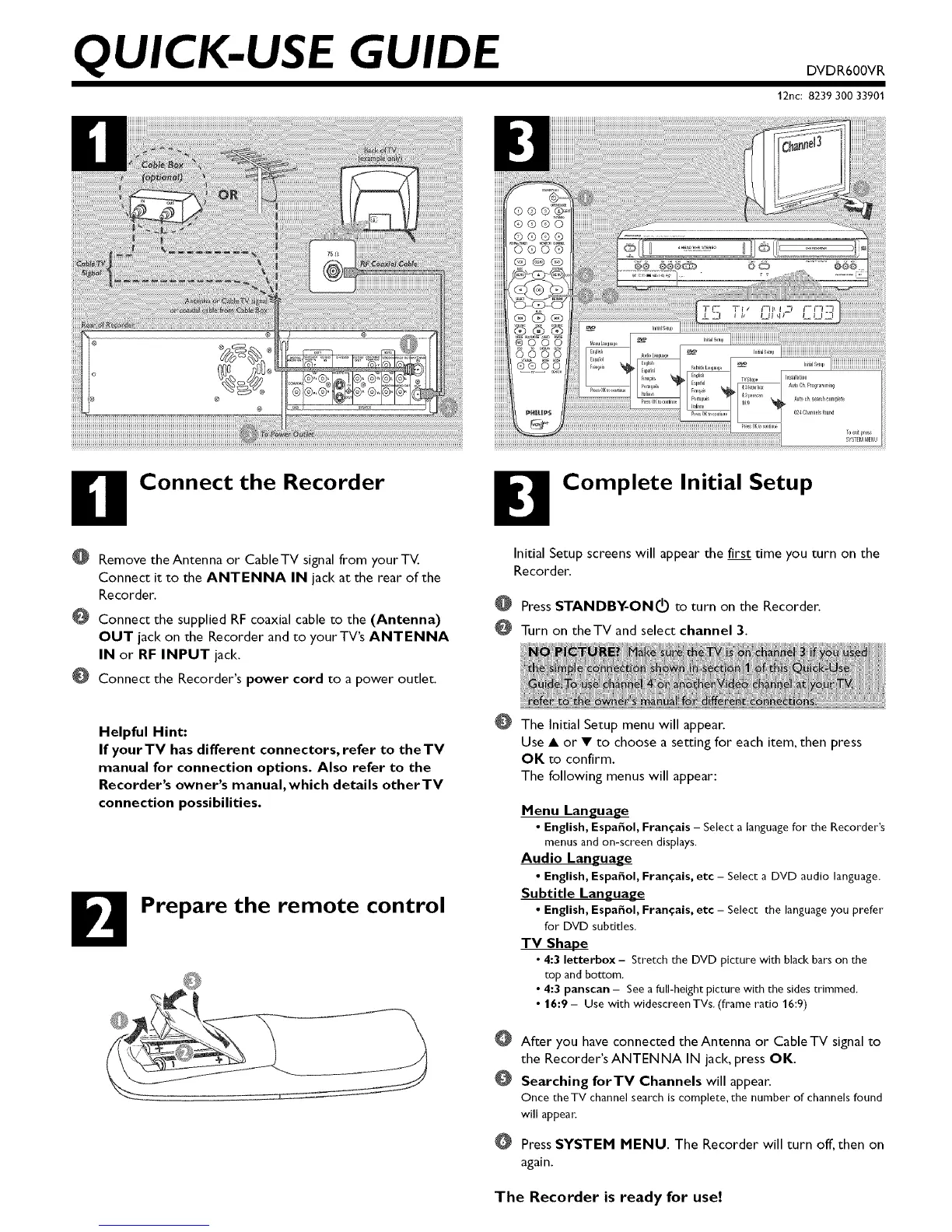
Connect the Recorder
@
@
@
Remove the Antenna or CableTV signal from yourTV.
Connect it to the ANTENNA IN jack at the rear of the
Recorder.
Connect the supplied RF coaxial cable to the (Antenna)
OUT jack on the Recorder and to yourTV's ANTENNA
IN or RF INPUT jack.
Connect the Recorder's power cord to a power outlet.
Helpful Hint:
If yourTV has different connectors, refer to theTV
manual for connection options. Also refer to the
Recorder's owner's manual,which details otherTV
connection possibilities.
B Prepare the remote control
Complete Initial Setup
Initial Setup screens will appear the first dine you turn on the
Recorder.
O Press STANDBY-ON I(b to turn on the Recorder.
Turn on theTV and select channel 3.
The Initial Setup menu will appear.
Use • or • to choose a setting for each item, then press
OK to confirm.
The following menus will appear:
Menu Language
• English, Espafiol, Fran_ais - Select a language for the Recorder's
menus and on-screen displays.
Audio Language
• English, Espaffol, Fran_ais, etc - Select a DVD audio language.
Subtitle Language
• English, Espafiol, Fran_ais, etc - Select the language you prefer
for DVD subtitles.
TV Shape
• 4:3 letterbox - Stretch the DVD picture with black bars on the
top and bottom.
• 4:3 panscan - See a full-height picture with the sides trimmed.
• 16:9 - Use with widescreenTVs. (frame ratio 16:9)
After you have connected theAntenna or CableTV signal to
the Recorder's ANTENNA IN jack, press OK.
Searching forTY Channels will appear.
Once the TV channel search is complete, the number of channels found
will appea_:
Press SYSTEM MENU. The Recorder will turn off, then on
again.
The Recorder is ready for use!













 To Next Page