Alignments
EN 45Q552.2E LA 6.
2011-Jun-01
back to
div. table
6.4.2 Dealer Options
For dealer options, in SAM select “Dealer options”.
See Table 6-17 SAM mode overview
.
6.4.3 (Service) Options
From 2011 onwards, it is not longer possible to change
individual option settings in SAM. Options can only be changed
all at once by using the option codes as described in section
6.4.4
.
6.4.4 Opt. No. (Option numbers)
Select this sub menu to set all options at once (expressed in
two long strings of numbers).
An option number (or “option byte”) represents a number of
different options. When you change these numbers directly,
you can set all options very quickly. All options are controlled
via eight option numbers.
When the NVM is replaced, all options will require resetting. To
be certain that the factory settings are reproduced exactly, you
must set both option number lines. You can find the correct
option numbers on a sticker inside the TV set.
Example: The options sticker gives the following option
numbers:
• 32776 00001 15421 02235
• 43847 36615 33024 00012
The first line (group 1) indicates hardware options 1 to 4, the
second line (group 2) indicate software options 5 to 8.
Every 5-digit number represents 16 bits (so the maximum value
will be 65536 if all options are set).
When all the correct options are set, the sum of the decimal
values of each Option Byte (OB) will give the option number.
Diversity
Not all sets with the same Commercial Type Number (CTN)
necessarily have the same option code!
Use of Alternative BOM => an alternative BOM number usually
indicates the use of an alternative display or power supply. This
results in another display code thus in another Option code.
Refer to Chapter 2. Technical Specifications, Diversity, and
Connections.
6.4.5 Option Code Overview
Refer to the sticker in the set for the correct option codes.
Important: after having edited the option numbers as
described above, you must press OK on the remote control
before the cursor is moved to the left!
6.4.6 Option Bit Overview
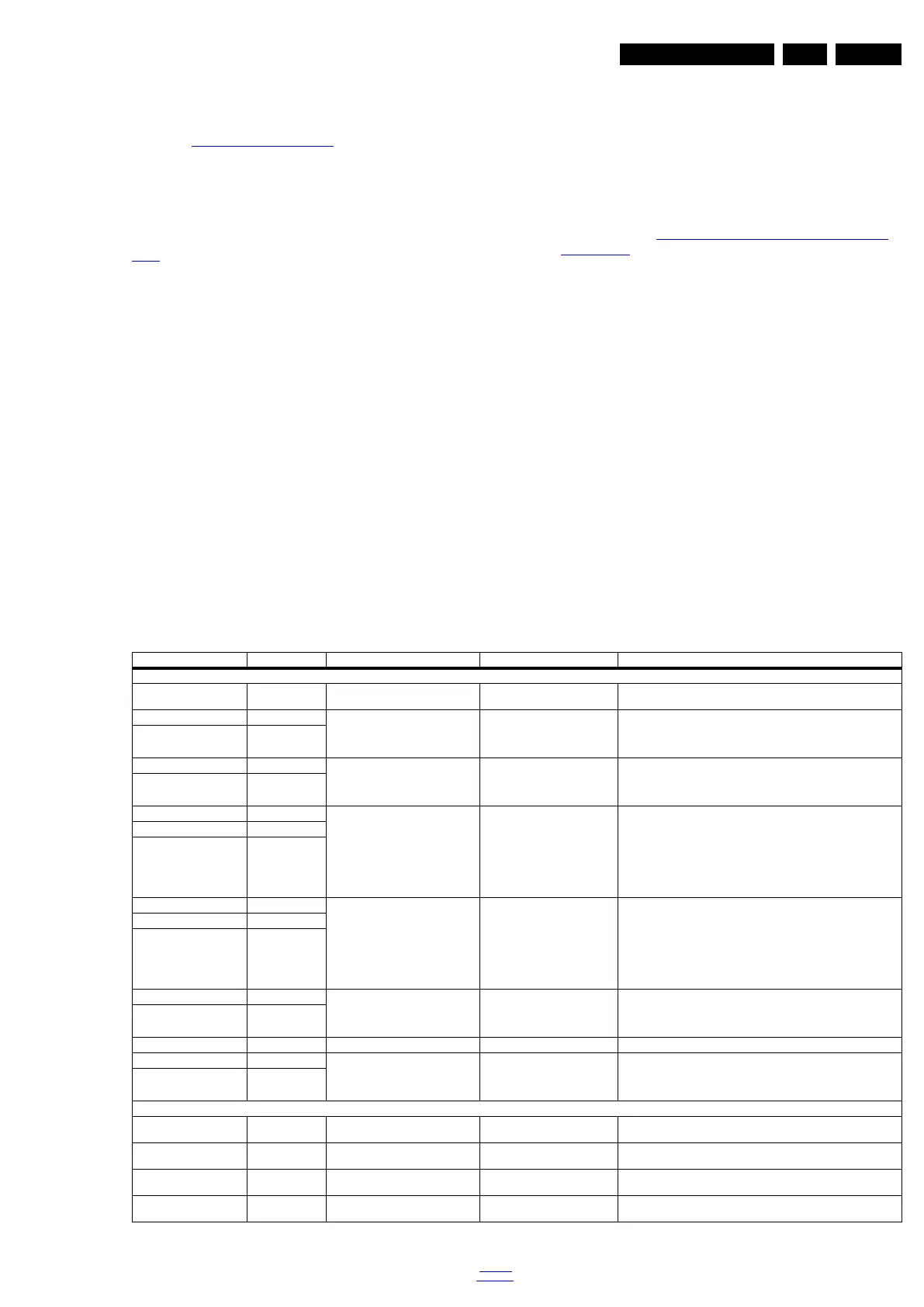
For test purposes, please find below an overview of the Option
Codes on bit level. With a bin/dec converter, you can calculate
the Option Code.
Caution
When manipulating option codes, know what you’re doing.
Wrong option codes could damage the set.
Prescribed option codes below are an example, not valid for all
sets and are subject to modification.
The correct option codes are always present on a sticker inside
the set!
Table 6-16 Option codes at bit level (Option 1 - Option 8)
Option & Bit Dec. Value Option Name Prescribed Value
1)
Description
Option 1 (prescribed value 32776
1)
)
Bit 15 (MSB) 32768 Video Store Streaming 1
1)
0 = OFF
1 = ON
Bit 14 16384 Multi App 00
1)
00 = none
01 = multi app (Multiview BASIC)
10 = AVPIP + multi app (Multiview ENHANCED)
11 = future use
Bit 13 8192
Bit 12 4096 Perfect Pixel 00
1)
00 = Pixel Plus HD
01 = Pixel Precise HD
10 = Perfect Pixel HD
11 = future use
Bit 11 2048
Bit 10 1024 Tuner Type 000
1)
000 = TH2603 (Europe/AP)
001 = FA2307 (Brazil)
010 = VA1E1ED2411
011 = future use
100 = future use
101 = future use
110 = future use
111 = future use
Bit 9 512
Bit 8 256
Bit 7 128 PQ Profiles 000
1)
000 = profile 0
001 = profile 1
010 = profile 2
011 = profile 3
100 = profile 4
101 = profile 5
110 = profile 6
111 = profile 7
Bit 6 64
Bit 5 32
Bit 4 16 DNM 01
1)
00 = Perfect Natural Motion
01 = HD Natural Motion
10 = future use
11 = future use
Bit 3 8
Bit 2 4 MOP AL 0
1)
CPLD, not used in 2011
Bit 1 2 AL Optical Syst 00
1)
00 = 140 nit
01 = 200 nit
10 = future use
11 = future use
Bit 0 (LSB) 1
Option 2 (prescribed value 00001
1)
)
Bit 15 (MSB) 32768 AL Shop Mode 0
1)
0 = boost mode in shop is OFF
1 = boost mode in shop is ON
Bit 14 16384 AL settings storage location 0
1)
0 = stored in AL modules
1 = stored in SSB
Bit 13 8192 Wall Adaptive AL 0
1)
0 = OFF
1 = ON
Bit 12 4096 Sunset 0
1)
0 = OFF
1 = ON



 To Next Page