12
WiFi auto installation
Do this simple 4-step installation to enable streaming music between
your Center and Station:
– When you power on your system for the very first time
–
whenever you add a new Station (see ‘Installing multiple Stations’)
–
when you use other devices e.g. a PC to act as your Center
1 Install the Center
a After you plugged in the unit, the STANDBY ON LED lights up red. Wait several seconds until the
display shows the ‘Station status’ screen.
b Press STANDBY ON on the unit.
the STANDBY ON LED lights up green.
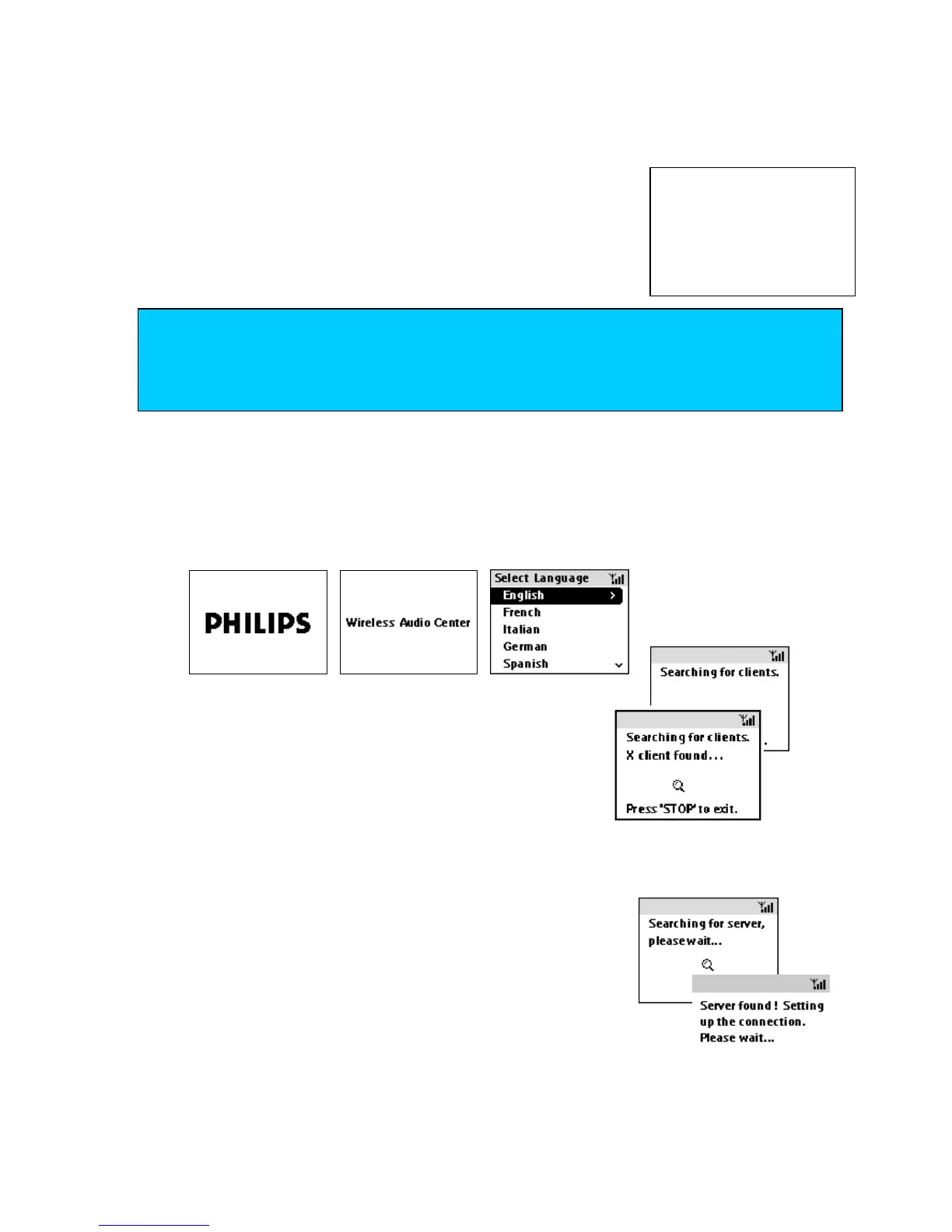
Center displays the following screens. In the language screen, select and confirm your language.
The Center searches for the other device, the Station.
Station search and connection status is shown, where X denotes
the number of Stations detected.
On the Station: Center search and connection status is shown.
HD screen appears. Your unit is now ready to play.
2 Install the Station
a After you plugged in the unit, the STANDBY ON LED lights up red. Wait a few seconds until the
display shows the PHILIPS’ screen.
b Press STANDBY ON on the unit.
the STANDBY ON LED lights up green.
Station displays the following screens. In the language screen, select
and confirm your language.
On the Station: Center search and connection status is shown.
HD screen appears. Your unit is now ready to play.
TIP
–
Make sure you place
WA
CS700 close together on a flat surface for easy handling.
–
To activate first-time setup, use the controls located on the Center and Station.
–
Do not use the remote controls until after you complete installation.















 To Next Page