Step-by-step development of an example project
105724_en_01 PHOENIX CONTACT 37
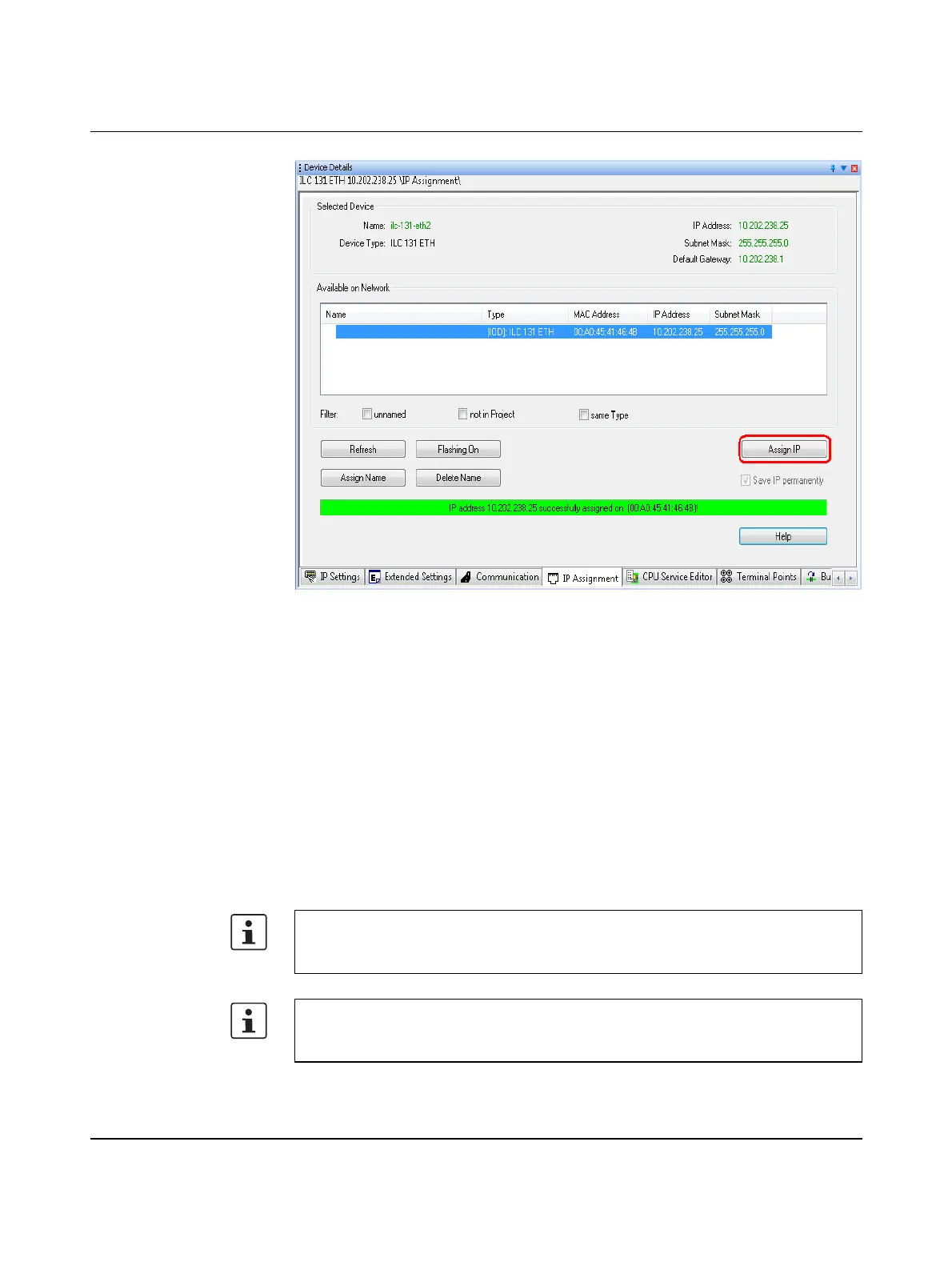
Figure 5-9 Starting IP address assignment via DCP
A green status indicator indicates successful IP address assignment.
The PROFINET device name is assigned in the same way.
Then check the communication between PC WORX EXPRESS and the ILC 131 ETH:
• In the “Device Details” window select the “Communication” tab.
• Click on the “Test” button.
A green status indicator indicates successful communication.
If communication could not be established between PC WORX EXPRESS and the
ILC 131 ETH, check again whether your network permits the IP settings used in the
example project (see section 5.1.3 on page 32). After you have made any necessary
changes, check the communication between PC WORX EXPRESS and the ILC 131 ETH
again.
5.1.4.2 BootP server
IP address assignment via a BootP server is an alternative to IP address assignment via
the DCP PROFINET protocol. If you have already assigned the IP address via the
DCP PROFINET protocol, you can skip Section 5.1.4.2, “BootP server”.
The connecting cable (RS-232 cable) PRG CAB MINI DIN (Order No. 2730611) is
available as an optional accessory for connecting the controller to a PC via the serial
interface.



 To Next Page