PicoQuant GmbH HydraHarp 400 Software V. 3.0.0.1
If there is a large difference between the current monochromator position and the position entered, the
movement will take some time. If you wish to interrupt this process, press the Stop button. The monochromator
immediately will slow down and stop. The deceleration is necessary to preserve the calibration.
Running TRES Measurements
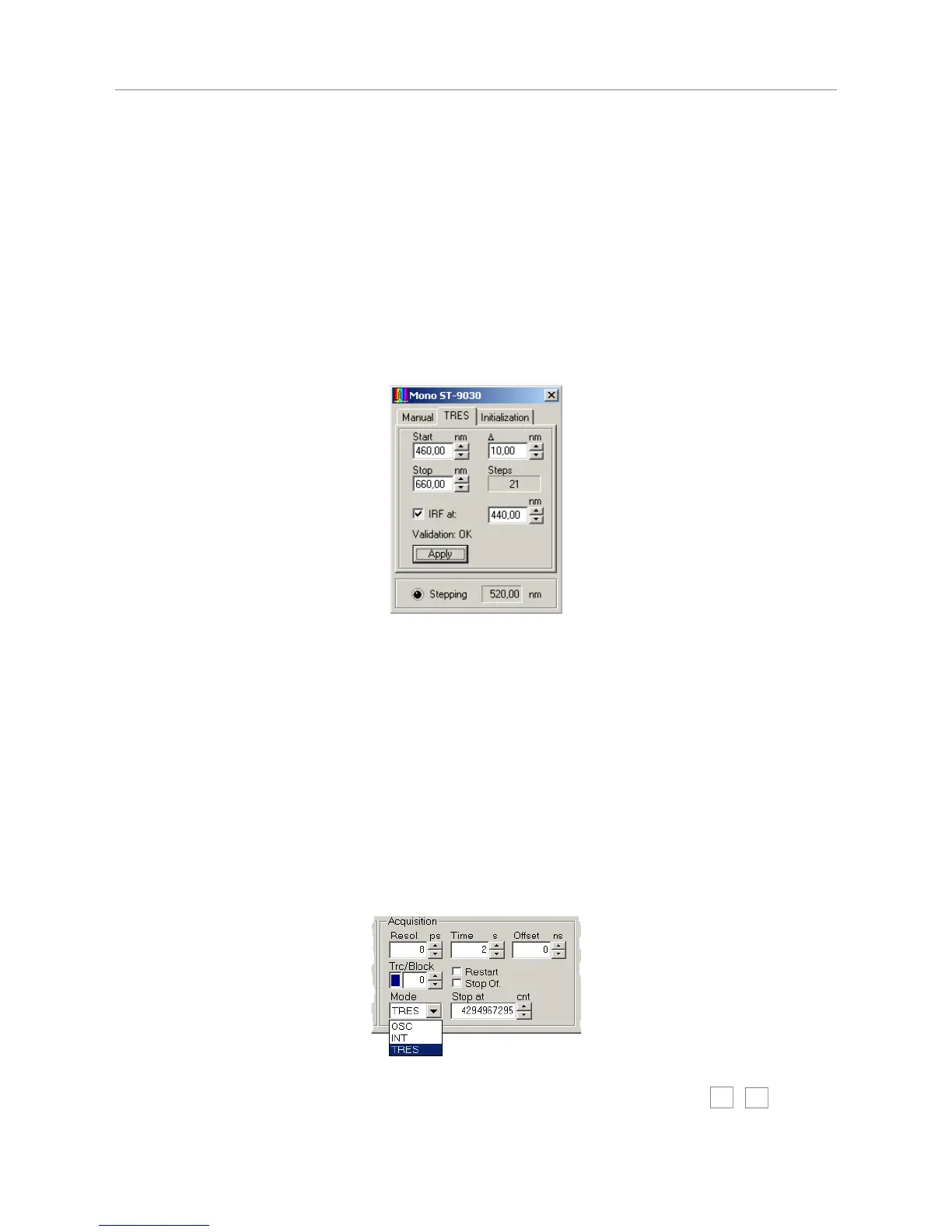
The TRES page of the dialog contains the controls used to set up an automated scanning of the
monochromator. The start and stop wavelengths of the scan can be entered in the corresponding edit boxes,
the D (delta) box defines the step width of the scan. The scan starts always exactly at the Start value. If the
Stop position cannot be reached by an integer multiple of the step width, the scan stops at the last position
within the start / stop range. If the start position is larger than the stop position, the scanning direction will be
reversed. The maximum range and number of wavelength steps is determined by the physical characteristics
of the monochromator as well as the maximum number of memory blocks to record histograms in (512). Again,
pressing the spin buttons will apply the change in the corresponding edit boxes immediately; entering values
manually require pressing <Enter> or the Apply button.
The IRF can be measured automatically as part of the scan, at a separately chosen wavelength. To do so,
check the box entitled IRF at and enter the wavelength at which to measure the IRF in the corresponding edit
box. The monochromator will go to the IRF position at the beginning of the TRES measurement. After the IRF
was measured, the actual TRES scan will be performed. The IRF will always be recorded in memory block 0,
while the wavelength scan always starts in block 1. Note that starting a TRES measurement will clear and
subsequently overwrite all curves in memory that may have been recorded previously. If you wish to measure
the IRF yourself you must do this AFTER the TRES measurement. If the curves in memory were loaded from a
file, the actual file on disk will not be overwritten until you save to the file ( Save menu or corresponding toolbar
button). Use Save As and select a new file name if you want to preserve the old file. Note that a TRES file will
remain a TRES file for its lifetime. This means that after creating or re-loading such a file you can do only two
things: perform a new TRES measurment (effectively overwriting the old file contents) or measure an IRF into
curve 0 (overwiting only curve 0). If you want to perform any other measurement you will need to create a new
file or load a non-TRES file.
The TRES measurement is selected in the HydraHarp control panel. You need to use the selection box for the
measurement mode to select TRES mode (instead of OSC or INT).
A TRES measurement is started or canceled as usual via the toolbar buttons for start
and stop. The data acquisition will be performed like a standard “Integration Mode”
measurement, while the block number is incremented for each new wavelength.
Page 38



 To Next Page