System
wlan
12
After the desired locomotive has been called up, it can be run directly using
the throttle’s dial. The dial will automatically turn to the speed the locomotive
was traveling at when overtaken from the previous throttle.
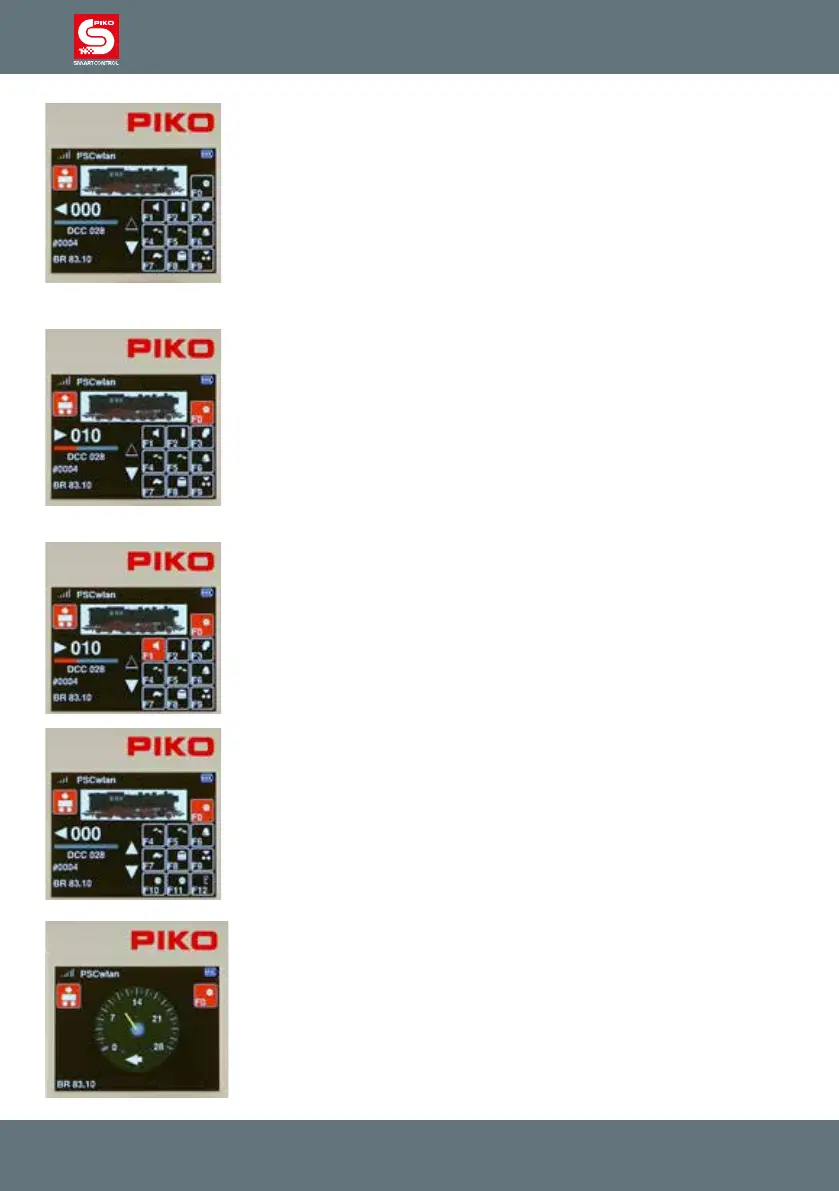
The display will now show the locomotive image stored in the locomotive
editor, the current speed step, and the direction arrow including the speed
bar underneath it on the lower left.
If the direction arrow points right, this indicates the locomotive is moving
forward. If the arrow points left, this indicates the locomotive is moving in
reverse. If the dial is turned to the right, the locomotive will move at
increasing speed in the indicated direction of travel . Pressing the dial
reverses the direction of travel when the speed is set to zero. If the dial is
pressed once while the locomotive is running, the locomotive will stop at its
programmed deceleration rate. The direction of travel is only reversed by
pressing the dial again (Like with AC throttles). If the dial is pressed twice
quickly while a locomotive is running, the locomotive stops instantly without
any braking delay. Whichever DCC speed step setting the locomotive is
programmed for, 14, 28, or 128, will be displayed under the speed bar.
Below the speed bar the locomotive address and name are displayed. The
current status of all available locomotive functions is found in the right half of
the display. If a function is switched on, the corresponding function icon
displays a colored background (see F0 here).
Locomotive functions are activated using the SmartController’s keypad. The
light function (F0) is always activated using the "0" key. For all other
functions, the eld in the display screen shows which keypad button to press
to activate a function.
The two triangles to the left of the function eld indicate whether additional
functions are available. If a triangle is solid white, you can scroll line by line
in the corresponding direction of the triangle by using the Up or Down
keys.A locomotive may have even more functions available, but they have
been turned o during locomotive data entry
Fun fact:
If the "up" button is pressed for approx. two seconds, the display changes to
a DEUTA "tachometer display" of the speed step levels. The F0 function
can also be switched here. Pressing the "back button" or the "down button"
for approx. two seconds switches back to the standard display.



 To Next Page