wlan
33
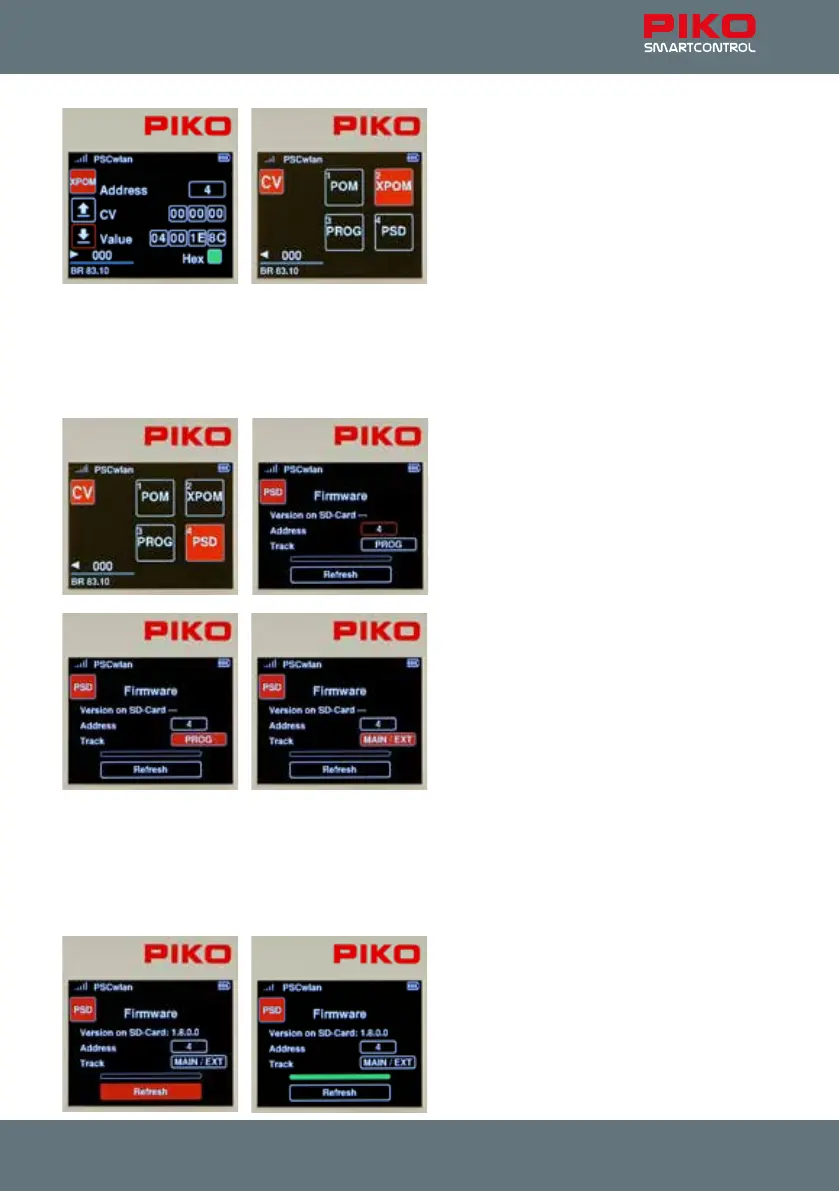
If the display in hexadecimal form is desired, then
select the "Hex" eld with the navigation keys and
activate with the "OK" button. The values greater
than 9 (A - F) can be set using the telephone
keypad or the "up" and "down" navigation keys
and conrmed with the OK button.
To exit the XPOM programming menu, press the
"back" button. The display will again show the
programming menu.
3.7.4 Update menu for PIKO SmartDecoder XP 5.1 and further versions
(PSD)
This menu can be used to update PIKO SmartDecoders beginning with version XP 5.1. The latest rm-
ware can be found in the web shop on the PIKO website and can be copied to the SD card.
To update a decoder it has to be in a locomotive
on the main or programming track, or inserted
into a PIKO SmartTester that is plugged into the
"Extension" port on the side of the PIKO
SmartBox
wlan
.
After selecting the "PSD" eld, the input eld for
the decoder address and the option for selecting
the "track" where the update will occur appear in
the next window.
The decoder address can be changed in the
"Address" eld if necessary. To do this, press the
OK button when the address eld is highlighted,
enter the address, and then conrm with the OK
button.
If the locomotive is not on the specied track, the
track selection can be changed using the "Track"
eld. There are two options here which can be
selected by using the "up" or "down" button.
"PROG" for the programming track output and
"MAIN / EXT" for the main track output or the SmartTester connected to the extension port. Locomo-
tives with other decoders can start moving unintentionally due to their automatic analogue detection.
When your selection is conrmed with the OK button, the system will search for the decoder and
identify it’s type. If it is identied, the rmware version suitable for this decoder type will be displayed
on the SD card and only then can the update commence. Once the decoder has receives the signal, it
activates outputs A0f and A0r.
The update for this PSD decoder starts via the
"Update" eld by pressing the OK button. Please
do not interrupt the update process!
After a successful update, the progress bar will
appear solid green and the SmartBox will emit
three short beeps. The PSD menu can now be
exited using the "back" button.
The CV menu is now displayed again.



 To Next Page