wlan
47
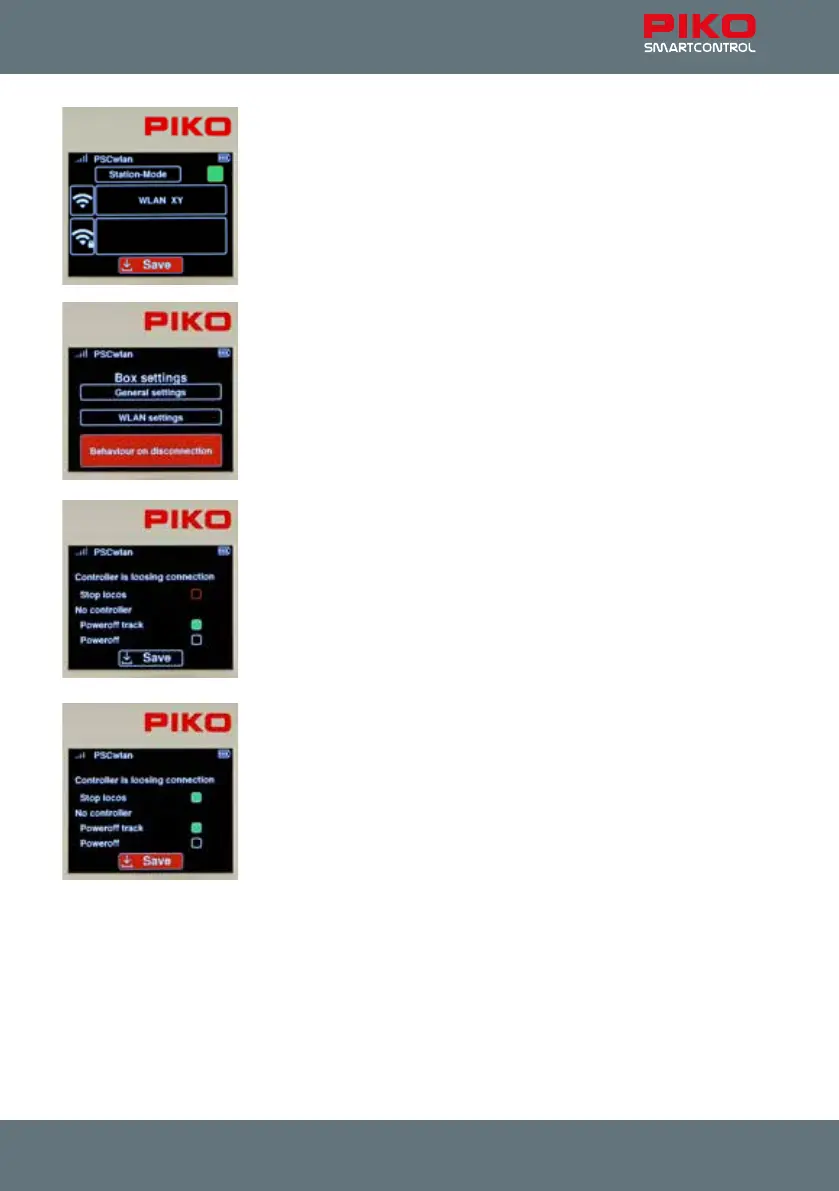
In the following window, the required entries can be made using the same
procedure as "AccessPoint mode", where the name of the desired Wi-Fi
network and its password must be entered here.
If these settings were saved using the "Save" icon and the SmartBox was
then restarted, it is now integrated into the Wi-Fi network.
This menu can be exited using the "back" button.
System response to a lost connection:
The next menu in the SmartBox settings lets you decide how your SmartBox
will respond to a loss of connection with one or more SmartControllers.
To access this menu, navigate to the "Behavior if the connection is lost" eld
and select it with the OK button.
Once on the menu, select the desired elds using the “up” or “down”
navigation keys and highlight the desired eld (eld will turn solid green), or
deactivate it with the OK Button.
If a throttle loses its connection during train operation and the eld in the
"Stop locomotives" line is activated (solid green eld), all trains on the layout
are stopped. If this selection was not made and there is another throttle
connected to the command station, then nothing will happen.
The next options are used to specify whether only the track itself should be
shut o or whether the SmartBox (track and Wi-Fi) should be shut o if the
last Controller loses its connection to the command station. In the later case,
the SmartBox can be reactivated using its I button. If none of the options are
selected here, the whole system will remain in operation even if no
Controller is connected to the command station (This is useful for a shop
window layout).
Once the desired entries have been made, they are saved by selecting the
"Save" symbol and the menu can be exited with the "Back" button.
Pressing the "back" button again returns you to the main menu.



 To Next Page