System
wlan
36
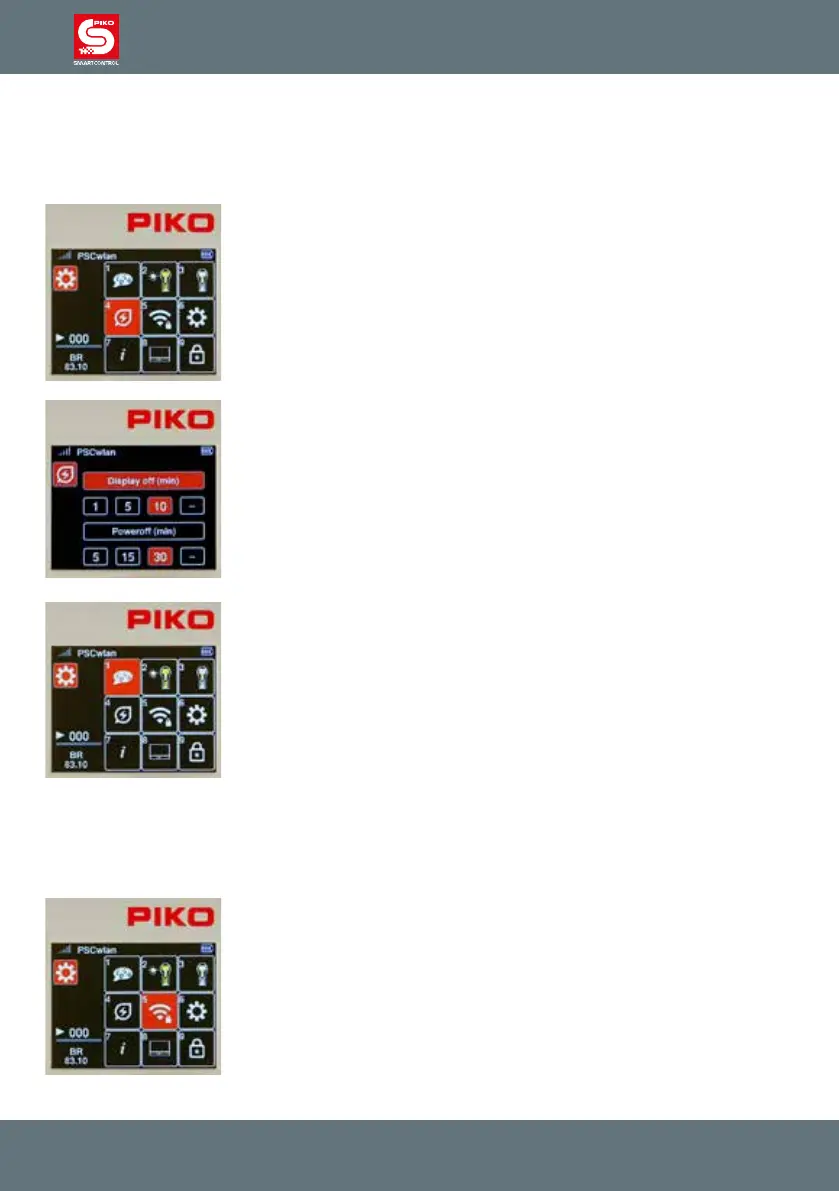
3.8.4 SmartController sleep mode
If the throttle has not been used for some time during an operating session, it makes sense to go into
sleep mode or shut down to conserve battery power. The time period between last use and activation
of sleep mode or shutdown is adjustable. These options are set here.
To do this, press key 4 in the settings menu or navigate to this eld and
activate the menu with the OK button.
The following window displays the settings for switching o the screen and
throttle. The desired application can be selected using the “up” and “down”
navigation buttons.
A time setting (in minutes) can be selected with the “right” or “left” navigation
buttons and conrmed with the OK button.
If the "--" eld is selected, the shut down option will not be activated.
If the screen goes into sleep mode during an operation session, it can be
re-activated with the press of any button on the throttle. After re-activation,
the throttle will execute commands again.
If you choose to retain these settings, pressing the “back” button will return
you to the Settings menu.
3.8.5 Select Wi-Fi network
NOTE: If the SmartController cannot connect to a Wi-Fi network after being turned on (the Wi-Fi sym-
bol is crossed out), it will display a message asking if you want to use the "FastConnect" option. Select
the "Yes" or "No" option.
The desired Wi-Fi settings can be entered into the Wi-Fi settings menu of
the SmartController.
To do this, press key 5 in the settings menu or navigate to this eld and
activate the menu with the OK button.



 To Next Page