wlan
31
3.7.2 CV Programming on the Main track (POM)
A prerequisite for main track programming is that the decoder address of the locomotive to be program-
med is known. In addition to be programmable on the main track, CVs can also be read from the main
track provided the decoder is capable of it.
NOTE: The currently active locomotive can still be operated while it is being programmed on the main
track.
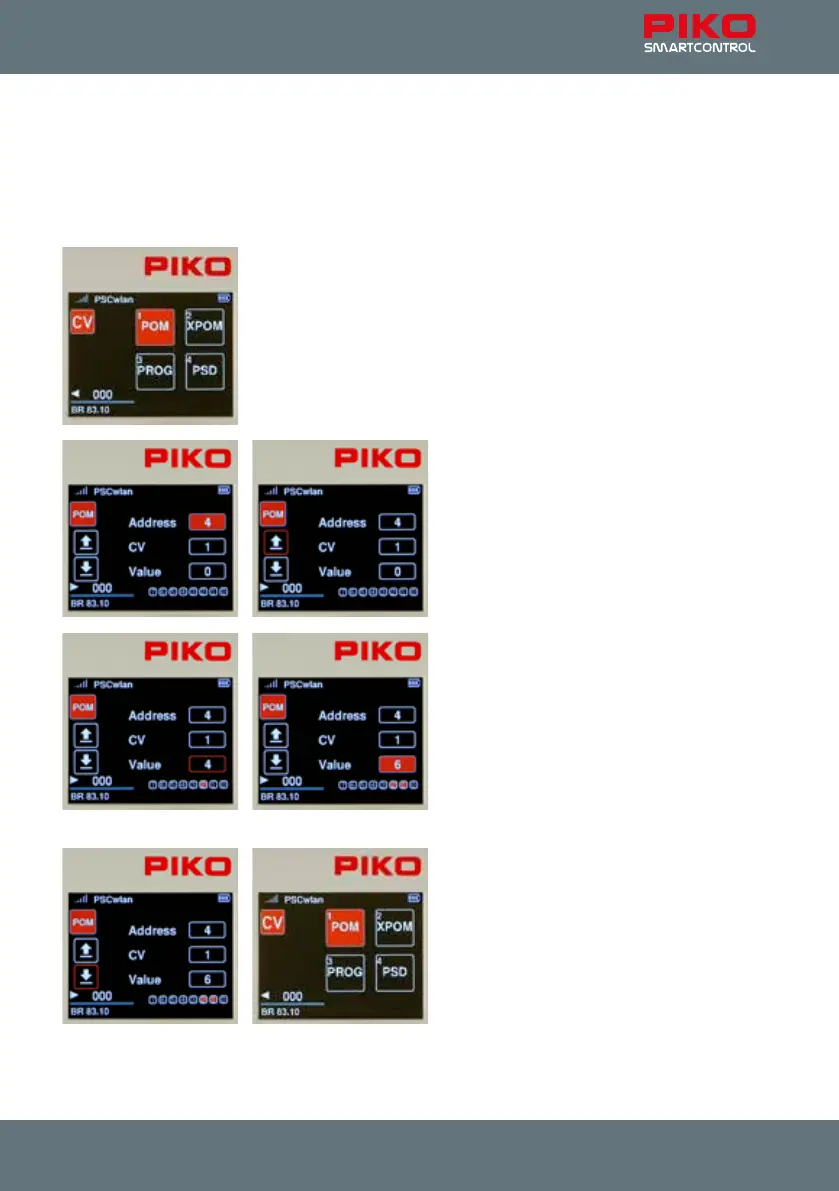
Call up the "POM" menu in the programming menu by pressing key 1 or
using the navigation keys followed by the OK button.
Now go to the "Address" eld, press the OK
button and enter the decoder address to be
edited, using the keypad. Conrm with the OK
button.
If the displayed CV is to be read, then use the
"left" navigation button to select the "read out"
symbol and conrm with the OK button. CVs from
1 to 1024 can be entered into the CV eld.
The read value is now displayed in decimal form
in the "Value" eld and as bits highlighted in red
in the bit representation (below).
If the CV value is to be changed, use the navi-
gation buttons to navigate to the "Value" eld
and activate it with the OK button. Enter the new
value using the keypad and conrm it with the
OK button. You can also change the CV bits in
this window (Chap. 3.7.1 " ... programming track
(PROG)").
Now use the "left" navigation button to select the
"write" symbol on the left-hand side, and nish by
pressing the OK button.
Other CVs can be programmed in the same way.
To leave main track programming, press the
"back" button. The display will again show the
programming menu.
During Programming on the Main track, the input and action elds behave in the same way as they do
when programming on the Programming track. If a CV has been successfully read or programmed, the
corresponding action eld will also be solid red.



 To Next Page