System
wlan
30
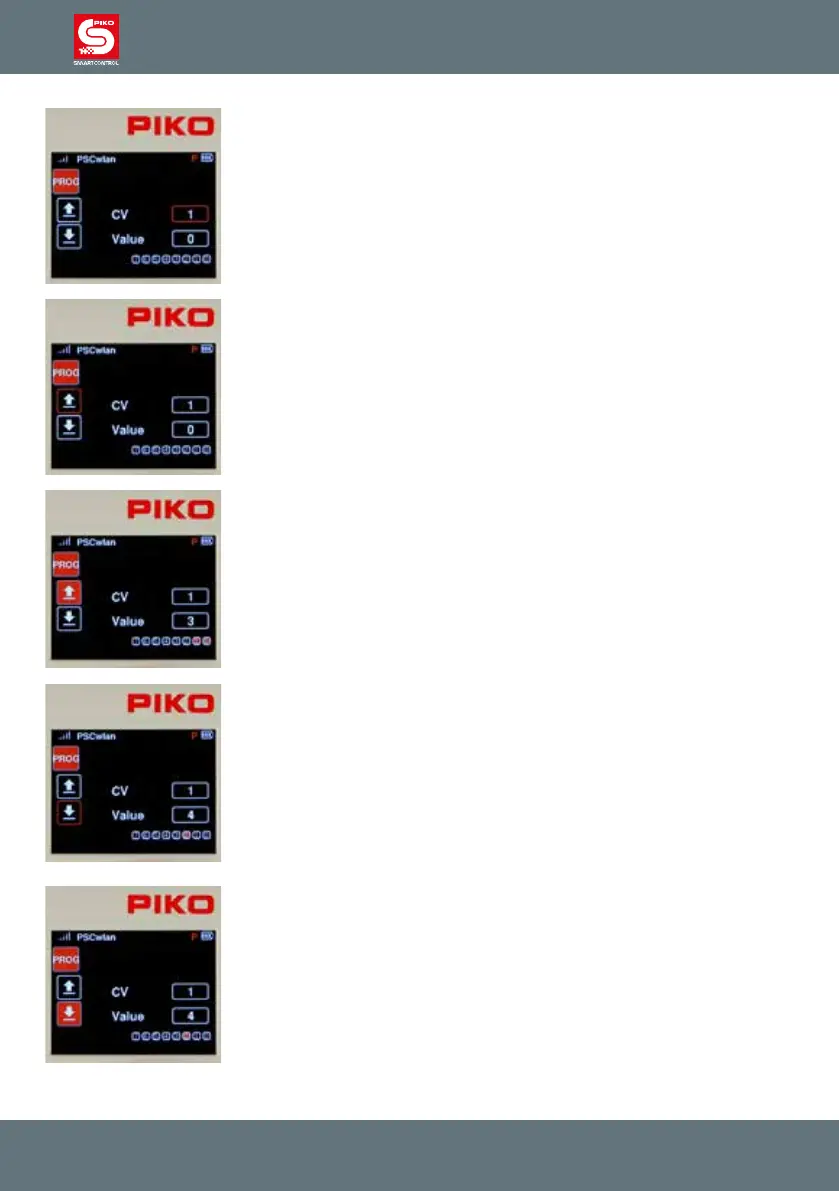
The panel's green Run LED will ash and a red "P" will appear in the top line
of the next display window.
Use the navigation keys to jump to the "CV" eld and enter the CV number
to be read or written. To do this, rst press the OK button. The input eld will
now become solid. Now enter the CV number using the keypad and conrm
it by pressing the OK button again.
CVs up to 1024 can be edited.
If you want to read the CV, use the "left" navigation button to select the "read
out" symbol and conrm it with the OK button.
NOTE: If a message is displayed saying "Prog. Tr. is occupied, please
wait.", the programming track is currently being used by another controller
and cannot be accessed by this controller.
The read value is now displayed in decimal form in the "Value" eld, and as
bits highlighted in red in the bit eld underneath. The "read out" eld is now
solid red. The meaning of the CV’s individual bits can be found in the
instruction manual for the decoder.
If the CV read out failed, the "Value" eld will display a 0 and the "Read"
eld will remain outlined in red.
If this CV is to be programmed with a dierent value, then select the "Value"
eld on the right-hand side and conrm with the OK button. Now enter the
desired value, conrm with the OK button and select the "write" symbol on
the left-hand side. Complete this step by pressing the OK button.
The value to be written can be entered in decimal form in the "Value" eld
and in bit representation as bits highlighted in red. For bit-by-bit program-
ming, use the "down" button to jump into the bit sequence, use the "left" and
"right" navigation buttons to select the desired bits and conrm each with the
OK butto.
If the CV was written successfully, the "Write" eld will now turn solid red.



 To Next Page