System
wlan
40
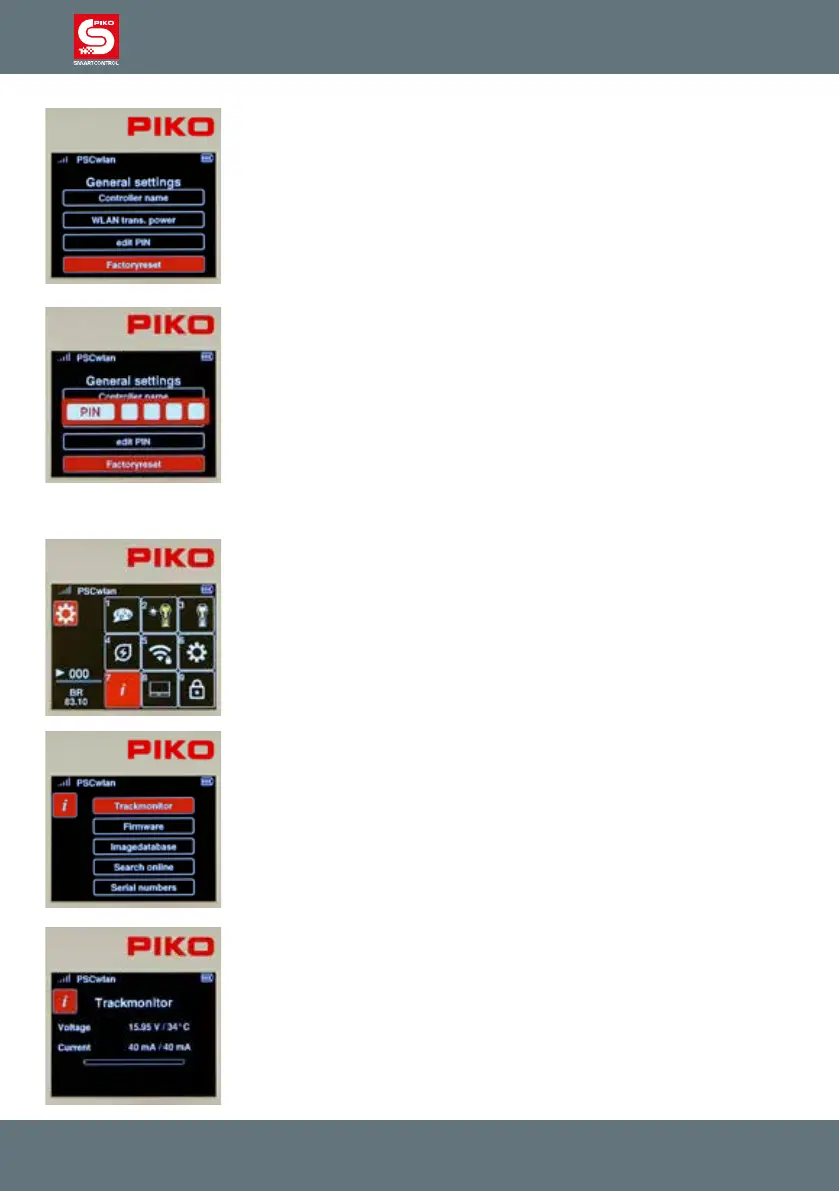
The Controller can be reset to factory settings by highlighting the last eld in
the settings menu. To do this you will have to use the PIN you created in the
previous step. The following Controller settings are then reset to factory
settings: the Wi-Fi password, the Controller name, the throttle mode, sleep
mode/shutdown settings, screen/keyboard brightness, and your PIN.
“Locked" menus will become unlocked.
To reset the Controller to factory settings, navigate to the "Factory settings"
submenu and conrm with the OK button.
Now enter your four-digit PIN and conrm with the OK button. Once the
Controller is rebooted it is restored to factory settings.
3.8.7 The Information menu
The Information menu allows you to view a wide range of information about
the Controller, the track status and the SD card.
It is accessed by pressing button 7 on the keypad (while in the settings
menu) or by navigating to this eld and selecting the menu with the OK
button.
Five submenus are displayed: "Track Monitor", "Firmware", "Image
Database", "Search Online" and "Serial Numbers".
The layout monitor: This menu shows the current state of the track output
on the SmartBox along with track voltage, operating temperature, current
draw, and the highest current draw during the present operating session
(right Value).
The green area in the "current bar" shows the present current draw in
relation to the maximum possible current. The red marker shows the highest
current draw during the present operating session.



 To Next Page