System
wlan
44
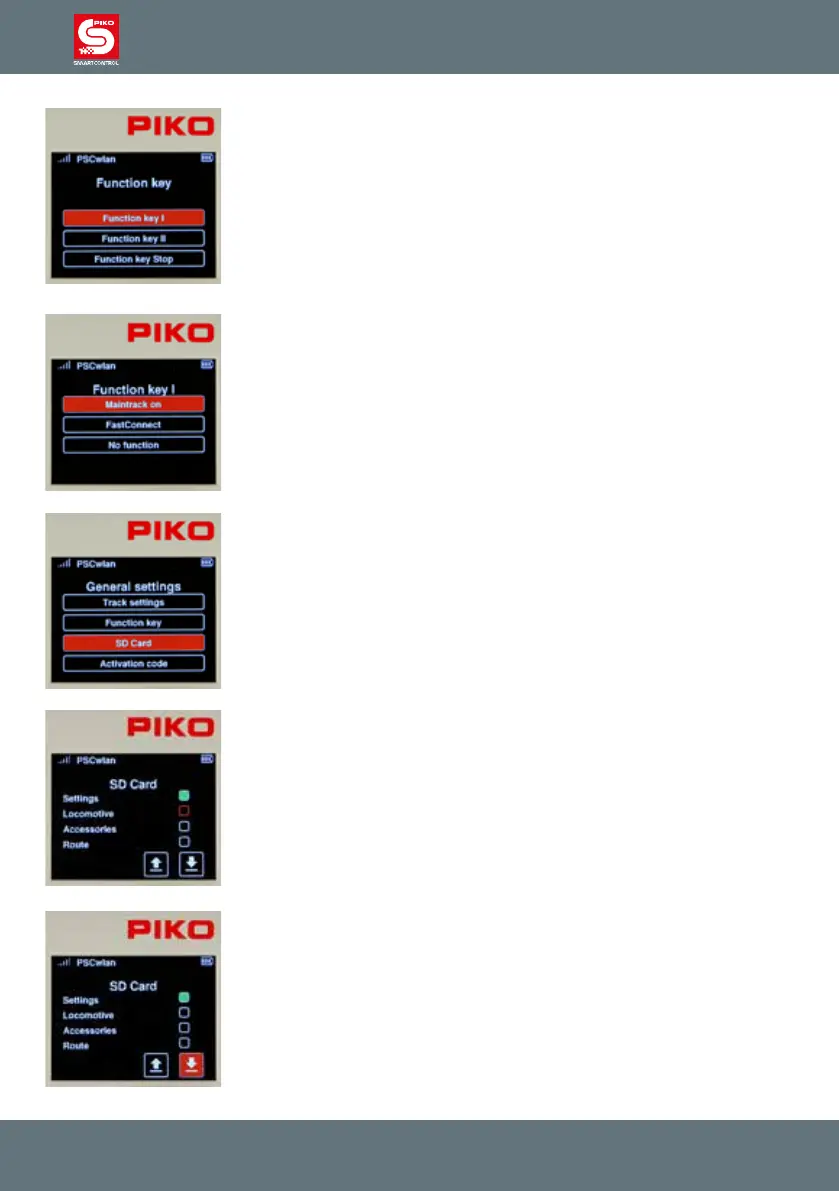
You can choose between three functions for buttons I and II.
1. Main track on (send power to the main track)
2. FastConnect (quick connection with a SmartController)
3. No function
The Stop button has two options:
1. Power o (power to the main track must be switched on again using
another button or a Controller)
2. Power o / on (power to the main track can be switched o and on again
using this button)
To set the desired function of a button, rst navigate to the corresponding
button and select it with the OK button.
Then, highlight the desired function for the button in the settings menu.
Finally, conrm your choice with the OK button.
You may exit the menu using the "back" button.
The SD card settings:
This submenu lets you manage some of the SD card’s data.
Each eld is used to specify which data should be saved or read, both for
writing to the SD card and for reading from the SD card.
To do this, navigate to the desired eld and activate it (solid green eld) or
deactivate it with the OK button.
Settings: This eld deals with the SmartBox settings.
Locomotive: This eld deals with all available locomotive data sets.
Accessory items: This eld deals with all available records of accessory
items.
Route: This eld deals with all available data records of routes.
Each of the desired SD card options can be highlighted using the OK button.
The “up” arrow lets you read the SD card setting while the “down” arrow lets
you write settings to the SD card.
The SD card’s yellow LED ickers while reading or writing.
This menu can be exited using the "back" button.



 To Next Page