wlan
45
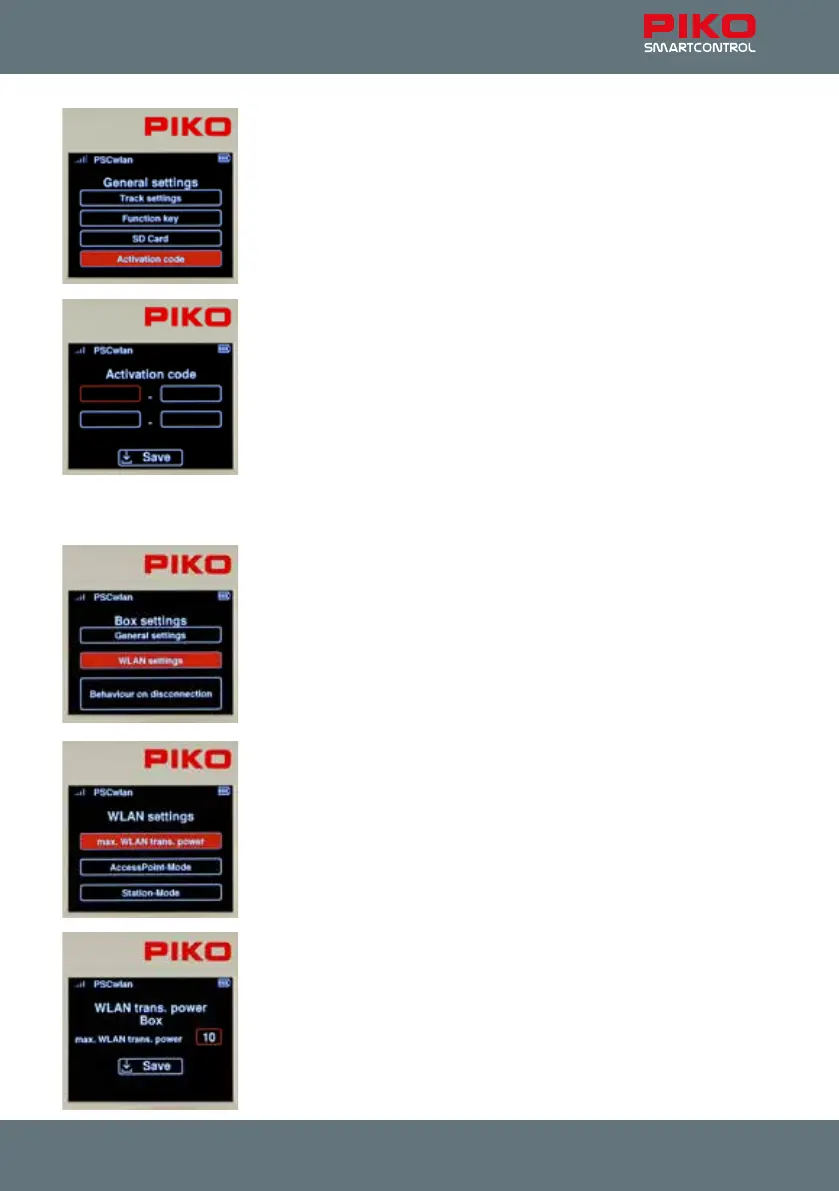
The activation code inputs:
This eld is only activated if the connected SmartBox comes from a digital
StartSet. If the SmartBox does not come from a StartSet, this eld will be
grayed out and cannot be selected.
If the SmartBox comes from a digital starter set, then “55825A” will be dis-
played in the start screen of the Controller along with a text stating
“Start-Set”.
This SmartBox can be upgraded to a full-edged version via a paid upgrade.
This upgrade can be purchased from PIKO dealers or the PIKO web shop.
An activation code will be generated after the purchase that is entered into
the elds of this menu using the “telephone keypad” and then saved using
the “Save” eld. If the SmartBox and Controller are restarted, the full range
of functions becomes available.
This menu can be exited using the "back" button.
This concludes the general setting options of the SmartBox. You can now switch back to the SmartBox
settings menu using the "back" button.
The Wi-Fi settings:
The next menu in the SmartBox settings lets you chose the desired Wi-Fi
settings for your SmartBox.
To get to this menu, select “Wi-Fi settings" and conrm it with the OK button.
The Wi-Fi settings submenu is available for selection in this window.
"Max. Wi-Fi signal transmission power"
"AccessPoint mode" (the SmartBox creates its own Wi-Fi network)
"Station mode" (the SmartBox is integrated into an existing Wi-Fi home
network)
Just like the controller setting, the "max. Wi-Fi signal transmission power”
can be set here in a range from 0 (low) to 10 (maximum).
By nally saving via the "Save" eld, the entered value is saved and you
switch directly back to the WLAN settings menu.



 To Next Page