System
wlan
46
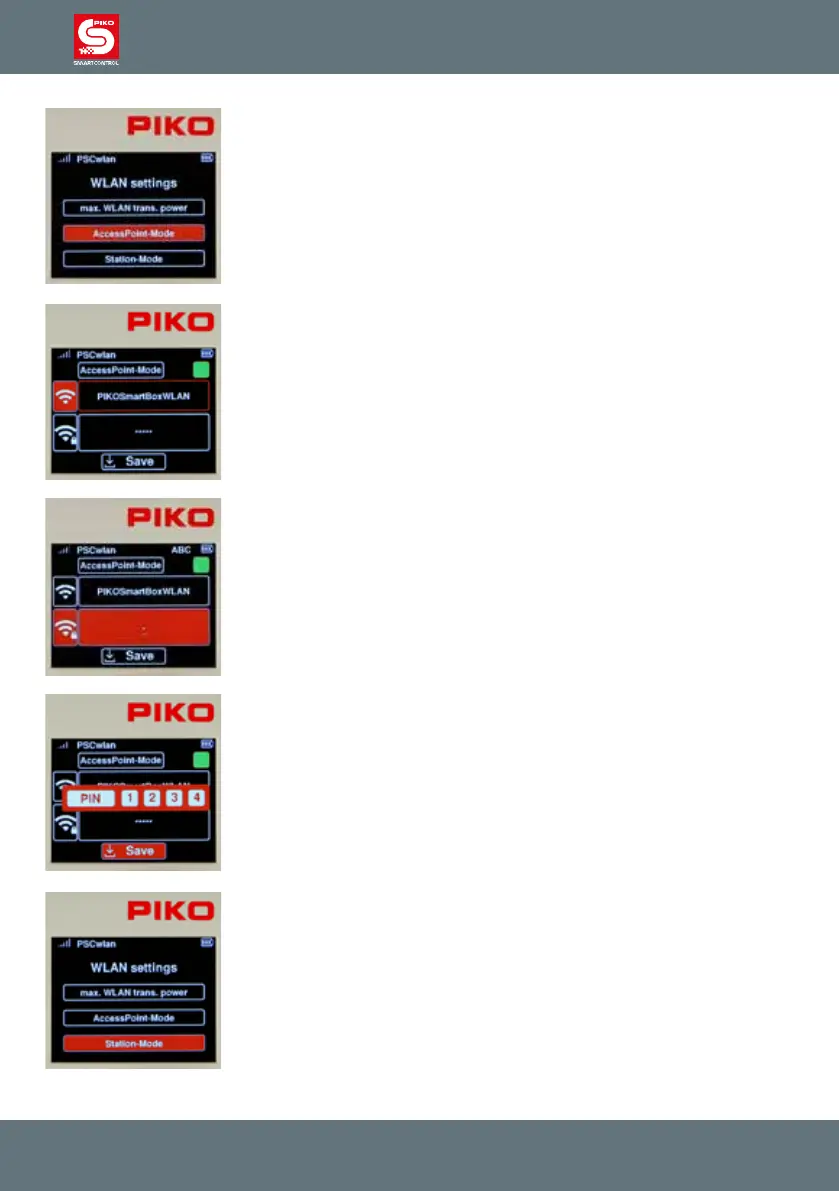
In order to set up the system’s self-contained Wi-Fi network, the "Ac-
cessPoint mode" needs be activated. This is the factory default setting. The
necessary settings can be entered in the next submenu, which can be selec-
ted by highlighting it followed by pressing the OK button.
By highlighting the "AccessPoint-Mode" eld and then pressing the OK
button, the corresponding eld can be activated (green eld) or deactivated.
The next line lets you enter or change the name of this Wi-Fi network by
using the "telephone keypad" method you are already familiar with.
The line with the "Wi-Fi / lock" symbol can be selected here to enter the
Wi-Fi password. The subsequent "OK" button will open the input eld, where
the password you type in will automatically appear in the eld as a series of
hyphens. If you want to leave this input eld without making any changes,
rst delete the hyphen with the “left” navigation key and only then leave this
eld by using the “back” key. If, on the other hand, a password of at least 8
characters needs to be assigned, it can be entered using the “telephone
keypad” followed by conrmation with the OK button.
The factory password is "abcd1234".
Once all required entries have been made, they are saved by selecting the
"Save" symbol and entering the four-digit PIN followed by the OK button.
If you want to integrate the SmartBox into an existing Wi-Fi home network
(to check for online updates), then Station Mode must be activated.
This is found in the Wi-Fi settings menu and conrmed by pressing the OK
button.



 To Next Page