System
wlan
34
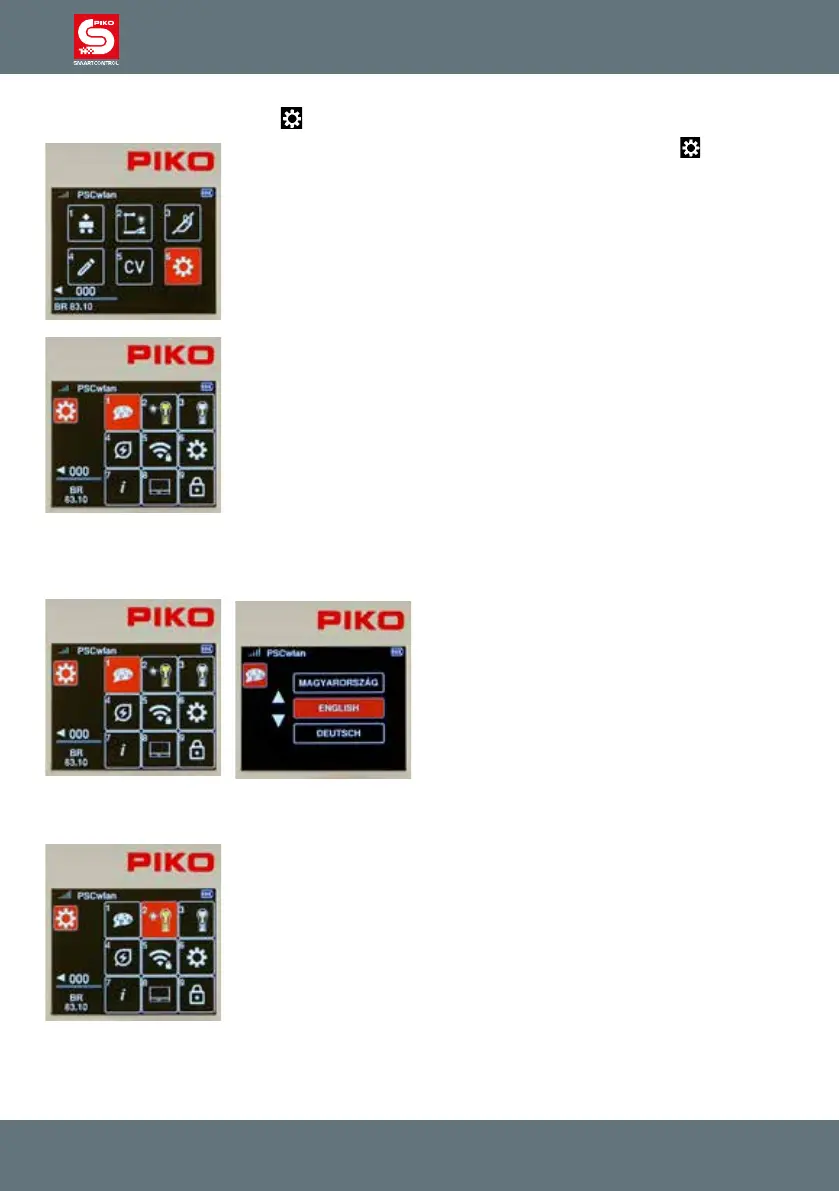
3.8. The Settings menu [ ]
To assign settings in the PIKO SmartControl
wlan
devices, the " " icon for
the settings menu must called up in the main menu by using key 6 or by the
navigation keys followed by pressing the OK button.
The Settings menu gives you options for setting system attributes like
language (1), screen brightness (2), and general settings (6) all the way
through special settings for the SmartBox (8).
3.8.1 Setting the Language
Currently, nine languages are available, and their respective alphabets are used in their character sets.
To change a language, select the Language icon
using key 1 or by navigation and then pressing
the OK button.
You can use the "up" or "down" navigation but-
tons to scroll to the desired language and then
select it with the OK button.
To exit the language menu, press the "back"
button. The display now returns to the settings
menu.
3.8.2 Setting the Controller’s display brightness
The Controller’s display brightness as well as the keyboard backlight
brightness can be set separate from each other.
To do this, press key 2 on the numeric keypad in the settings menu, or navi-
gate to this eld and activate the menu with the OK button.



 To Next Page