System
wlan
6
System connections
The PIKO SmartBox
wlan
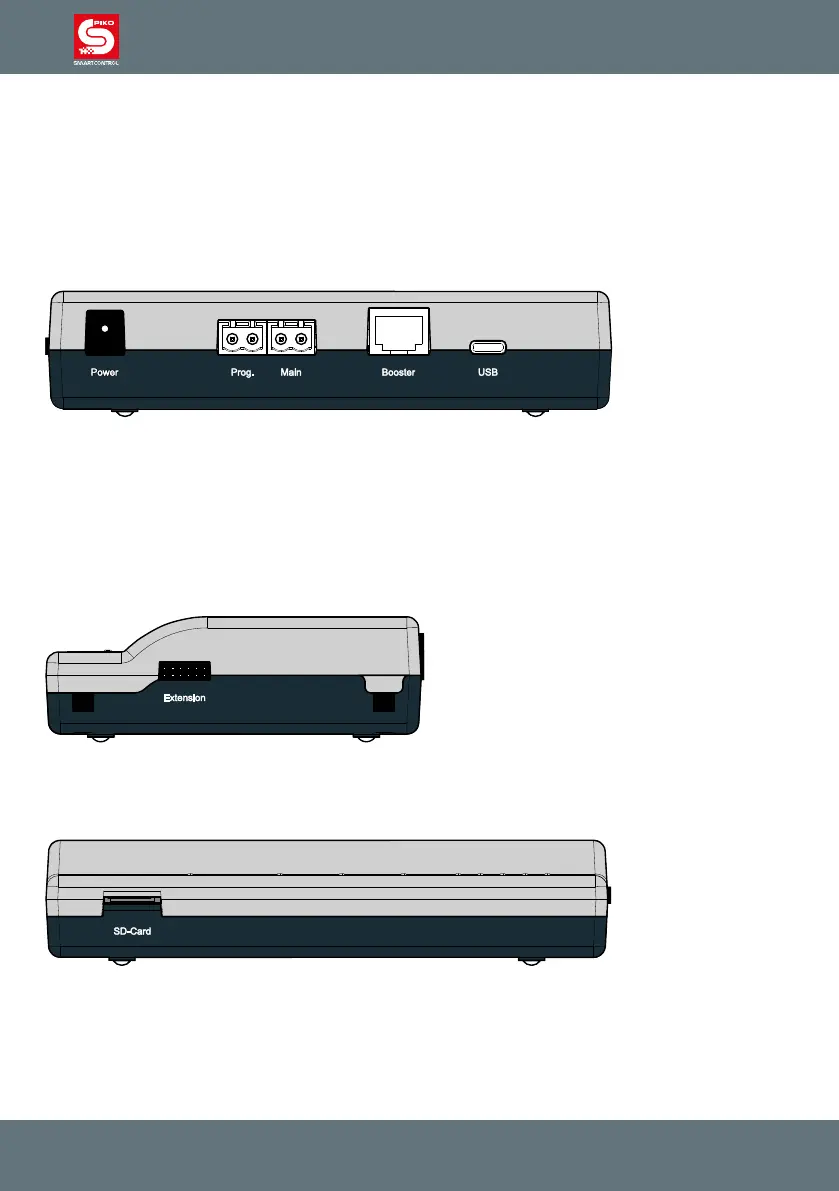
has ports for a main track, a programming track, a PIKO SmartBooster, the
PIKO SmartTester, as well as USB-C port and a socket for the power cord.
Connection points on the PIKO SmartBox
wlan
Back side
Power: Connection port for the 16V DC power cord
Prog.: Port for the programming track (only for decoder programming; No digital traction
voltage)
Main: Port for the Main track connection with DCC digital voltage
Booster: Connection port for a PIKO Booster
USB: USB-C port for PSCw app and rmware updates (cable included)
Right side
Extension: Connection port for SmartController accessories like the PIKO SmartTester
Front side
SD-Card: SD card: Slot for the micro SD card
The included micro SD card is used to store locomotive images and to transmit updates to the com-
mand station. In addition, the information stored in the system about locomotives, accessories and
routes can be saved on the micro SD card and later transferred back to the SmartController (backup
function). The SD card must be inserted to operate the SmartBox.



 To Next Page