System
wlan
20
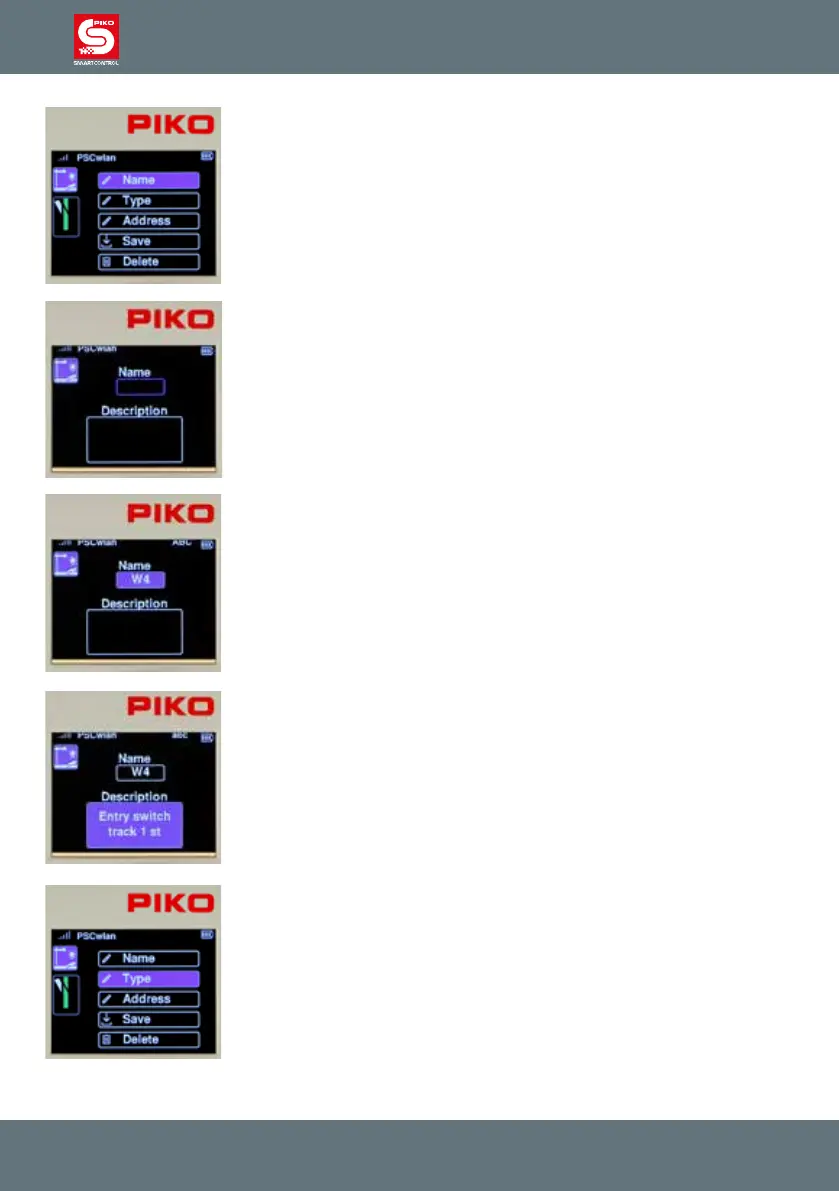
Various steps can now be selected in this view. The rst step is to enter the
name and a brief description of the item.
To do this, select the "Name" eld and conrm it with the OK button
The name will appear later in the accessories menu as an identier for
selecting the accessory and the description will appear when the desired
item has been called up. After the "Name" eld has been selected with the
OK button, the name eld is highlighted in blue and marked for entry with
the OK button.
The name is entered using the “telephone keypad” and is a maximum of 4
characters long. To switch between upper and lower case letters, press the
"down" key. The active case notation can be found in the top line of the
display as "ABC" or "abc". The name entry is then completed with the OK
button.
The input eld for the accessory description will now be framed in blue by
pressing the "down" button and marked for input with the OK button.
A short two-line description can be entered in the text eld.
The description is conrmed by pressing the OK button.
Use the "back" button to go on to other entries
.
You can now use the "down" button to scroll to the "Type" entry and then
select it with the OK button. Various switching options are available here,
which can be activated depending on the type of decoder used.



 To Next Page