You can listen to the radio by using the naviga-
tion system. This section describes operations
for radio (FM).
% Press SRC/OFF button to display the
“TUNER” screen.
= For details, refer to Switching the audio op-
eration screen on page 69.
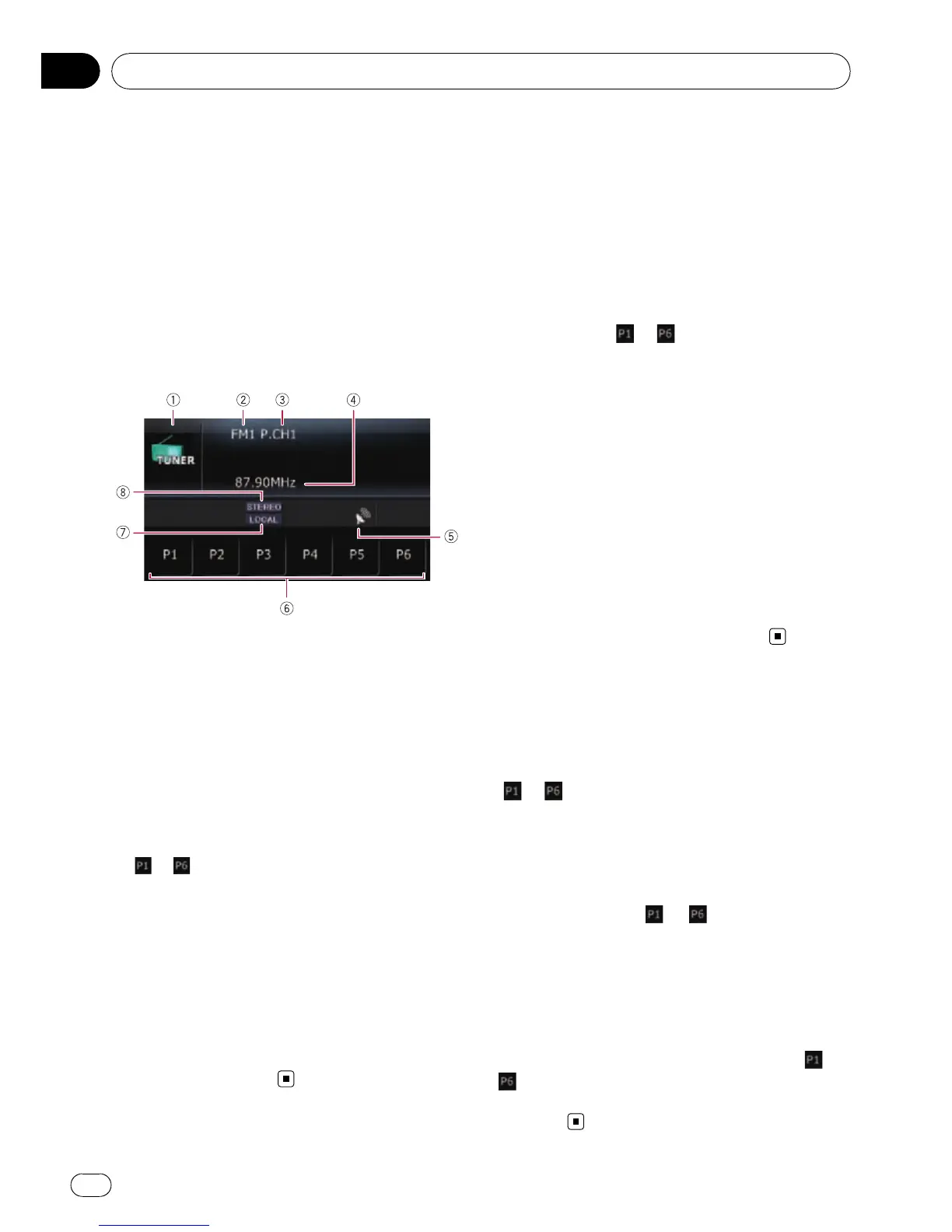
Reading the screen
1 Source icon
Shows which source has been selected.
2 Band
Shows which band the radio is tuned to: FM1
to FM3.
3 Preset number indicated next to “P.CH”
Shows what preset item has been selected.
4 Frequency
5 Signal level indicator
6 Touch panel keys
to :
Recalls radio stations.
= For details, refer to Storing and recalling
broadcast frequencies on this page.
7 Local indicator
Shows when local seek tuning is on.
= For details, refer to Tuning in strong sig-
nals on the next page.
8 STEREO indicator
Shows when the selected frequency is being
broadcast in stereo.
Operating by hardware
buttons
Pressing BAND/ESC button
Band can be selected from among FM1, FM2,
FM3,orAM.
Pressing MULTI-CONTROL up or down
You can recall radio stations assigned to pre-
set tuning keys
to .
Pressing MULTI-CONTROL left or right
The frequencies move up or down step by
step.
Pressing and holding MULTI-CONTROL
left or right
The tuner will scan the frequencies until a
broadcast strong enough for good reception is
found.
p You can cancel seek tuning by pressing
MULTI-CONTROL left or right.
Pressing the center of MULTI-CONTROL
The function select screen appears.
Storing and recalling
broadcast frequencies
With a touch of any of the preset tuning keys
(
to ), you can easily store up to six broad-
cast frequencies for later recall (also with the
touch of a key).
1 When you find a frequency that you
want to store in memory, keep touching a
preset tuning key
to until the preset
number (e.g., P.CH1) stops flashing.
The selected radio station has been stored in
memory.
p Up to 18 stations, 6 for each of three FM
bands can be stored in memory.
2 Touch the same preset tuning key to
.
The radio station frequencies are recalled from
memory.
Using the radio (FM)
En
72
Chapter
14



 To Next Page
 Loading...