53
Everything a Step Can Be (Continued)
Step Condition
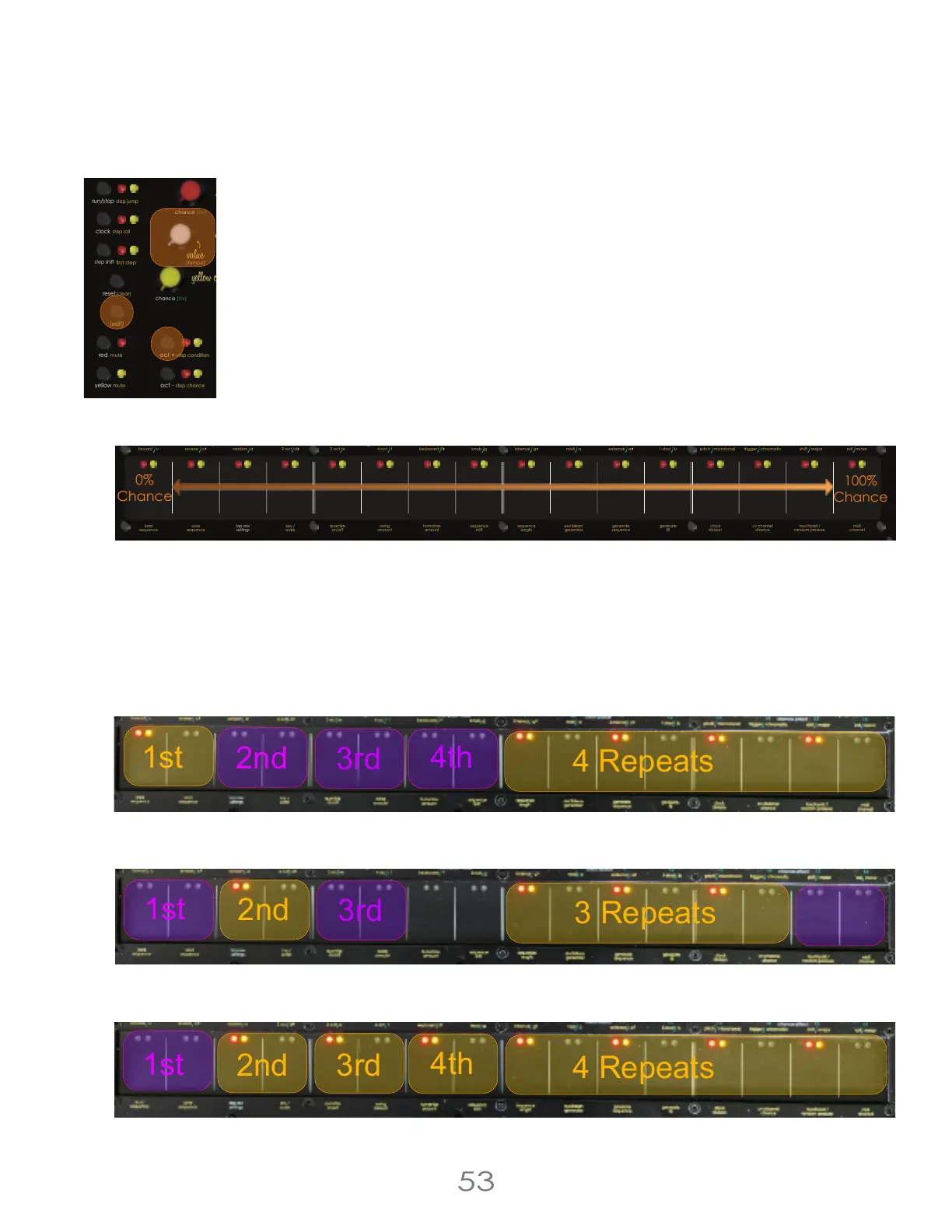
Step Condition skips playing steps based on the Condition applied to that step. To add Step
Conditions, hold the [EDIT BUTTON] and press the [OCT+ BUTTON] to enter the Step Condition
Screen. While in the Step Condition Screen, use the [TOUCH PADS] to select steps to apply
conditions to, and use the [VALUE KNOB] to select the condition.
There are two types of Step Conditions: Percentage Chance Conditions, and Repeat Counter
Conditions. When assigning Step Conditions with the [VALUE KNOB], the fist half of the knob assigns
Percentage Chance Conditions, and the second half of the knob assigns Repeat Counter
Conditions.
Percentage Chance Conditions
Percentage Chance Conditions operate on random number generation. The Percentage Chance Condition is the
chance that an event will occur. For Step Condition this is the chance that the step will not play.
Repeat Counter Conditions
Repeat Counter Conditions will happen a number of times for every number of repeats. For example:
The First of every Four Repeats;
The Step will be skipped the rst time of every four plays through the sequence.
The Second of every Three Repeats;
The Step will be skipped the second time of every three plays through the sequence.
The Second, Third, and Fourth of every Four Repeats;
The Step will be skipped the second, third and fourth time of every four plays through the sequence.
4 Voltage Lab 2 Touch Controller
chance (cv)
chance (cv)
step shift
(edit)
mute step condition
red
mute
yellow
run/stop
step roll
clock
oct +
oct -
rst step
sequencer
step jump
reset
(clear)
(tempo)
step chance
step length
pressure
pitch
cv
cv channel
gate
trigger
reset /
1-shot
reset /
1-shot
repeat repeatchance
scan
pressure
pitch
cv
trigger
chance
scan
envelope
clock clock
resetout
thru
in
13
3 oct e
4 oct f
knob gkeyboard f
internal g midi a 1-shot bexternal a
5
8
7
6
1
42
3
chance (cv)
chance (cv)
16
15
14
9
12
11
10
red channelclockmidi
yellow channel
pittsburgh
modular
c d
step shift
(edit)
mute step condition
red
mute
yellow
run/stop
step roll
clock
cv channel
oct +
oct -
rst step
seq. direction
touchpad mode
knob range
clock source
pitch microtonal trigger chromatic roll minorshift major
chance effect
c
2 oct d
gate
envelope
sequencer
step jump
reset
(clear)
(tempo)
step chance
step length
cv cv
euclidean
generator
sequence
length
touchpad /
random pressure
generate
ll
generate
sequence
clock
division
midi
channel
sequence
shift
cv channel
chance
quantize
on/off
top row
settings
key /
scale
load
sequence
save
sequence
swing
amount
humanize
amount
forward
reverse
random
100%
Chance
0%
Chance



 To Next Page