Chapter D - ADJUSTMENT & CALIBRATION
Planmeca Proline CC panoramic x-ray D-35
Technical Manual
9.3 Head support adjustment
Switch the unit off. Remove the cephalostat arm upper cover, attachment casting cover and
attachment mechanism cover.
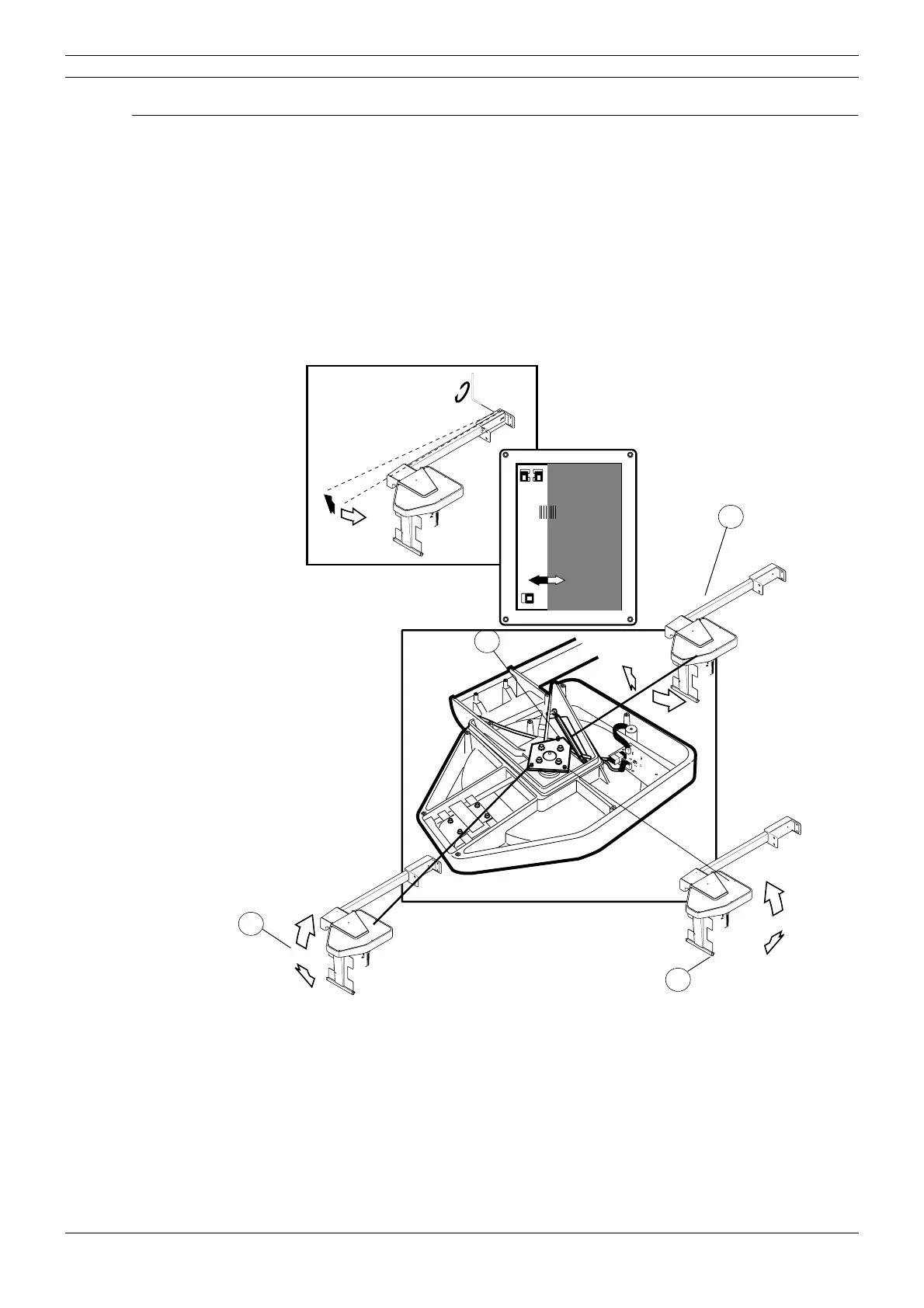
Make sure that the locking screw of the adjustment flange is loosened (Fig. 37, 1). Adjust the
head support position according to the Fig. 37. Rotate the head support around its vertical axis to
adjust the ear posts in horizontal direction (Fig. 37, 2) and around its horizontal axis to adjust the
ear posts in vertical direction (Fig. 37, 3).
If the cephalostat cassette holder does not run parallel with the primary slot, adjust the cassette
holder in vertical direction (
Fig. 37, 4).
Figure 37
Fasten the loosened screws and replace the covers.
Remove the head support alignment tools and place the ear posts in the ear post holders.
45
6
PLANMECA PM 2002 Proline CC Cephalostat 18x24
No.652232
1
Soft tissue filter adjustment
(see section “Soft tissue filter adjustment”)
2
3
4



 To Next Page