Chapter E - DIMAX3 DIGITAL SYSTEM ADJUSTMENT
E-10 Planmeca Proline CC panoramic x-ray
Technical Manual
2.3 Checking the panoramic beam position
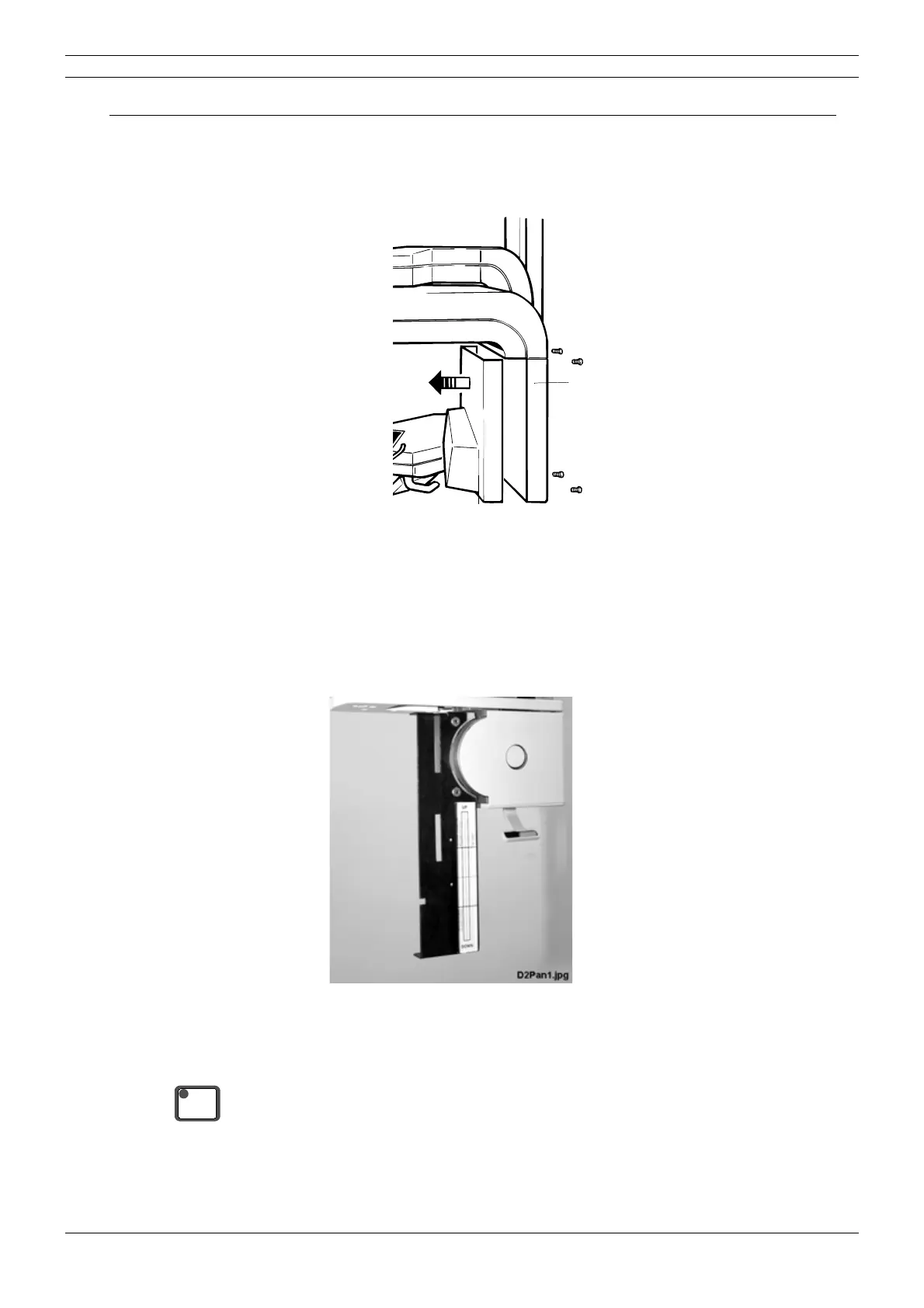
Before the x-ray is used the position of the radiation beam must be checked. Remove the inner
cover from tube head assembly. Four screws hold the tube head cover in position, these are
located at the rear of the tube head assembly.
Figure 12
Remove the sensor head from the quick connector mechanism (see instructions given in Plan-
meca Proline CC panoramic x-rays user’s manual), or remove the fixed sensor head from its
adapter (refer to section
“Removing and attaching the fixed sensor head” on page E-4). Attach
the sensor alignment tool to the adapter. Place the beam alignment tool to the sensor alignment
tool as shown on the
Fig. 13. Note which way round it goes. Slide the beam alignment tool as up
as it goes in this sensor alignment tool position.
Figure 13
Switch the unit on. Enter the test mode (see section “Test mode” on page B-4).
Press the ready key to drive the x-ray into the exposure position. The rotating unit will move to
the ready position. When the x-ray is ready the indicator light will come on.
Tube head
assembly
Tube head cover
Beam alignment tool
READY
PRET



 To Next Page