Chapter D - ADJUSTMENT & CALIBRATION
Planmeca Proline CC panoramic x-ray D-37
Technical Manual
9.4 Checking the soft tissue filter and the filter positioning light position
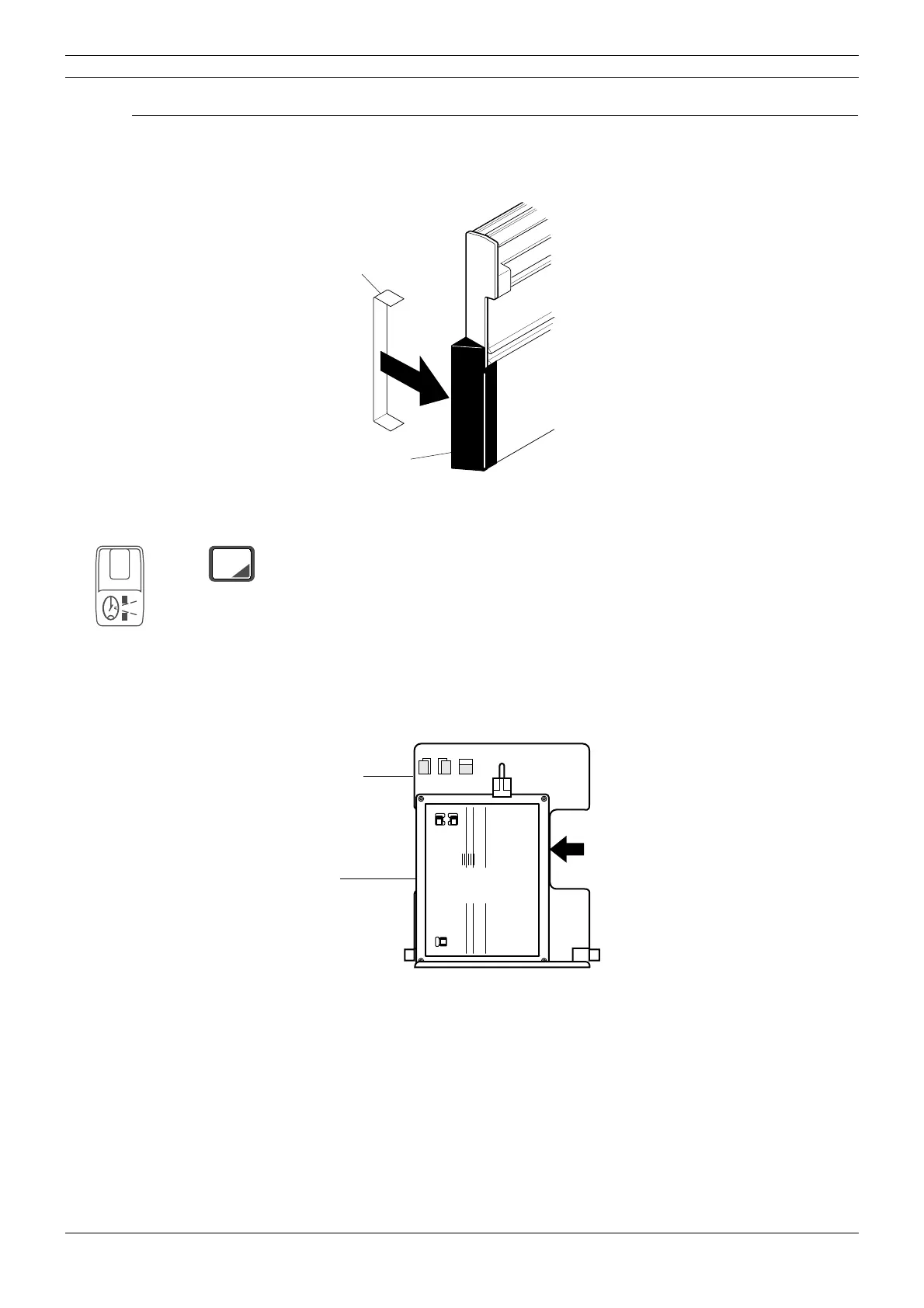
Clip the soft tissue filter positioning tool to the soft tissue filter which is at the end of the cassette
carriage (
Fig. 39). This will enable you to see the soft tissue filter when you check its position.
Figure 39
Press the ceph mode selection key to enter the ceph mode if you are not already in it. The rotat-
ing unit and cassette carriage will move automatically to the correct position for taking cephalom-
etric exposures. Collimator number 4 will be automatically selected.
Orientate the Cephalometric beam alignment tool so that it is vertical and then place it in the
cephalometric cassette holder. Position it so that it is on the left of the cassette holder (lateral
exposure position).
Figure 40
Soft tissue filter
Soft tissue filter
positioning tool
Cassette carriage
CEPH
4
4 5
6
PLANMECA PM 2002 Proline Cephalostat 18x24 No. 652232
Soft tissue filter 0mm
Positioning light 0mm
Positioning light 25mm
Cassette
holder
Beam
alignment
tool



 To Next Page