Section 4. PlexTools Professional Functions
22 PlexTools Professional Reference Guide
Retrieving CD/DVD Information
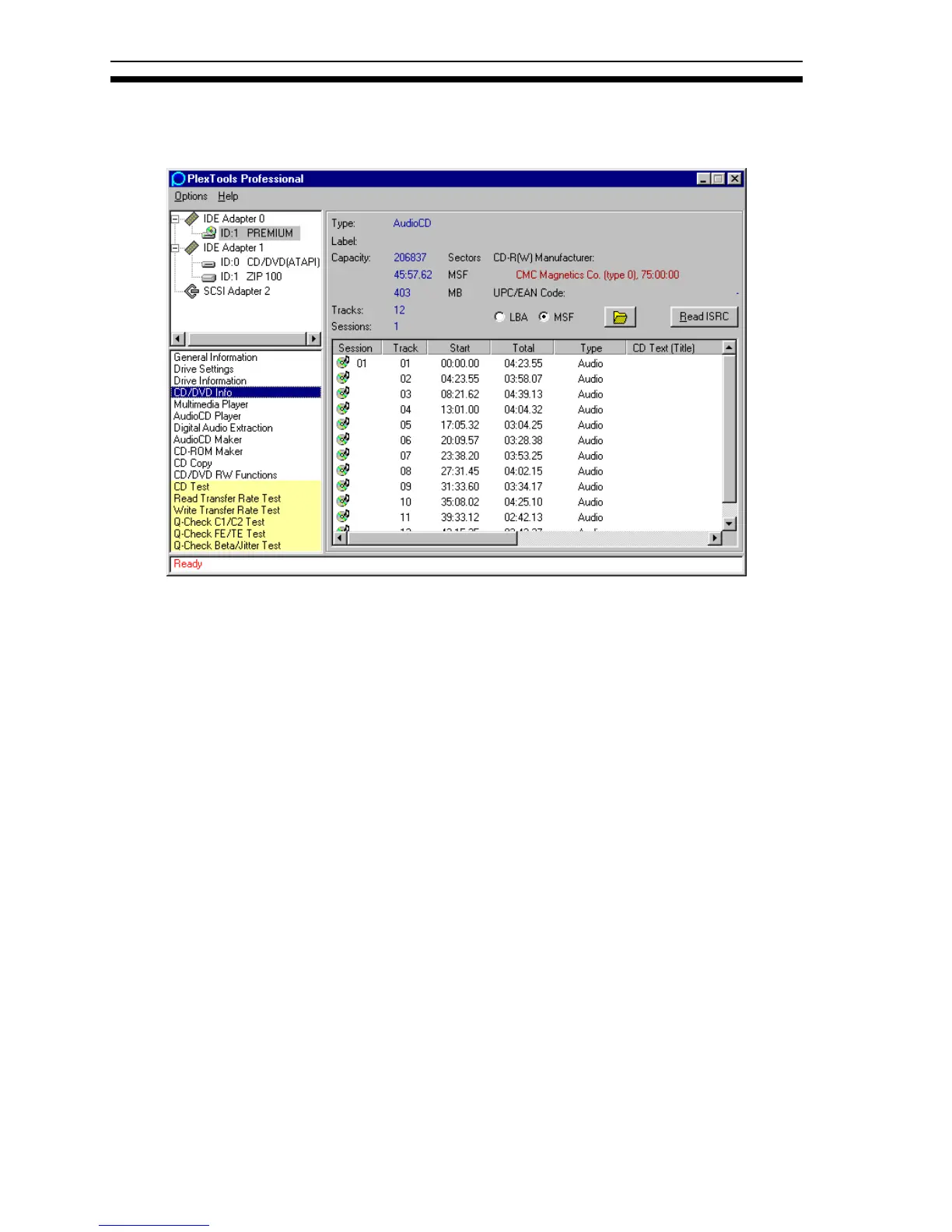
The CD/DVD Info window shows more information about the inserted disc.
Figure 19: CD/DVD Information Window
CD Information
For CD’s the information comprises:
• Type, Label: Indicates the CD type and label.
• Capacity: Shows the capacity of the disc in sectors, MSF (minutes, seconds,
frames) and MB (megabytes).
• Tracks/Sessions: Indicates the number of tracks/sessions.
• CD-R(W) Manufacturer: Indicates the name of the CD-R(W) manufacturer.
• UPC/EAN Code: LBA/MSF: Changes between indication in logical blocks
(LBA) or minutes, seconds, frames (MSF).
• CD TEXT: Shows the CD TEXT information on the disc (if your drive is
capable of reading it).
• Read ISRC: Shows the International Standard Recording Code, if present.
Saving Information
A right-click on the CD Info window opens the option to print or save the disc
information.
• Standard Information: Prints a brief description of disc contents.
• Advanced Information: Prints a detailed description of the contents of the disc.



 To Next Page