24
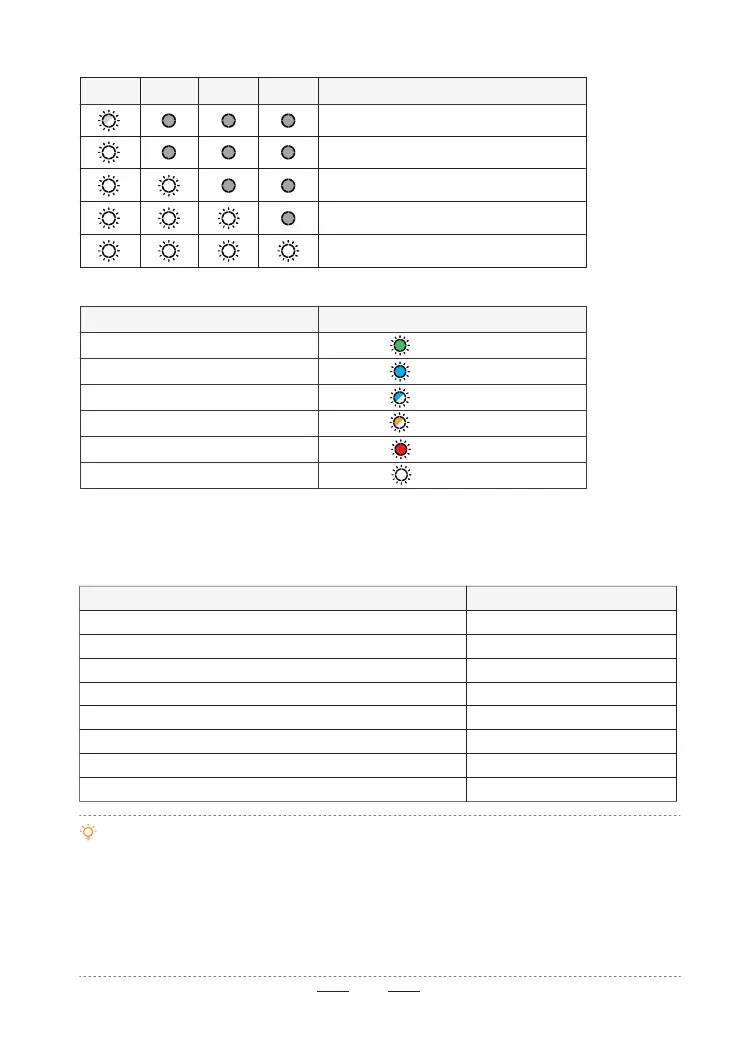
LED 1 LED 2 LED 3 LED 4 Current power level of batte
0% ~ 10%
75% ~ 100%
50% ~ 75%
10% ~ 25%
25% ~ 50%
Power Indication (in use)
Status Indication (via LED 1)
•If you want to stop the continuous beeping of the remote controller during the RTH process, you can
cancel the beeping by pressing once the power button.
•In the Potensic Eve App, go to Settings > Safety > Return (RTH) > Silent Return. When this option is
enabled, the remote controller will beep twice only once when RTH is triggered, and will not continue
to beep.
•When the remote controller’s batte is low and the drone has not landed, the remote controller will
emit a slow, continuous beeping sound. You can also cancel the current beeping by pressing once the
power button.
6.3.2 Remote Controller Ale
The remote controller emits dierent ale beeps depending on its status or mode. The
common ale beeps are listed in the table below:
Status LED 1
Status Beep
Connected
Not connected
Pairing
Upgrading
Critically low batte
Remote controller calibration
Solid green
Solid blue
Fast ashing blue
Flashing yellow
Solid red
Solid white
Power on/o
ATTI mode
The remote controller triggers a function, such as RTH
The remote controller ends a function, such as RTH
RTH in progress
Landing
Connected to a mobile device
Low batte level
2 beeps
4 beeps
2 beeps
1 beep
2 beeps (repeated)
1 beep (repeated)
1 beep
3 slower beeps (repeated)



 To Next Page