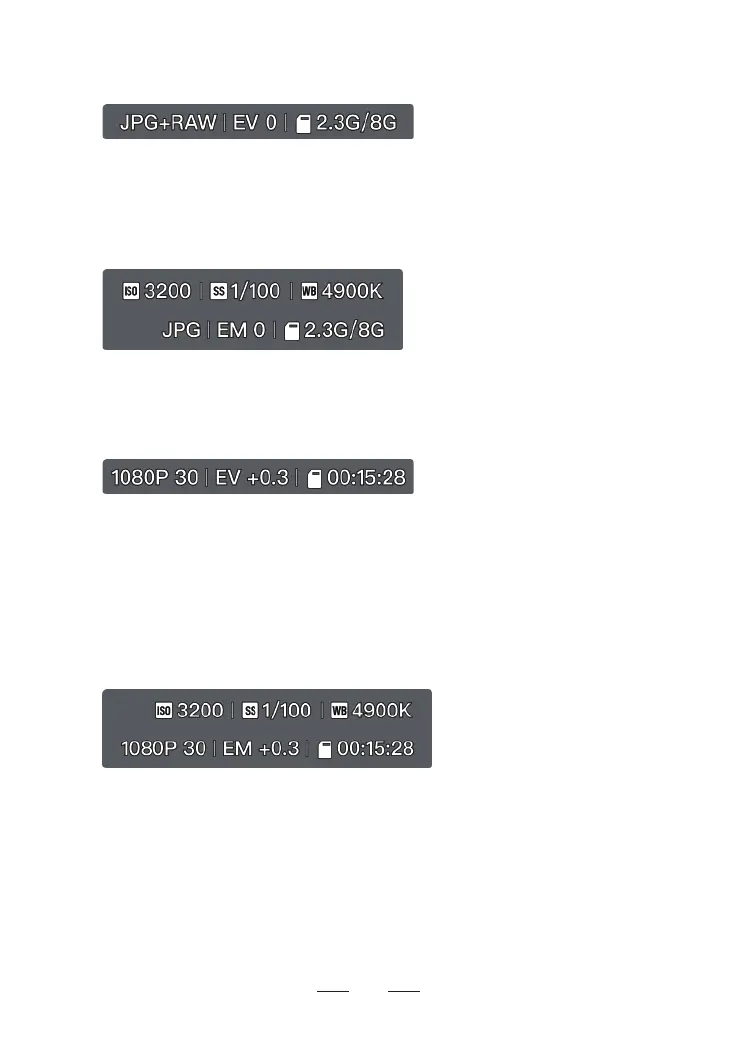
15. Shooting Parameters
Photo Auto Mode:
Set photo format (JPG/JPG+RAW) and photo aspect ratio (16:9/9:16/4:3).
Adjust the EV.
Switch the display between the remaining number of photos and the available capacity of
the current SD card.
Photo Manual Mode:
Adjust the ISO.
Adjust the shutter speed.
Adjust the white balance.
Video Auto Mode:
Set the video aspect ratio/resolution/frame rate, and color mode (Standard/HDR).
• 4K: 24/25/30 fps (suppos 16:9)
• 2.7K: 24/25/30 fps (suppos 4:3/16:9/9:16)
• 1080p: 24/25/30/50/60 fps (suppos 4:3/16:9/9:16)
Adjust the EV.
Switch the display between the remaining video recording time and the available capacity
of the current SD card.
Video Manual Mode:
Adjust the ISO.
Adjust the shutter speed.
Adjust the white balance.
31
16. Flight Safety Tips
Users can enable ight safety tips in Potensic Eve App > Safety > General Settings >
Flight Safety Tips. After enabling, ight-related tips will be displayed at the bottom of
the ight inteace.



 To Next Page