Power Meter Bulletin No. 3020IM9503R6/98
Chapter 6—Communications December 1998
38 1998 Square D All Rights Reserved
Connecting to a SY/MAX Programmable Controller
Using POWERLOGIC Communications
• Connect up to 32 PM&CS devices to a programmable controller. See
Length of the Communications Link in this chapter for distance limita-
tions at different baud rates.
• Connect PM&CS devices to the RS-422 port of the programmable
controller.
• The programmable controller must contain a program to access
POWERLOGIC device data.
• Configure the baud rate of the programmable controller’s port to match
the baud rate of the POWERLOGIC devices on the communications link.
• Refer to the programmable controller instruction manual for detailed
instructions on configuring the programmable controller.
Note: PM&CS devices can be connected to other manufacturers’ systems using
available communication interfaces. For further information, contact the
POWERLOGIC Technical Support Center.
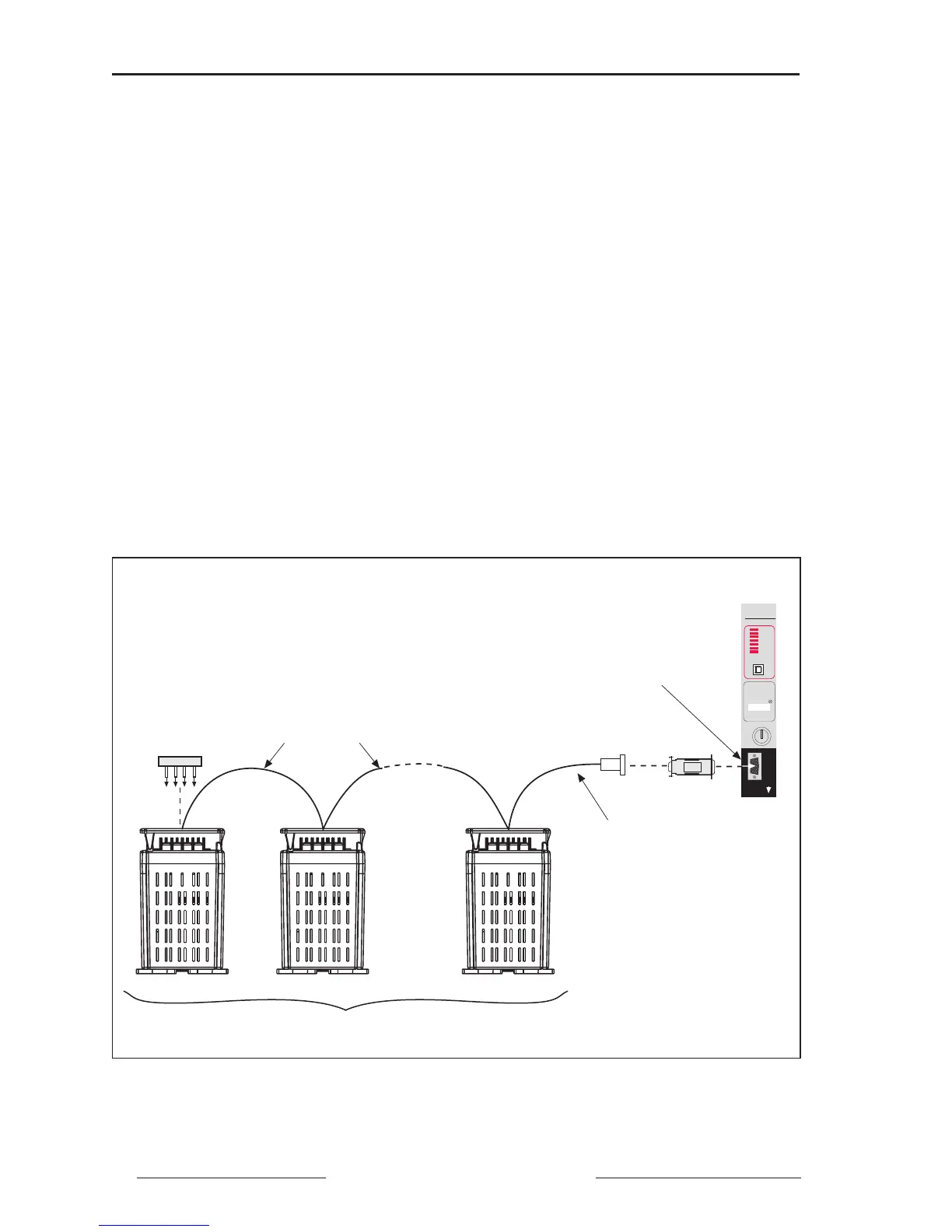
Figure 6-3: Power meters connected to a SY/MAX programmable controller
Belden 8723
(or equivalent)
1–32 Devices (Power Meters and Other Power
Monitoring & Control System Compatible Devices)
CAB-107
MCA-485
Connect Power Meters
to RS-422 Port of
Programmable
Controller
Programmable
Controller
MCTAS-485
(or MCT-485
with Terminal
Block)
SY/MAX
RUN
HALT
MEMORY
FORCE
I/O
BATTERY
LOW
WRITE
PROTECT
MODEL
PROCESSOR
400
BATTERY
INSTALLED
DATE
RUN
PROGRAM
RUN
HALT
DISABLE
OUTPUTS
PRGMR
CHNL 1
COMM
CHNL 2



 To Next Page