Model PD6000 Analog Input Process Meter Instruction Manual
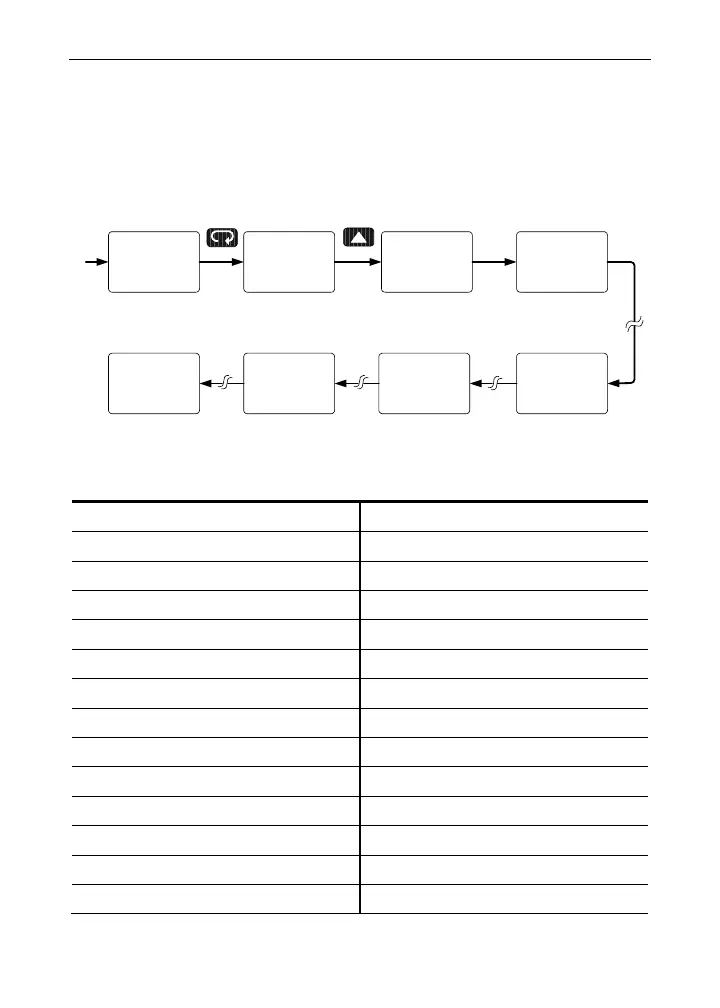
Programmable Function Keys User Menu (user)
The User menu allows the user to assign the front panel function keys
F1, F2, F3 and up to eight digital inputs to access most of the menus or
to activate functions immediately (e.g. Reset max & min). Up to eight
digital outputs can be assigned to a number of actions and functions
executed by the meter (e.g. Alarms, relay acknowledgement, etc.).
user
LL I 1
user
LL O 8
user
LL O 1
user
LL I 8
user
F1
user
F3
user
F2
user
Function Keys & Digital I/O Available Settings
Display Description Display Description
Ack
Acknowledge relays
Big Lo
Min on big display
Reset
Reset menu
Big HL
Max/min big display
Rst Hi
Reset max
Little
Little display menu
Rst Lo
Reset min
Lit Hi
Max on little display
Rst HL
Reset max & min
Lit Lo
Min on little display
relay
Relay menu
Lit HL
Max/min little display
Set 1
Set point 1 - 8
disabl
Disable function key
Rly d
Disable all relays
menu
Menu button
Rly E
Enable all relays
Right
Right arrow button
O Hold
Relays output hold
up
Up arrow button
Dsplay
Display menu
Enter
Enter button
Big
Big display menu
Alm 1
Alarm 1 – 8
Big Hi
Max on big display
68



 To Next Page